ONT Orange Box on USG FLEX 200H does not dial



 Freshman Member
All Replies
-
Hi @Aballo,
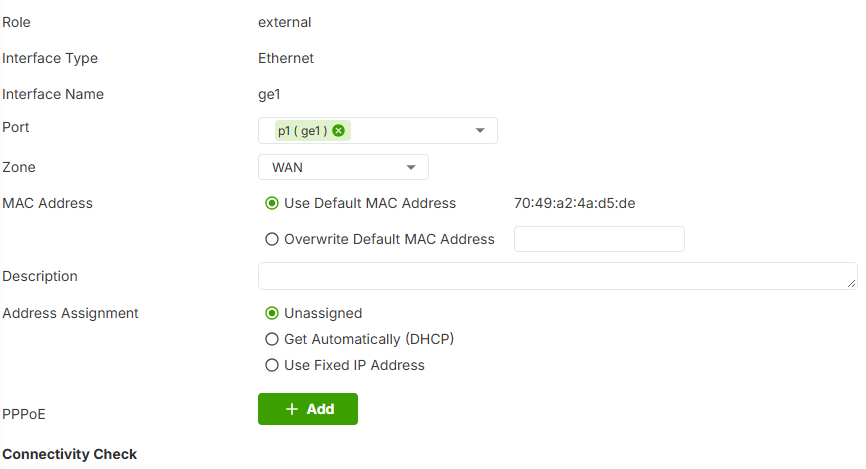
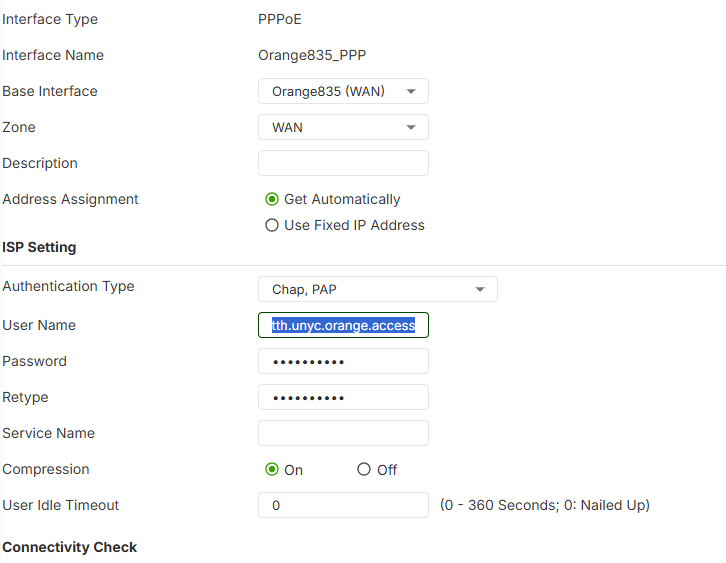
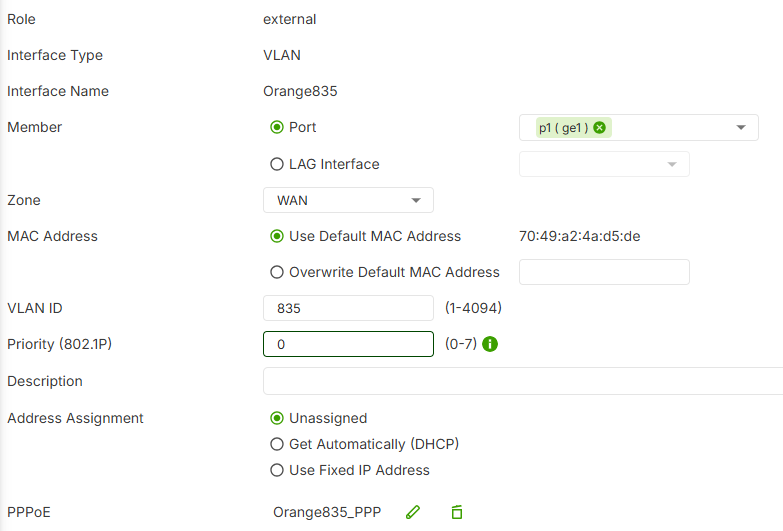
can you share a screenshot about the external interface final configuration? Try to enable also to enable the other authentication type (check all) and try to deactivate the compression.
You need to use only the VLAN 385 and the PPP
0 -
Hi @Aballo ,
A few specific things worth checking, since “Failed to Dial” at this stage usually points to the PPPoE account settings or the ONT/VLAN path, not a hardware issue with the FLEX 200H itself:
1. ONT bridge mode. Can you confirm the Huawei HG8010Hv3 is running in pure Bridge mode (not router/NAT mode)? If the ONT is still handling PPPoE itself, the FLEX 200H will never see a response to its PADI/PADO discovery.
2. Username format. As we know Orange PPPoE usernames require the
fti/prefix (e.g.fti/yourusername). Worth double-checking that your configured username includes it. Currently, we can see that your username is tth.unyc.orange.access from the screenshot.3. Authentication type. As Maverick87 suggested — try toggling all authentication types (or forcing one specifically)
4. Compression. Confirm MPPC/compression is disabled on the PPP interface.
5. Packet capture. If the above doesn’t resolve it, run Maintenance > Diagnostics > Packet Capture on the physical WAN interface and/or the VLAN835 interface while dialing and share for our reviewing.
Zyxel_Judy
0 -
Hello,
PPPOE is handled by the Flex 200H. ONT is pure bridge mode.
The username format is correct and is the same used in the USG20-VPN (and it work).
Already tried all authentification type, both VPN 832 and 835, priority CoS 6 (and 0)…
It seems that Orange (the provider) need CoS 6 on DHCP request and the USG can not (google !)
the best way could be to use an intermediate smart switch to manage the VLAN/CoS
0 -
Hi @Aballo,
Try to clone the mac address of the USG20-VPN and put into the PPP or VLAN interface, can be that Orange have a MAC Address Lock0 -
Hello,
I tried this, still the same…
As the customer need to work, we put the Flex 200H in the DMZ of Omada ER605. This one can manage the ONT with only username/password…I did not understand with it's running with the USG20 and not the 200H…
Many thank's form your help
0 -
Hi @Aballo,
can you share screenshot about your USG20 configuration, 200H configuration and a screenshot about the error that you see?
Thank you
0 -
Hi @Aballo ,
Since all the usual suspects (bridge mode, username, MAC, VLAN/CoS combos) have been ruled out, we really need packet-level visibility to make further progress here.
One thing that could help a lot: since you now have the Omada ER605 successfully connecting through the same ONT, you’re in a good position to get a direct comparison: Please check the Omada ER605’s WAN/PPPoE configuration — specifically, is it using any VLAN tag at all, or is it running plain/untagged PPPoE? If the Omada connects successfully with no VLAN tag, that would suggest your line might not actually require VLAN 385/832/835 at all, and the FLEX 200H could be failing simply because it’s tagging a VLAN that Orange’s BRAS isn’t expecting on this specific line.
If possible, a packet capture from both sides would be ideal — one while the Omada is connected successfully, and one of the FLEX 200H’s failed dial attempt (on the WAN interface and/or the VLAN interface, whichever you’re using). Comparing the two side by side should make it much clearer whether the difference is in VLAN tagging, CoS, or something else entirely in how the discovery/auth packets are sent.Zyxel_Judy
0



 Guru Member





 Zyxel Employee
Categories
- All Categories
- 442 Beta Program
- 3.1K Nebula
- 244 Nebula Ideas
- 6.9K Security
- 805 USG FLEX H Series
- 392 Security Ideas
- 1.8K Switch
- 88 Switch Ideas
- 1.5K Wireless
- 60 Wireless Ideas
- 7.3K Consumer Product
- 330 Service & License
- 540 News and Release
- 106 Security Advisories
- 31 Education Center
- 10 [Campaign] Zyxel Network Detective
- 5.5K FAQ
- 34 Documents
- 89 About Community
- 124 Security Highlight