USG FLEX 500H VLAN interface receives no traffic from directly connected client

 Freshman Member
Hello,
I have a clean USG FLEX 500H (firmware 1.40, standalone mode, no Nebula) and I'm trying to understand whether my VLAN configuration is missing a required step.
Setup
- Factory-reset USG FLEX 500H
- No switches, APs, or other network devices involved
- Default SNAT enabled on WAN interface ge1
- Ports 11 and 12 unused before configuration
- Client is a standard laptop connected directly to the firewall
Configuration
- Create GUEST zone.
- Add an Outgoing Security Policy for the GUEST zone.
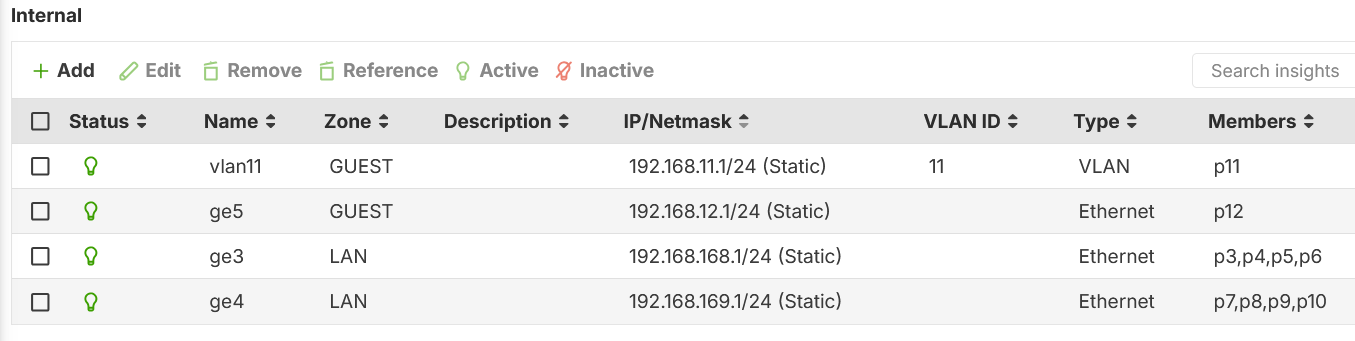
- Create interface vlan11:
- VLAN ID: 11
- Physical Port: 11
- Zone: GUEST
- IP: 192.168.11.1/24
- DHCP enabled with default settings
- Create interface ge5:
- Physical Port: 12
- Zone: GUEST
- IP: 192.168.12.1/24
- DHCP enabled with default settings
Results
- Connecting the laptop to Port 12 (ge5) works as expected. The client receives a DHCP lease and traffic is visible in packet captures.
- Connecting the laptop to Port 11 (vlan11) does not work. The client receives no DHCP lease.
- Packet capture on vlan11 shows no DHCP negotiation and no other client traffic.
- Swapping the physical ports does not change the behavior: ge5 always works, vlan11 never does.
Questions
- Has anyone successfully connected an untagged laptop directly to a VLAN interface on a USG FLEX 500H, without using a switch?
- Is additional configuration required to make a physical port act as an access/untagged port for vlan11?
I'm mainly trying to determine whether this setup is supported and whether I'm missing a configuration step on the firewall.
Thanks!
Accepted Solution
-
Hi @Firewall_User,
In this configuration, you have declared the P11 as tagged-only port (ID 11).
So, you can use the P11 only with devices that support VLAN Tagging (obviously set the ID 11), and by-design/by-default a computer not have a VLAN ID already configured (so by-default a computer cannot connect to a VLAN Tagged-only port)So, in this situation:
- When you connect the computer on port P12, you don't need to add a VLAN Tag (because the P12 port is configured as Untagged —> no VLAN are configured)
- When you connect the computer on port P11, you need obligatory use a VLAN Tag (the port P11 is configured as tagged-only, so support only devices that support VLAN Tagging).
If you would like to use the computer into a VLAN, you need to configure a VLAN ID Tag into the LAN Ethernet device configuration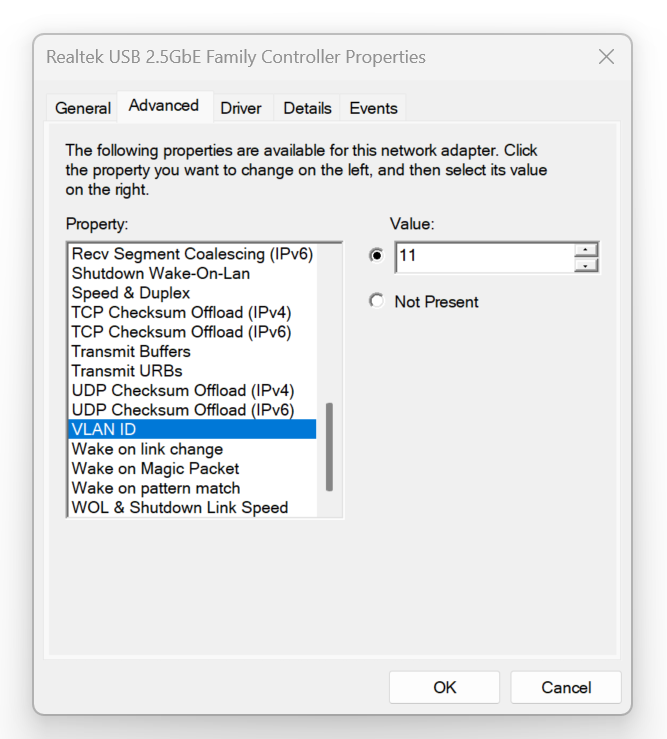
Otherwise you need to configure the port P11 as VLAN and Physical (no VLAN ID Tag necessary, in this case the port P11 can be used as tag and untag).
For example, if you add the P11 as member of the ge5 interface:- When on P11 arrive a VLAN Tag (ID: 11, as per VLAN ID declared) the port take the vlan11 interface configuration;
- When on P11 don't arrive a VLAN Tag (so is Untagged) the port take the ge5 interface configuration;
- If on the P11 arrive a VLAN Tag different to ID 11, the packet are dropped and the port don't take any configuration —> so no IP is released and no connectivity are present
Thank you
2





 Guru Member
All Replies
-
Hi @Firewall_User,
In this configuration, you have declared the P11 as tagged-only port (ID 11).
So, you can use the P11 only with devices that support VLAN Tagging (obviously set the ID 11), and by-design/by-default a computer not have a VLAN ID already configured (so by-default a computer cannot connect to a VLAN Tagged-only port)So, in this situation:
- When you connect the computer on port P12, you don't need to add a VLAN Tag (because the P12 port is configured as Untagged —> no VLAN are configured)
- When you connect the computer on port P11, you need obligatory use a VLAN Tag (the port P11 is configured as tagged-only, so support only devices that support VLAN Tagging).
If you would like to use the computer into a VLAN, you need to configure a VLAN ID Tag into the LAN Ethernet device configuration
Otherwise you need to configure the port P11 as VLAN and Physical (no VLAN ID Tag necessary, in this case the port P11 can be used as tag and untag).
For example, if you add the P11 as member of the ge5 interface:- When on P11 arrive a VLAN Tag (ID: 11, as per VLAN ID declared) the port take the vlan11 interface configuration;
- When on P11 don't arrive a VLAN Tag (so is Untagged) the port take the ge5 interface configuration;
- If on the P11 arrive a VLAN Tag different to ID 11, the packet are dropped and the port don't take any configuration —> so no IP is released and no connectivity are present
Thank you
2 -
This is why VLAN switches are used to take a untagged device to a tagged interface
but in your case if your going to use a separate port why not just have it as Ethernet?
1 -
@Firewall_User
If you need to tag an untagged device, you need to use a VLAN-capable Switch, in which you can assign a VLAN Tag to a port, and permit to have also an untagged traffic (Access Port).
For example:- Port P5 assigned to VLAN Tag ID 11 (so the port is allowed to send the VLAN ID 11 from the port to the uplink)
- Port P5 configured as untagged (in this way the port allow untagged traffic)
- Port P5 to VLAN PVID ID 11 (the default VLAN ID for all the untagged traffic)
In this way, all the devices connected to the port P5 that cannot have a native-vlan implementation, can VLAN-tagged via the default PVID ID and now the VLAN ID is transported to the uplink.
0 -
Hi @Firewall_User ,
Thanks @Maverick87 and @PeterUK for the clear explanations .
To summarize:
When P11 is assigned to
vlan11, it only accepts traffic tagged with VLAN ID 11. A laptop sends untagged traffic by default, so nothing reachesvlan11and no DHCP lease is given when capturing packets. The firewall port does not tag untagged traffic for you the way a switch access port does.You can choose whichever fits your goal:
- Only need an untagged port: Assign P11 to an Ethernet interface instead of a VLAN interface.
- Need both tagged and untagged on P11: Keep
vlan11and also add P11 to an Ethernet interface. Untagged devices will get an IP from the Ethernet interface’s subnet. - Need the laptop in VLAN 11: Either set VLAN ID 11 on the laptop’s NIC (if the driver supports it), or place a VLAN-capable switch in between with the laptop’s port set as an untagged member of VLAN 11 with PVID 11.
Zyxel Tina
1






 Zyxel Employee
Categories
- All Categories
- 442 Beta Program
- 3.1K Nebula
- 244 Nebula Ideas
- 6.9K Security
- 807 USG FLEX H Series
- 392 Security Ideas
- 1.8K Switch
- 88 Switch Ideas
- 1.5K Wireless
- 60 Wireless Ideas
- 7.3K Consumer Product
- 333 Service & License
- 541 News and Release
- 106 Security Advisories
- 31 Education Center
- 10 [Campaign] Zyxel Network Detective
- 5.5K FAQ
- 34 Documents
- 89 About Community
- 124 Security Highlight