[USG Flex H] - Dual IP reservation, same MAC Address but different subnet





 Guru Member
Hello everyone,
I've a problem with my NAS when I use a DHCP reservation of same MAC Address but on different subnet.
I use a subnet LAN2 (192.168.2.0/24) and LAN (192.168.1.0/24). For both I've reserved the same mac address for my QNAP NAS.

In this configuration, seems that is some cases, the NAS request an IP from a subnet, but is really assigned from the other subnet:

Actually the NAS is connected to the LAN subnet
Accepted Solution
-
Hi @Maverick87,
The firewall did offer/assign the correct IP (192.168.1.251) in response to the NAS’s request. If the NAS still doesn’t end up holding that correct IP afterward, this points to how the NAS itself processes the DHCP response, rather than an issue on the firewall side. In that case, we’d recommend contacting the NAS vendor’s support team, as they would be better positioned to check the client-side DHCP handling.
Zyxel_Judy
1





 Zyxel Employee
All Replies
-
So your NAS is sometimes getting the wrong IP?
0 -
I don't know, because not response to both IPs
0 -
Hi @Maverick87,
Quick question: was the NAS previously connected to LANIface_P2 (LAN2) before being connected to LANIface (LAN)? If so, this isn’t the firewall assigning a wrong IP.
The log shows the NAS first requesting its old address, 192.168.2.2 (LAN2), with no Discover/Offer beforehand — consistent with a client re-verifying a previously-leased IP on restart. Since it’s no longer on that subnet, this wasn’t honored. Three seconds later it completed a normal exchange (Offer → Request → ACK) and got 192.168.1.251, the correct reservation for LAN.
So our read is: the NAS briefly tries to reclaim its old LAN2 address before self-correcting, which can occasionally cause a short delay/no-response window.
To confirm this more precisely, could you share a wider log export (a minute or so around this event, not just these 4 lines) and, if possible, the DHCP/network log from the QNAP side for the same time?
In the meantime, since the same MAC has reservations on both LAN and LAN2, we’d still recommend removing the unused one (LANIface_P2 / 192.168.2.2) to eliminate the ambiguity.
Zyxel_Judy
0 -
Hi @Zyxel_Judy,
Unfortunalety I cannot provide any other logs.
Anyway yes, primarily the NAS was connected to LAN_2, then I've tried to connect it on LAN.
I've spent more or less 10 minutes in this situation, I've tried to change cable etc etc but the port goes up and no ping. When I opened the flex log, I had found a lot of these DHCP Offer.
Now, with a working bridge configuration between P2 and P3-P12, I've deleted the double reservation, but before I've needed of this for tried to keep a best port speed between P2 and the others.
Can you reproduce this behaviour on your lab?
0 -
Hi @Maverick87,
I ran a lab test on my end, and I saw the same symptom you described. It is the expected behavior.

I connected the laptop to ge4 (192.168.169.1/24) first, then disconnected it and connected it to ge3 (192.168.168.1/24).

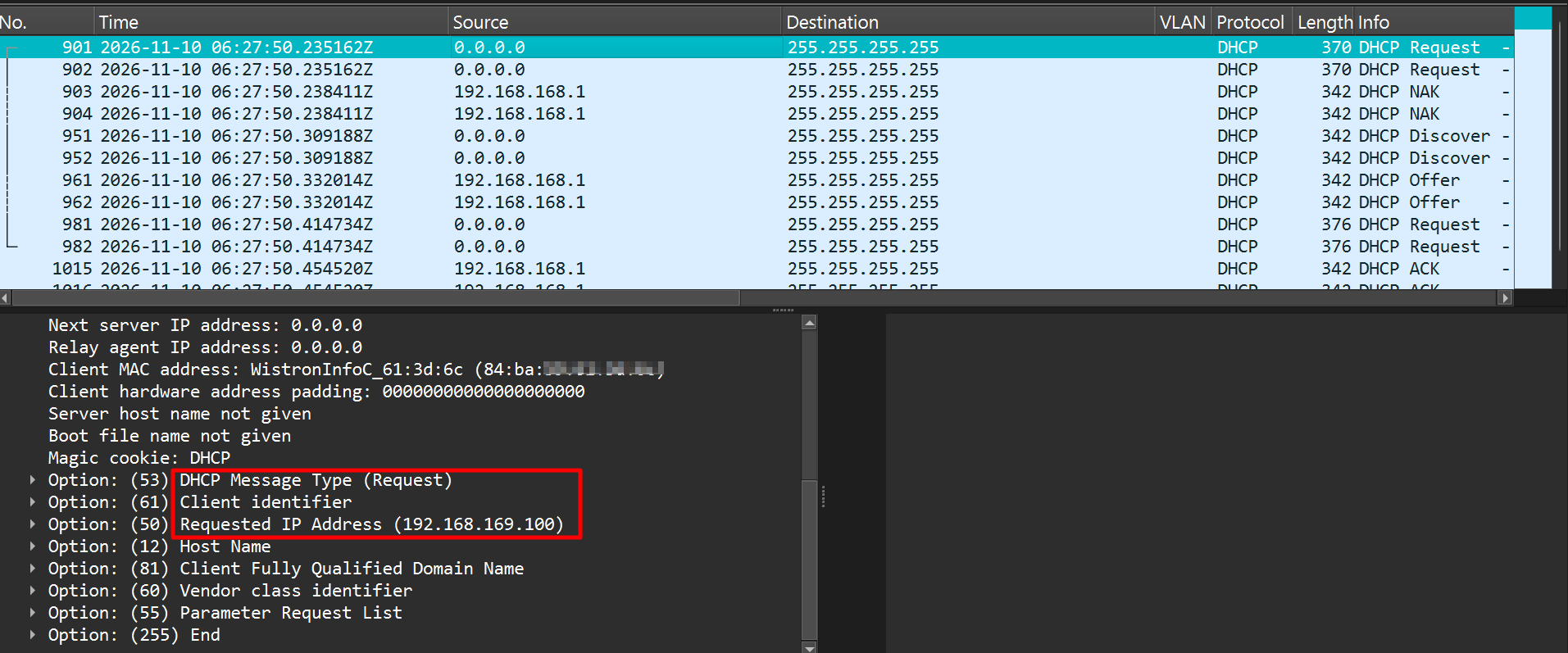
The packet capture shows that after connecting to ge3, the client’s first DHCP request still asked for 192.168.169.100, the IP it had received earlier.
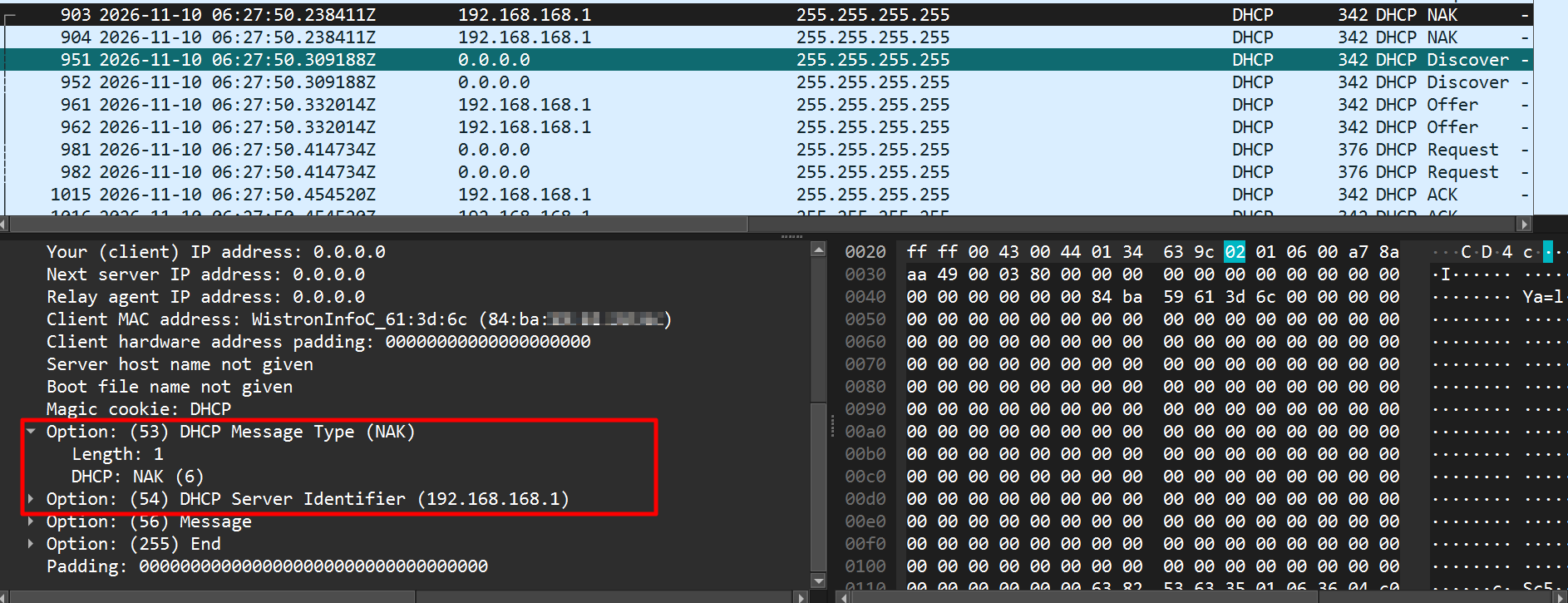
The DHCP server on ge3 replied with a NAK, because that IP does not exist on its subnet.
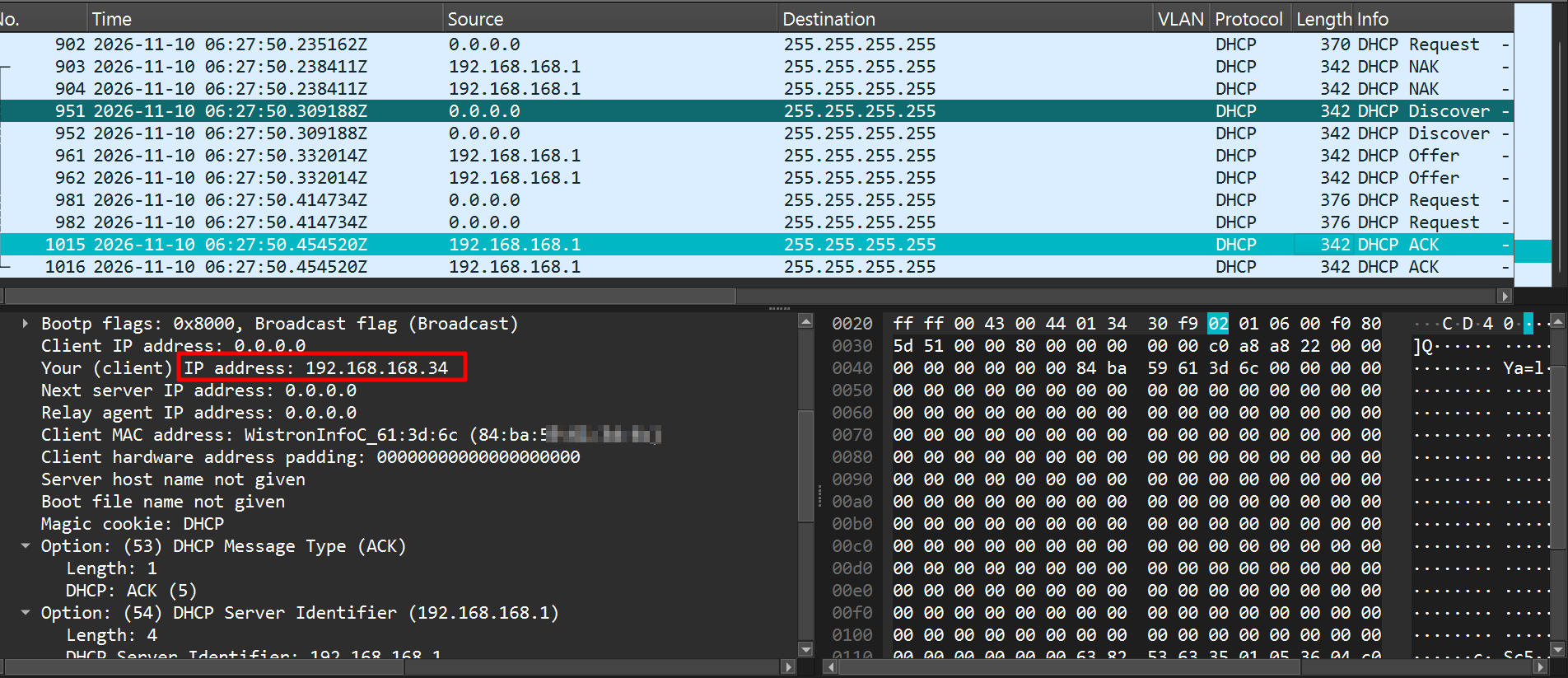
The normal DHCP flow then started, and the client received the ge3 IP, 192.168.168.34.
To sum up, the firewall is not assigning a wrong IP.
To avoid any ambiguity on logs (for you), you can keep only one DHCP reservation per MAC address. Alternatively, you can keep two DHCP reservations for one MAC address, with the flow behaving as described above.
Zyxel_Judy
0 -
Hi @Zyxel_Judy,
Seems that, I don't know why, my NAS don't chance its IP also for 15mins.
So seems that your behavious is expected only for a certain devices.
0 -
Hi @Maverick87,
I am not sure why you say the NAS does not change its IP for 15 minutes. In the screenshot in your original post, I can see the NAS gets the correct IP address in the LAN (192.168.1.0/24) after the DHCP server sends a NAK for 192.168.2.2.
The symptom you reported in the original post is expected, as I explained above.
Zyxel_Judy
0 -
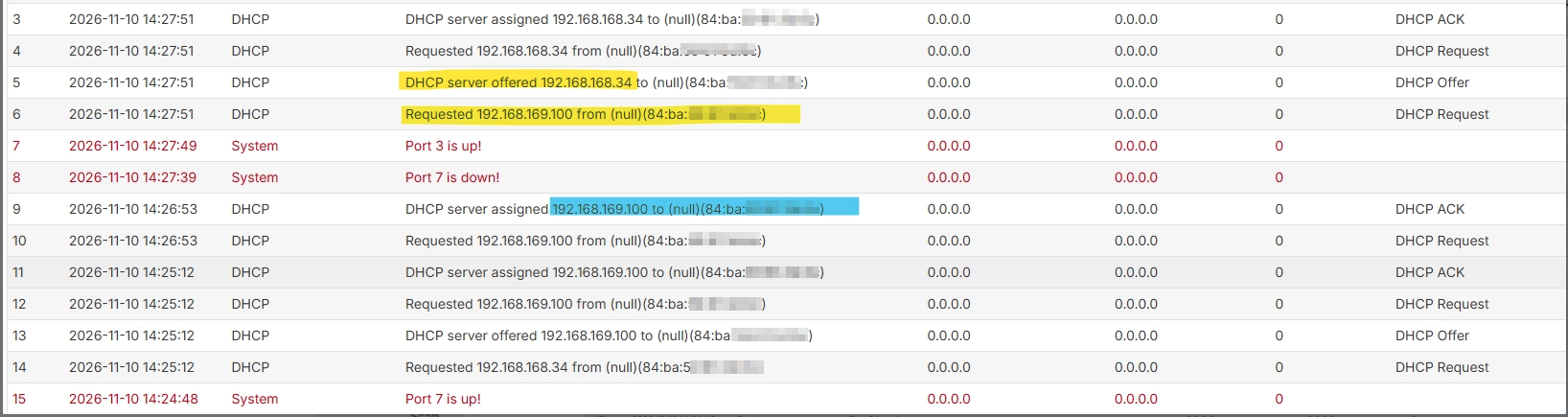
You can see in my lab log that it shows the same pattern as the log in your original post.
Zyxel_Judy
0 -
Hi @Zyxel_Judy,
Yes, if you see my screen
The NAS request is for .2.2 but the flex return and assign .1.251, but the NAS seems to refuse it.
In you case, you request .168.34 but the flex return and assign .169.100 and from your side, the PC then assign the correct IP.
So you suggest that is the NAS that refuse the IP correctly assigned?
0 -
Hi @Maverick87,
The firewall did offer/assign the correct IP (192.168.1.251) in response to the NAS’s request. If the NAS still doesn’t end up holding that correct IP afterward, this points to how the NAS itself processes the DHCP response, rather than an issue on the firewall side. In that case, we’d recommend contacting the NAS vendor’s support team, as they would be better positioned to check the client-side DHCP handling.
Zyxel_Judy
1




Categories
- All Categories
- 442 Beta Program
- 3.1K Nebula
- 244 Nebula Ideas
- 6.9K Security
- 800 USG FLEX H Series
- 392 Security Ideas
- 1.8K Switch
- 88 Switch Ideas
- 1.5K Wireless
- 59 Wireless Ideas
- 7.3K Consumer Product
- 328 Service & License
- 532 News and Release
- 104 Security Advisories
- 31 Education Center
- 10 [Campaign] Zyxel Network Detective
- 5.5K FAQ
- 34 Documents
- 91 About Community
- 124 Security Highlight