Switch – Copy running configuration to start-up configuration.




 Freshman Member
Hello,
I have two switches (GS1900-24E and GS-1900-24EP) and I want the start-up config is the same as the running configuration.
I tried to do that via Maintenance > Configuration > Management, Source=Runing, Destination=Start-up.
To check if the start-up file is now identical to the running config, I backuped the start-up configuration. But the configuration file has NOT changed compared to the previous start-up file!
The result is the same on both switches! I cannot change the start-up configuration file.
So here is my question:
- How do I update/change the start-up configuration file?
It would been very nice if the switches would handle/indicate the configuration business equivalent to AP’s of FW’s!
Thanks!
Accepted Solution
-
Hello,
I found the issue.
I use some ad- and script-blocker on my browser.For testing purposes, I used another browser with no blocker at all and the “Management” copy option worked for me.
So, the solution is:
- Don’t use any blocking extensions!Ikarus
0
All Replies
-
When you login the top right click save
0 -
-
Hello,
I found the issue.
I use some ad- and script-blocker on my browser.For testing purposes, I used another browser with no blocker at all and the “Management” copy option worked for me.
So, the solution is:
- Don’t use any blocking extensions!Ikarus
0



 Guru Member



 Zyxel Employee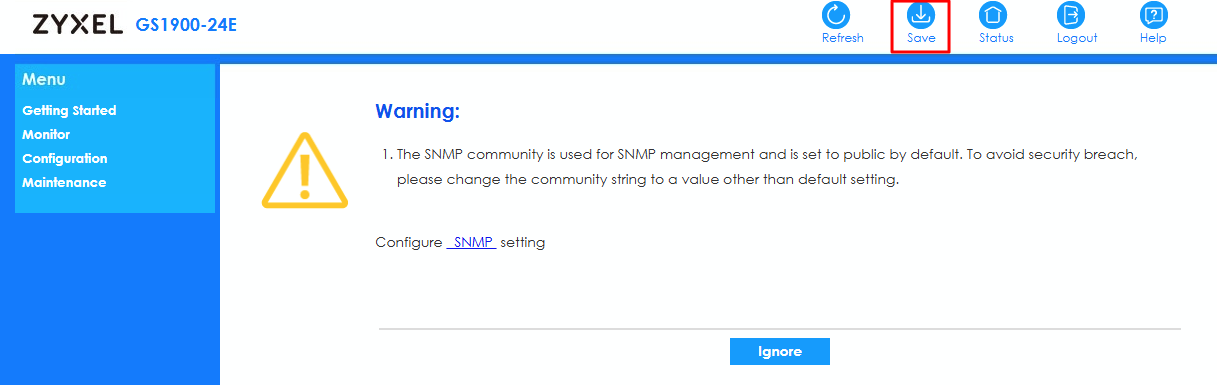
Categories
- All Categories
- 442 Beta Program
- 3.1K Nebula
- 243 Nebula Ideas
- 6.8K Security
- 781 USG FLEX H Series
- 387 Security Ideas
- 1.8K Switch
- 87 Switch Ideas
- 1.5K Wireless
- 58 Wireless Ideas
- 7.2K Consumer Product
- 324 Service & License
- 527 News and Release
- 101 Security Advisories
- 31 Education Center
- 10 [Campaign] Zyxel Network Detective
- 5.3K FAQ
- 34 Documents
- 91 About Community
- 121 Security Highlight


