Bug Report / Feature Request — USG FLEX Web UI: 2FA verification field does not accept ENTER key





 Ally Member
Summary
Inconsistent keyboard behaviour between the login stage and the 2FA verification stage creates a daily usability and security friction point for administrators using standalone mode with 2FA enabled.
Current behaviour
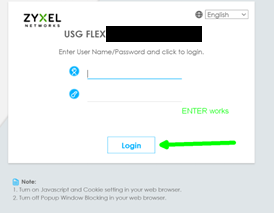
Step 1 — Username/password screen: ENTER key submits the form correctly.
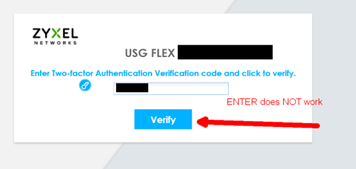
Step 2 — 2FA verification screen: ENTER key does not submit. Mouse click on the Verify button is mandatory.
Why this matters operationally
TOTP codes are time-limited to 30 seconds. The forced context switch from keyboard to mouse on the 2FA screen costs 2-4 seconds minimum. When a code is in its final seconds, this delay is enough to cause the code to expire before submission, requiring the administrator to wait for the next code cycle and re-enter. Multiplied across several logins per day, across multiple devices, this is a significant and entirely unnecessary friction point.
Expected behaviour
ENTER key should submit the 2FA verification form, consistent with the behaviour of the preceding username/password screen.
Fix required
Add keydown ENTER event listener to the 2FA verification input field, identical to the implementation already present on the username/password screen. This is a one-line frontend fix.
Environment
Standalone firewall mode, web UI login, 2FA enabled, any browser.
Priority justification
Administrators managing security infrastructure should not be forced to use a mouse to complete a security-critical authentication step. The inconsistency is particularly punishing in time-sensitive TOTP scenarios.
All Replies
-
I did a quick replicate with my USG FLEX 100(5.42 patch 1) via Chrome, and the 2FA verify button is clickable.
Jam | Video - https://10.214.36.53/
Could you help to share:
- Your firewall's firmware version.
- Your browser.
- Use Jam.dev to record a video. (You may share the link via a private message) (P.S. If your browser doesn't support this plugin, you may skip it.)
Thanks!
Zyxel Melen0 -
- V5.42(ABAR.1), latest for my 'since 2017' years old USG device. Same consistent behaviour since years.
- Any browser, Edge and Firefox unhardened/standard installs, other hardened browsers- it makes no difference, the behaviour is the same everywhere, since years and tens of browser versions, firewall firmware versions, different operating systems, standard browser installations inclusive. Using the same browser to log in here to the community: username + password, ENTER works, then 2FA, ENTER works. FIrewall, 1. enter username+password always works pressing ENTER, 2. entering 2FA code then pressing ENTER never works, I need to grab the mouse to press on the button.
- No recording available.
0 -
Get the issue point. I'm checking with our team and will update you once I get further information.
Zyxel Melen1 -
Just adding informations- at the same time, I log into other different devices from other vendors using 2FA since all these years , and the whole 2FA process always worked and still does with other vendors.
0 -
Dear Zyxel team, this issue is annoying as heck since years on older devices as I have.
This is also a bit worrying, because it means a mix of one or many or all of the following:
- not many use 2FA to log in to their firewalls, therefore no problems :)
- not many have such older devices :)
- people do not care about this annoyance :)
Anyways…
I haven't heard anything since the initial posting on 15.04.2026. That is soon 2 months away.
Can you please update the status?
0




 Zyxel Employee
Categories
- All Categories
- 442 Beta Program
- 3.1K Nebula
- 242 Nebula Ideas
- 6.8K Security
- 769 USG FLEX H Series
- 386 Security Ideas
- 1.8K Switch
- 87 Switch Ideas
- 1.5K Wireless
- 58 Wireless Ideas
- 7.2K Consumer Product
- 324 Service & License
- 526 News and Release
- 100 Security Advisories
- 31 Education Center
- 10 [Campaign] Zyxel Network Detective
- 5.3K FAQ
- 34 Documents
- 91 About Community
- 121 Security Highlight


