What "uOS" is?

 Guru Member



As Handbook of USG Flex 100H reports, there's a new kid (firmware) on Zyxel firewalls.
uOS1.10
New toys for the customers? I hope not cloud-only…
All Replies
-
Hi @mMontana ,
This is new product we are going to release. Please kindly find more introduction in following site. Thank you
https://support.zyxel.eu/hc/en-us/articles/11623150198546-USG-FLEX-vs-USG-FLEX-H-Series-Benefits
0 -
I've seen USG Flex 100H datasheet. I don't know how much will be the MSRP, however this seems a "too little" for any use. Companies do not change device in 2 years.
In 2023 1GBe devices (even with plenty ports) are simply not enough, slowest Ethernet interface available should be 2.5Gbe.
And a full 8x1GBe ports is all over "H" Series. Comparable machines from NetGate have 2x or 4x 10GBe, plus 4x 2.5gbe.0 -
I've started toying with my first "uOS" device.
I think that's still a really long way to go (it's really slow on Firefox, and you cannot edit name of any created object. Not really quality of life).
0 -
Hi,
I'm using devices with uOS for a longer time now and I'm very happy with it.
Created objects like address or services can easily be renamed.
I'm using a USG Flex200H with firmware 1.37.
0 -
I was not that lucky on vLANS, security policy, objects.
I can only get them right or throw them away; also, on ZLD 5 i was able to rename interfaces, currently LAN1 is… only LAN1; I would love to rename it as "City6_Store".
IDK, maybe I might have that option on Chrome?0 -
Chrome will not help.
Regarding interfaces: What I know is you have to delete and add them to give them a new name.
Could be easier, yes.But for me I like to work with uOS.
0 -
I was expecting that…
Rename is necessary.
0 -
A small upgrade from ZLD to uOS: upgrade possible from WK firmwares to officially released one.
Manual and "local" (so not via cloud) but still better than rollback to a non-WK firmware before update.0 -
Rename an interface: the long way…
- save startup-config.conf file of your device into a custom one in the same device; name it as you wish it
- donwload that renamed file on your computer
- rename the downloaded file in a different way to make yourself clear that this is an experimental and different file
- edit the file with a respectable text editor (I used Notepad++), replacing the "wrong" name with the correct name; in my case was from "ge3" to a custom label.
- save the file on your PC
- upload the file on your device
- apply the config. This will take considerable time also because the device will reboot so apply if you have at least 15 minutes that can be waited for the full reboot
- take a walk and don't be too anxious
It worked for me, the device I'm configuring is currently in staging (not production) therefore i could still royally f-it up and proceed if necessary to a full reset and upload the latest not screwed up configuration file.
I don't know if Zyxel will consider this approach in any proper but… it worked for me.
Why i did not deleted and recreated? ge3 was the "normally" LAN1 interface/network segment.
0 -
Hi @mMontana ,
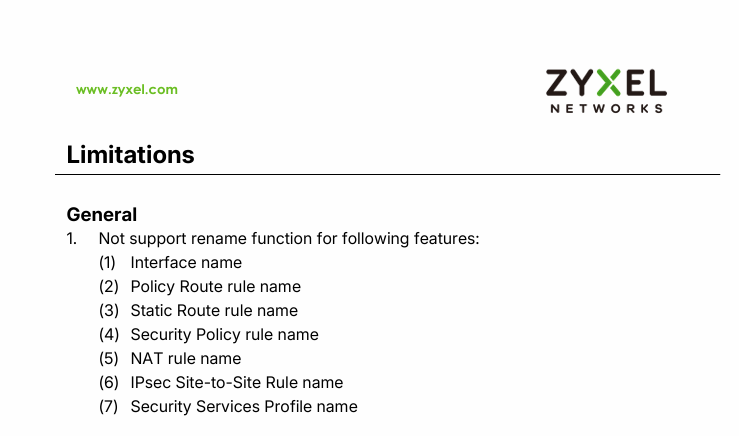
As mentioned in the H firewall release notes, Version V1.38 Patch 0 release note for example, the rename function is not supported, as shown in the screenshot below.
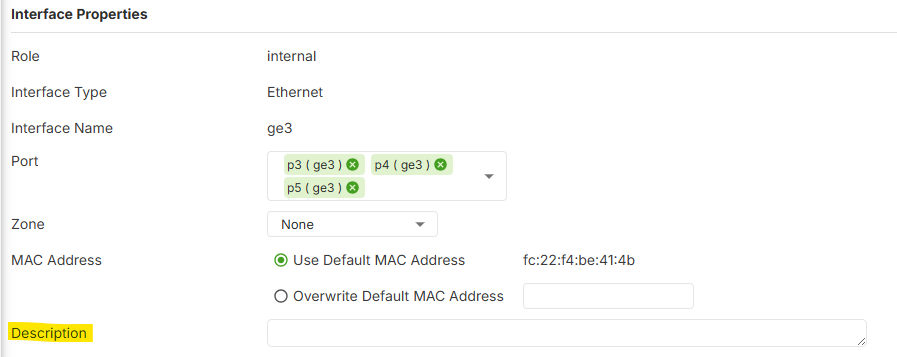
Objects such as addresses and services can be renamed easily. For items that do not support renaming, such as interfaces and policy control, a Description field is available for users to add notes as needed.
Zyxel_Judy
0

 Zyxel Employee


 Ally Member







Categories
- All Categories
- 442 Beta Program
- 3.1K Nebula
- 237 Nebula Ideas
- 6.8K Security
- 740 USG FLEX H Series
- 376 Security Ideas
- 1.8K Switch
- 87 Switch Ideas
- 1.5K Wireless
- 58 Wireless Ideas
- 7.2K Consumer Product
- 319 Service & License
- 512 News and Release
- 99 Security Advisories
- 31 Education Center
- 10 [Campaign] Zyxel Network Detective
- 5.3K FAQ
- 34 Documents
- 91 About Community
- 119 Security Highlight


