OpenVPN (SSL VPN) not connecting after migration from USG FLEX 50HP (ZLD) to USG FLEX 100H (uOS)


 Freshman Member
Hi everyone,
I just completed a migration from a USG FLEX 50HP (ZLD firmware) to a USG FLEX 100H (uOS 1.37). The new firewall is up and running — internet access works fine, and LAN clients can reach the internal server without issues.
However, I'm unable to establish an OpenVPN connection. Here's what I've done so far:
- Configured SSL VPN under VPN > SSL VPN on the 100H (incoming interface set to WAN, port 10443, Split Tunnel mode)
- Created local users under User & Authentication > User/Group > User and assigned them to the SSL VPN allowed users
- Downloaded the .ovpn configuration file from VPN > SSL VPN > Download (the "SSL VPN Configuration" button)
- Imported the .ovpn file into OpenVPN Connect on the client side
- Connection attempt fails — the client either times out or gets a TLS handshake error (I can provide exact logs if needed)
What I've already checked:
- Port forwarding on the Swisscom router is still pointing to the correct WAN IP of the new 100H
- The SSL VPN service is enabled and shows as active in the dashboard
- I did NOT import the old ZLD config (I know ZLD and uOS configs are incompatible), so the SSL VPN was configured from scratch on the 100H
- Firewall security policy: I have not added a specific rule for SSL VPN traffic — could this be the issue on uOS? On ZLD this was handled automatically.
My questions:
- Does uOS require a specific security policy rule to allow incoming SSL VPN (OpenVPN) connections on port 10443, unlike ZLD which handled it implicitly?
- Is there anything specific about the .ovpn file generated by the 100H that requires a particular version of OpenVPN Connect?
- Are there known issues with SSL VPN on uOS 1.37 that I should be aware of?
- Should I check anything under Network > Routing or Security Policy > Policy Control related to the VPN tunnel zone?
Any guidance would be greatly appreciated. Happy to share screenshots or logs.
Thanks!
Accepted Solution
-
Hi @SHDM ,
No additional policy controls are required for the USG FLEX 100H, nor is a specific OpenVPN version necessary. All SSL VPN policy settings were left at their defaults.

However, you need to configure the Default_Allow_WAN_To_ZyWALL service group, add SSLVPN as member
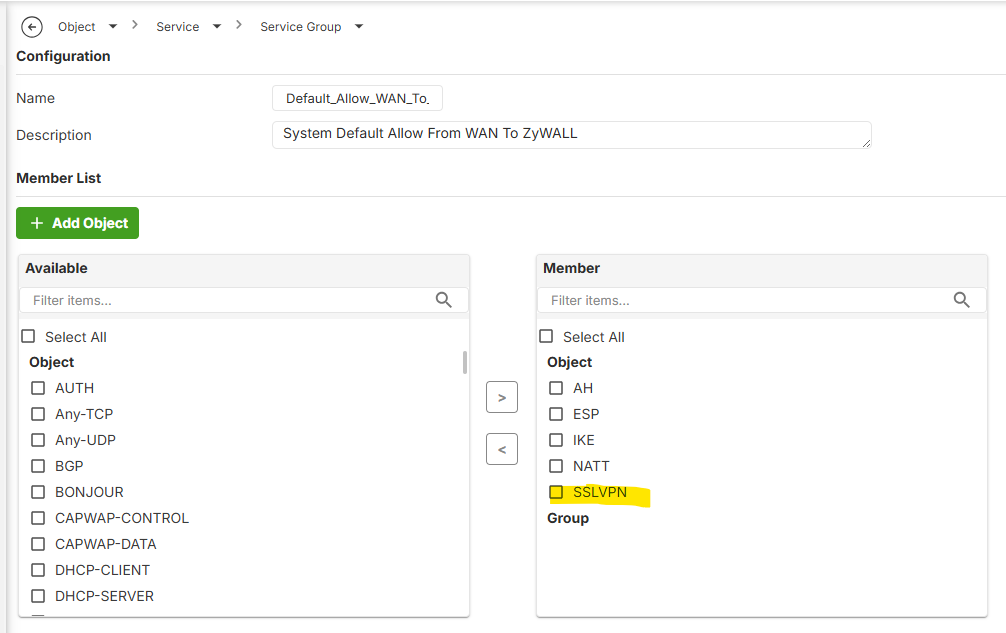
With this configuration, I verified this in a lab environment using firmware version 1.38 on the H firewall with OpenVPN (version 3.8.0(4528)), and the VPN client connected successfully.
Please upgrade your USG FLEX 100H to the latest firmware (v1.38), do the configuration and test again. If the issue persists, please collect a diagnostic file so we can investigate further.
Note: The USG FLEX 50HP is not available with ZLD firmware.
Zyxel_Judy
0





 Zyxel Employee
All Replies
-
Hi @SHDM ,
No additional policy controls are required for the USG FLEX 100H, nor is a specific OpenVPN version necessary. All SSL VPN policy settings were left at their defaults.
However, you need to configure the Default_Allow_WAN_To_ZyWALL service group, add SSLVPN as member
With this configuration, I verified this in a lab environment using firmware version 1.38 on the H firewall with OpenVPN (version 3.8.0(4528)), and the VPN client connected successfully.
Please upgrade your USG FLEX 100H to the latest firmware (v1.38), do the configuration and test again. If the issue persists, please collect a diagnostic file so we can investigate further.
Note: The USG FLEX 50HP is not available with ZLD firmware.
Zyxel_Judy
0 -
Thanks for you reply.
I have another question plz, the vpn configuration file (.ovpn) need to be edited before using it?0 -
There should be no need to edit it however there is a bug in V1.38 that DNS by Zywall does not work should be fix next firmware easy workaround use custom only and if your VPN IP Address Pool is 192.168.51.0/24 set as 192.168.51.1 or any other DNS
0 -
Thanks!
0




 Guru Member
Categories
- All Categories
- 442 Beta Program
- 3.1K Nebula
- 241 Nebula Ideas
- 6.8K Security
- 755 USG FLEX H Series
- 379 Security Ideas
- 1.8K Switch
- 87 Switch Ideas
- 1.5K Wireless
- 58 Wireless Ideas
- 7.2K Consumer Product
- 321 Service & License
- 512 News and Release
- 99 Security Advisories
- 31 Education Center
- 10 [Campaign] Zyxel Network Detective
- 5.3K FAQ
- 34 Documents
- 90 About Community
- 119 Security Highlight


