Captive Portal with USG Flex 100


 Freshman Member
Dear Zyxel Community Support Team,
I am currently configuring a USG FLEX 100 (AP is NWA5123-AC) with a Captive Portal for our guest network (VLAN 10, subnet 10.0.10.0/24). While the portal itself works perfectly when accessed directly via http://10.0.10.1 , automatic redirection for unauthenticated users does not function - no portal appears when users try to browse the web, and Firefox shows "NS_ERROR_OFFLINE" (or similar errors in other browsers).
Is there a specific setting I’m missing for automatic redirection?
Does the USG FLEX 100 require additional NAT or routing rules for this to work?
Are there known limitations with certain devices (e.g., iOS/Android)?
I’d appreciate any insights or troubleshooting steps to resolve this. Thank you for your support!
Best regards,
Lutzer
All Replies
-
Hi @Lutzer ,
To better assist you, could you please provide the following information?
- What management mode are your USG FLEX 100 and NWA5123-AC currently using — Nebula, Standalone, or AP Controller mode?
- How have you configured the automatic redirection portal for unauthenticated users? Please describe the steps in detail, include the configuration path, and provide screenshots if possible.
- Could you confirm the guest network (VLAN 10) is for wireless clients only, and that the unauthenticated users you are referring to are wireless clients?
Zyxel_Judy
0 -
Hello Zyxel_Judy,
- Standalone - i switched from NXC2500 (EoL) to USG 100 Flex Web Authentication only.
- I don't know how I can find the automatic redirection portal for unauthenticated users. I think, there is no Option like this in my USG 100 Flex.
- yes absolutely!
I tested it with my Android Phone and it works fine. The Captive Portal option pops up and I can login. But on my Linux laptop (connected via Wi-Fi to the guest network), there is no captive portal detection.
When I open the Firefox browser, I should normally be redirected to the captive portal login page as long as I’m not authenticated. However, this only works if I manually enter http://10.0.10.1 in the address bar.From other networks (Hotel or City Hotspots), I automatically redirected to the captive portal when I try to access any website and haven’t logged in yet. But this automatic redirection isn’t working with my USG Flex 100.
Thank you for helping me!
Best regards,
Lutzer
0 -
Hi @Lutzer ,
Currently, there is no function to display a captive portal pop-up upon authentication failure. Could you share more about your use case and the reason you would like the captive portal to appear in this scenario? This will help us better understand the actual application and evaluate the request.
Zyxel_Judy
0 -
But on my Linux laptop (connected via Wi-Fi to the guest network), there is no captive portal detection.
Regarding the captive portal not appearing on your Linux laptop, please check the laptop's DNS settings, as the root cause may be that DNS is unable to resolve. You may try setting the DNS to a known address such as 8.8.8.8 to see if this resolves the issue.
Zyxel_Judy
0 -
When I open the Firefox browser, I should normally be redirected to the captive portal login page as long as I’m not authenticated. However, this only works if I manually enter http://10.0.10.1 in the address bar.
Regarding the Firefox browser, could you clarify whether the issue is that when connecting to the Wi-Fi, the login portal does not automatically appear for you to enter your username and password, and you need to manually type http://10.0.10.1 to access it? Please provide more details so we can assist further.
Zyxel_Judy
0 -
Hi Zyxel_Judy,
I don't know what the reason was, but suddenly everything worked! Thank you very much for your help!
Best regards,
Lutzer
0 -
The portal redirect works correctly, and users can log in successfully.
However, on Apple/iPhone devices, the problem is different:
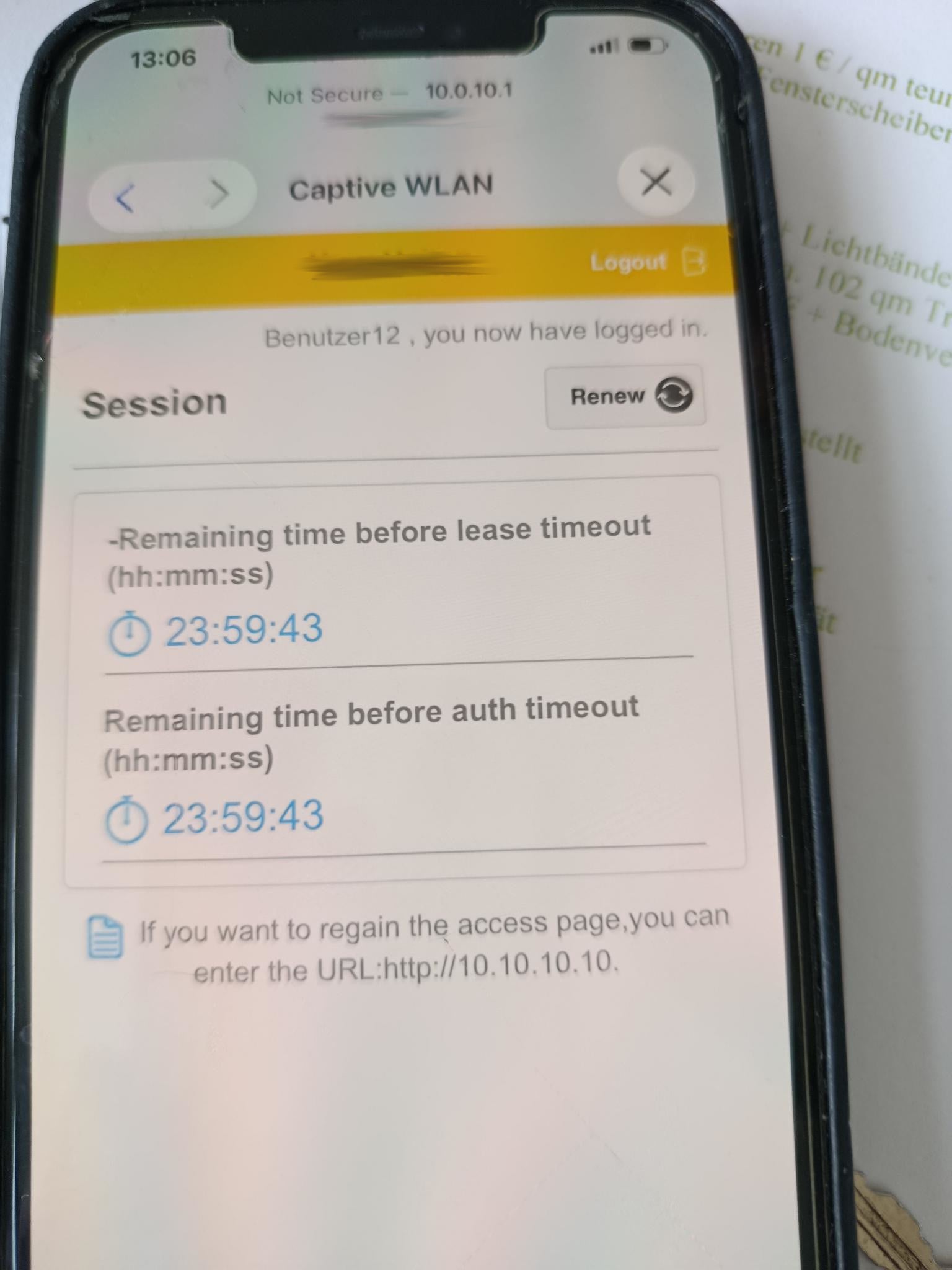
- The captive portal page appears on the iPhone
- Login is successful
- The session lease/auth timeout counts down normally (24 hours)
- The portal even shows: “you now have logged in”
- But iPhone users still cannot access the internet afterward
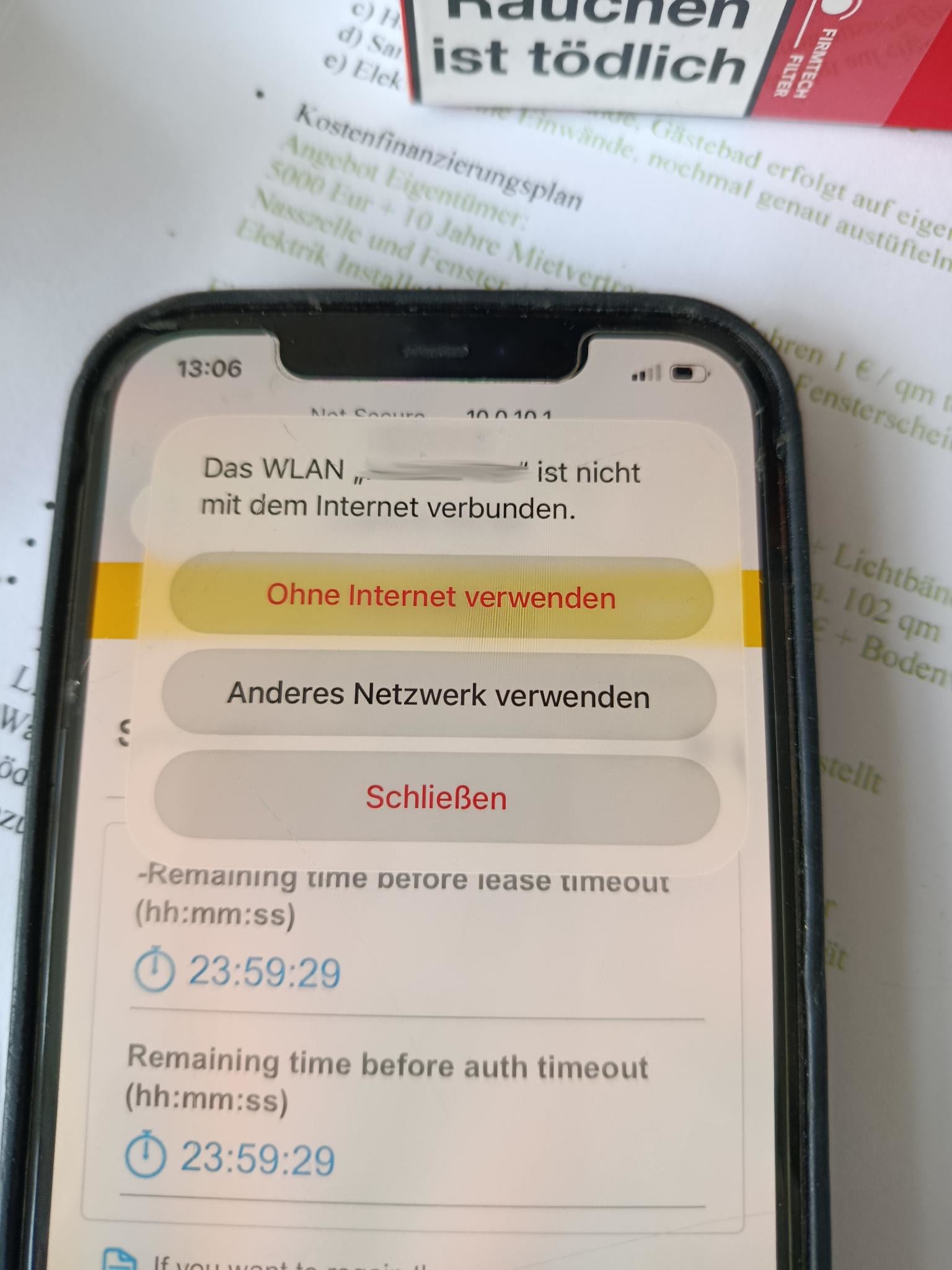
On the iPhone, iOS shows:
- “The WLAN ‘GUEST’ is not connected to the internet”
- iOS then offers “Use Without Internet”, “Use Other Network”, or Close
What I have observed:
- The captive portal login itself appears to work
- The lease/auth timer runs correctly
- The issue seems specific to Apple/iOS devices - I tested it on several iPhones
- Non-Apple devices do not appear to have the same problem
What I would like to know:
- Is this a known issue with iOS / Apple captive portal behavior on the USG FLEX series?
- Are there recommended settings or workarounds for iPhone/iPad clients?
- Could this be related to:
- Apple Private Wi-Fi Address / MAC randomization
- session or policy mismatch after login
- captive portal / CNA behavior on iOS
- firmware-related issues
- Are there any specific logs or troubleshooting steps I should check on the USG FLEX 100?
Thank you for your help.
Best regards,
Lutzer0 -
Hi @Lutzer ,
Please help to try:
- Disable Private Wi-Fi Address on the iPhone
Go to: Settings → Wi-Fi → tap the GUEST network → disable "Private Wi-Fi Address"
This ensures a consistent MAC address, preventing session mismatches after authentication. - Check DNS Settings on the USG FLEX 100
Ensure the DHCP server for VLAN 10 is pushing a valid DNS (e.g., 8.8.8.8). - Verify IP assignment
On the USG FLEX 100, go to Monitor → Network Status → DHCP table— confirm the iPhone get IP address
Zyxel_Judy
0 - Disable Private Wi-Fi Address on the iPhone
-
Thanks for the quick response!
For VLAN10, the IP address 10.0.10.1 was specified as the DNS server within the DHCP settings. I have now entered 8.8.8.8 and instructed the iPhone users to check whether "Private Wi-Fi Address" is enabled, and if so, to disable it.
I will test this out and get back to you!
Best regards,
Lutzer0





 Zyxel Employee
Categories
- All Categories
- 442 Beta Program
- 3.1K Nebula
- 243 Nebula Ideas
- 6.8K Security
- 783 USG FLEX H Series
- 389 Security Ideas
- 1.8K Switch
- 87 Switch Ideas
- 1.5K Wireless
- 58 Wireless Ideas
- 7.2K Consumer Product
- 325 Service & License
- 527 News and Release
- 101 Security Advisories
- 31 Education Center
- 10 [Campaign] Zyxel Network Detective
- 5.3K FAQ
- 34 Documents
- 91 About Community
- 122 Security Highlight


