Why is my WBE630S showing as limited power when connected to a 30W poe adapter

 Freshman Member
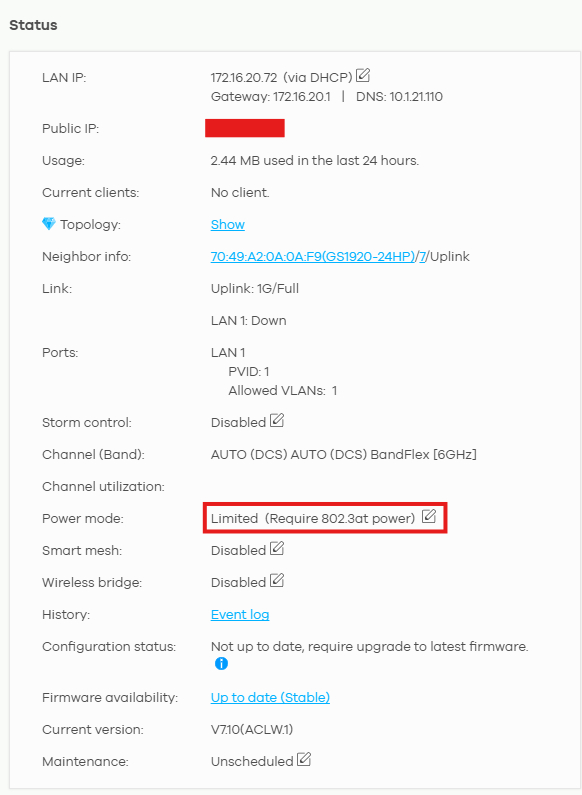
My zyxel WBE630S said it was on limited function due to limited power. It says that it requires 802.3at power which my PoE+ Adapter should provide. I have tested another 630S and it did not work until I connected a poe++ injector which are more expensive so I don't want to have to use those for each access point. Is there something I'm missing or is the stated power requirement just incorrect?
Best Answers
-
Hi @Sognenett, @dukisha016 ,
It may be a compatibility issue since the PoE+ adapter you are using is not a Zyxel one. For best performance, we recommend using a Zyxel PoE injector.
PoE Injector Series | 30W/60W/90W PoE Injectors | Zyxel Networks
Zyxel_Judy
0 -
Hi @Sognenett, @dukisha016 ,
If your PSE has full provided capability but the AP shows a Limited status due to a compatibility issue, you can enable "Force override the power mode to full power." This option allows the AP to operate at full performance despite the limited power supply.
You can activate Force Override by clicking the Edit icon on the AP’s power mode status in the device management interface. To access these settings, navigate through the interface as follows: Devices > Access points > Choose the AP
Zyxel_Judy
0





 Zyxel Employee
All Replies
-
"It says that it requires 802.3at power which my PoE+ Adapter should provide".
First question is obvious. Are you sure your adapter supports PoE+?
"I have tested another 630S and it did not work until I connected a poe++ injector"
Second clue that your Poe+ might actually only be Poe(up to 15,4W) or unable to deliver 21.4W required according to the datasheet.
So my starting point would be to check that Poe adapter.
Otherwise share the modelnr.
Edit: I did not realise that AP is attached to GS1920-24HP. What does Switch itself report?0 -
Hi @Sognenett, @dukisha016 ,
It may be a compatibility issue since the PoE+ adapter you are using is not a Zyxel one. For best performance, we recommend using a Zyxel PoE injector.
PoE Injector Series | 30W/60W/90W PoE Injectors | Zyxel Networks
Zyxel_Judy
0 -
Hi @Sognenett, @dukisha016 ,
If your PSE has full provided capability but the AP shows a Limited status due to a compatibility issue, you can enable "Force override the power mode to full power." This option allows the AP to operate at full performance despite the limited power supply.
You can activate Force Override by clicking the Edit icon on the AP’s power mode status in the device management interface. To access these settings, navigate through the interface as follows: Devices > Access points > Choose the AP
Zyxel_Judy
0 -
@Zyxel_Judy Not my question, not my equipment.
Nontheless good tips.0



Categories
- All Categories
- 442 Beta Program
- 3.1K Nebula
- 243 Nebula Ideas
- 6.8K Security
- 783 USG FLEX H Series
- 389 Security Ideas
- 1.8K Switch
- 87 Switch Ideas
- 1.5K Wireless
- 58 Wireless Ideas
- 7.2K Consumer Product
- 325 Service & License
- 527 News and Release
- 101 Security Advisories
- 31 Education Center
- 10 [Campaign] Zyxel Network Detective
- 5.3K FAQ
- 34 Documents
- 91 About Community
- 122 Security Highlight


