USG FLEX H Series - V1.39 Patch 0 Firmware Release





 Zyxel Employee
Zywall USG FLEX H Series Release Note
July 2026
Firmware Version on all models
- Please use the cloud firmware upgrade function to upgrade USG FLEX H Series
| USG FLEX H Series | Firmware Version |
| FLEX50H | V1.39(ACLO.0)C0 |
| FLEX50HP | V1.39(ACLP.0)C0 |
| FLEX100H | V1.39(ABXF.0)C0 |
| FLEX100HP | V1.39(ACII.0)C0 |
| FLEX200H | V1.39(ABWV.0)C0 |
| FLEX200HP | V1.39(ABXE.0)C0 |
| FLEX500H | V1.39(ABZH.0)C0 |
| FLEX700H | V1.39(ABZI.0)C0 |
New Feature and Enhancements
1. [Enhancement] uOS now supports the same VPN PSK character set as ZLD for Nebula Manual Link VPN. [eITS#260201380]
2. [Enhancement] Enhanced the IPS performance, bypass IPS scanning for trusted UDP traffic identified by App Patrol. [eITS#250901294]
3. [Enhancement] Added cloning feature for App Patrol profiles. (Local GUI only) [eITS#210900804, 211000150]
4. [Enhancement] Nebula portal for H series now supports application usage policy (block / BWM). [eITS#250800313]
5. [Enhancement] Nebula Live tool now shows the DHCP client leasing table.
6. [Enhancement] Firmware upgrade logs are now available in Nebula.
7. [Enhancement] Sign-on with Nebula Identity Federation Service now supports Captive Portal and SSL VPN. Excludes SecuExtender.
8. [Enhancement] Added Passkey support in Nebula Cloud Authentication Server (NCAS) for Captive Portal. [eITS#250900521]
9. [Enhancement] External Group User support OIDC authentication for SSL VPN.
10. [Enhancement] ACME integration for streamlined obtaining, renewing Let's Encrypt certificate. (Local GUI only) [eITS#250401174]
11. [Enhancement] DDNS now supports Cloudflare DNS. [eITS#251200543]
12. [Enhancement] Added alert logs for session limit. (Local GUI only) [eITS#250500437]
13. [Enhancement] Nebula and SecuReporter abnormal device admin login notifications now include abnormal admin login to security appliance and security appliance health anomaly events.
14. [Enhancement] CLI scripts are now supported in USG FLEX H. (Local GUI only) [eITS#250200079]
15. [Enhancement] GUI sorting enhancement: sorting by value is no longer based on alphabetic order. (Local GUI only)
16. [Enhancement] IPsec S2S VPN enhancements: hover tooltips provide instant Local and Remote IP visibility. (Local GUI only)
17. [Enhancement] Dropdown lists now include a search function. (Local GUI only)
18. [Enhancement] uOS now displays IPsec VPN traffic status, including total site- to-site VPN traffic statistics. (Local GUI only) [eITS#251000840]
19. [Enhancement] Firmware management now supports Firmware Type (Stable / Latest) setting. (Default is Stable).
20. [Feature Change] Disabled the FTP service by default to enhance device security and comply with Cyber Resilience Act (CRA) audit requirements.
21. [Feature Change] ITS weekly firmware now supports Cloud firmware upgrade from device GUI.
[AP Controller] *Local only
1. [Enhancement] SSID Schedule is now supported.
Bug Fix
1. [eITS#260101052] Configuration Ordering will affect DNS Security Option Control changes is unable to be saved.
2. [eITS#260101429] Policy route is missing after an HA failover.
3. [eITS#260200230] App Patrol cannot block AnyDesk.
4. [eITS#260300222] The VLAN over LAG interface does not display statistics, although statistics are available for base LAG interface and LAG ports.
5. [eITS#260300497] Traffic cannot pass through the policy-based VPN tunnel.
6. [eITS#260301752] NCC's VLAN MAC address assignment differs from local GUI.
7. [eITS#260301905] The resolved IP address of the Nebula-assigned domain name cannot be updated.
8. [eITS#260400155] VPN file missing after power outage.
9. [eITS#260400928] AD group user cannot match the allow user rule.
10. [eITS#260400971] Internet access is no longer available when using SSL VPN or Tailscale with the ZyWALL as an exit node.
11. [eITS#260401016] When DHCP server function is enabled and if there is no any DHCP client, dashboard will pop out error message.
12. [eITS#260401017] When using the captive portal with a Nebula cloud account, users are not displayed in the User section.
13. [eITS#260401133] (1) New VPN rule will cause VPN zone setting disappears. (2) The VPN PSK sometimes saves hashed password.
14. [eITS#260401173] AD Domain includes "_" what will result join domain failed.
15. [eITS#260401416] SSL VPN client can’t receive DNS IP when DNS is configured as “ZyWALL”.
16. [eITS#260401649] GUI display issue when multiple address groups in group at Security Policy page.
17. [eITS#260401720] Web GUI shows IPv6 link-local IP address.
18. [eITS#260402024] Interface IP displays 0.0.0.0 and DHCP fails when VLAN/LAG is configured with underlying ports down.
19. [eITS#260402035] Firewall will offer reserved IP address to any SSL VPN Client.
20. [eITS#260402039] Fixing the issue where the next hop for the VTI interface shows 'Route Missing' in the Policy Route.
21. [eITS#260402132] The MAC address different in LAG member ports.
22. [eITS#260402187] The session monitor page is unable to show detail session info by host IP.
23. [eITS#260500231] Ping Packet Loss to the Gateway IP During WAN Failover with Dual-WAN Policy Route Configuration.
24. [eITS#260500292] SSL VPN authentication fails when the allowed user object group contains an external group and multiple local users.
25. [eITS#260500459] 1:1 NAT settings within multi-WAN will affect one of 1:1 NAT rule doesn't work.
26. [eITS#260500962] Cannot send the alert email because the email notification service has not been successfully initialized.
27. [eITS#260501028] Cannot assign zone member if there is duplicate name.
28. [eITS#260501042] SNMP stops working in some cases.
29. [eITS#260501056] Security Policy rule within schedule object sometimes doesn’t work.
30. [eITS#260501160] Empty data in session count. (Statistics > Session Monitor > View by each type).
31. [eITS#260501374] Network connectivity issues after FP-RTE recovery.
32. [eITS#260502103] 1:1 NAT settings within multi-WAN will affect one of 1:1 NAT rule doesn't work.
33. [eITS#260600109] Navigating to Traffic Statistics > Session Monitor on the GUI and searching for all sessions results in the following error message: 'utf-8' codec can't decode byte 0xfd in position 8467: invalid start byte Error Code: (10031) show-conn-filter range begin 1 end 1000.
34. [eITS#260600116] The "Windows Update" is in the App Patrol list, but it cannot be found in the BWM > Application menu.
35. [eITS#260600501] SNMP stops working in some cases.
36. [eITS#260600690] DNS settings cannot be saved correctly.
37. [eITS#260600731] The VPN service didn't start up when booting.
38. [eITS#260601044] The AAA server's timeout value is not working on the Web-GUI.
39. [eITS#260700204] System generates conflict VTI Mark what result VPN traffic doesn't work.
40. [ZNGA-9910] The Apply button may remain unavailable when switching VPN authentication from PSK to certificate after rule creation, preventing the change from being applied.
41. [ZNGA-9896] In the Device GUI, the “Portal Type > Internal” dropdown may appear empty after adding a policy with the default theme configured in NCC.
42. [ZNGA-7240] It will be loading for a long time and there have two rules after edit full category app rules.
[AP Controller]
1. [eITS#260300673] APs with same name: GUI selection issue fixed.
2. [eITS#260600307] Set WPA-Enterprise SSID with local database and Limit simultaneous access logons to 1, but two different devices are still able to be authenticated with the same user.
Please refer to the Download Link for more details.
Important Note:
New Firmware Channel Selection: Stable & Latest
Starting with uOS 1.39, the USG FLEX H Series introduces Firmware Channel Selection, allowing administrators to choose between Stable and Latest firmware update channels, similar to the firmware management experience available in Zyxel Nebula.
- Stable (Default) – Devices are assigned to the Stable channel by default. This channel provides production-ready firmware that has undergone additional validation and is recommended for most deployments. The current Stable firmware version remains uOS 1.38. Therefore, devices using the Stable channel will not receive a "Latest firmware available" notification for uOS 1.39, and newly deployed devices will upgrade to the current Stable firmware version during initial setup.
- Latest – Administrators can switch devices to the Latest channel to receive newly released firmware as soon as it becomes available, enabling early access to the latest features, enhancements, and fixes. Once switched to the Latest channel, devices will receive notifications when newer firmware versions are available.
This new capability provides greater flexibility for customers to align firmware updates with their deployment strategy and operational requirements. If you can't find the 1.39 information in "Cloud firmware information", please 1. Manually upgrade (get the firmware via the link above). 2. Upgrade via Nebula (select latest version and click upgrade now).
Comments
-
At this time not showing up in "cloud firmware information", FLEX 200HP with V1.38(ABXE.0)
0 -
Hi @Sandro_ACP
This is because the new firmware management behavior. Please help to manually upgrade (get the firmware via the link above), or upgrade via Nebula (select latest version and click upgrade now).
Zyxel Melen0 -
"Therefore, devices using the Stable channel will not receive a "Latest firmware available" notification for uOS 1.39"
Just for info: I am running the USG FLEX 700H on V1.38(ABZI.0) stable and I received a Nebula notification for the update to V1.39.
And a question concerning: New Firmware Channel Selection
If I understand this correctly, I need to upgrade to V1.39, to be able to choose between Stable and Latest? But V1.39 is Latest, so that makes not much sense to me. 🙃
thanks & regards
0 -
Ok, I wait some time, this time, before upgrading…looks like a beta channel…no CVE involved so is not priority
0 -
The notification you received is most likely because your firewall's Nebula "Firmware Management" setting has Firmware Type set to "Latest" rather than "Stable" — this setting controls which channel's updates you get notified about, and it's independent of which firmware version is currently installed on the device (even if that version happens to also be the current Stable release).
Could you check Devices > [your device] > Firmware Management in Nebula and confirm what "Firmware Type" is currently set to? That should explain why you received the notification while believing you were on the Stable channel.
Zyxel Melen0 -
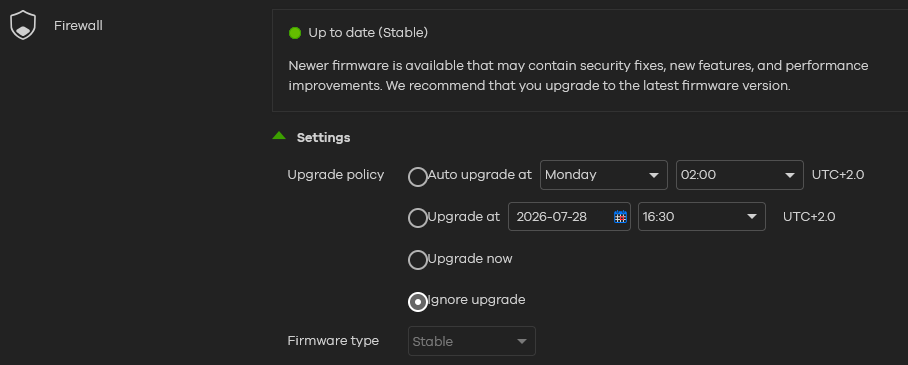
At "Devices > [your device] >" there is no "Firmware Management" in Nebula, but in "Configure > Firmware Management" I find data, see above screenshot. In my opinion, this is set to "Stable"?
0 -
After the Nebula update, I can no longer access the settings or view the configuration of individual devices. What is happening?
0 -
- [eITS#260401720] Web GUI shows IPv6 link-local IP address even IPv6 did not enabled by CLI.
Does this mean that I can enable IPv6 on the FLEX700H using the CLI for the WAN interface as well?
0 -
- [eITS#260401720] Web GUI shows IPv6 link-local IP address even IPv6 did not enabled by CLI.
Does this mean that I can enable IPv6 on the FLEX700H using the CLI for the WAN interface as well?
0 -



 Freshman Member




Categories
- All Categories
- 442 Beta Program
- 3.1K Nebula
- 243 Nebula Ideas
- 6.8K Security
- 784 USG FLEX H Series
- 391 Security Ideas
- 1.8K Switch
- 88 Switch Ideas
- 1.5K Wireless
- 58 Wireless Ideas
- 7.3K Consumer Product
- 325 Service & License
- 528 News and Release
- 102 Security Advisories
- 31 Education Center
- 10 [Campaign] Zyxel Network Detective
- 5.4K FAQ
- 34 Documents
- 91 About Community
- 122 Security Highlight