Content Filter profiles and security policies priority




 Freshman Member
Good morning
i need to apply a stricter content filter profile to the whole LAN, while some hosts need a more permissive one.
I thought i just needed to apply the stricter profile to the "LAN_Outgoing" default rule and to write an upper priority rule with the more permissive profile for my trusted hosts group.
Seems to me that both profiles are applied as the rules list goes to its end, with this kind of behaviour:
- Upper priority rule / permissive profile ⇒ trusted host ip matches ⇒ permissive profile should be applied, but it keep going to…
- LAN_Outgoing / strict profile ⇒ trusted host ip matches again as it is part of the entire network ⇒ stricter profile is applied
As the free hosts IPs are not progressive, I can't write a bunch of rules with different profiles to segment the entire LAN six or more times.
I also tried to simply exclude the hosts using "IP Exceptions" but it seems to only work for "reputation filter" and not for "content filter"
Any suggestions will be appreciated.
All Replies
-
Not one for using Content Filter but let see if I can work something out
so you have
permissive profile
strict profileand you want to restrict like 192.168.0.2 with strict profile and by 192.168.0.100 with permissive profile
you have Policy Control in order
from zone LAN
to zone WAN
source IP 192.168.0.2
strict profilefrom zone LAN
to zone WAN
source IP 192.168.0.100
permissive profilewhich I would think should work?
0 -
To help us better understand and reproduce the behavior you're seeing, could you please provide the following information?
- Which Zyxel product model and firmware version are you currently using?
- Could you share screenshots of your Security Policy configuration via private message? (Feel free to include any other relevant settings, such as your content filter.)
This information will help us investigate the issue more accurately.
Zyxel Tina
0 -
Actually i would like to have 192.168.1.0/24 - strict
Of wich, let's say, 192.168.1.10, 192.168.1.25, 192.168.1.50 - permissive
0 -
You need to split the policy between permissive and strict, in which the difference is the source.
So… primarily you need:
- Define a series of address object via IP: 192.168.1.10, 192.168.1.25 and 192.168.1.50 (obviusly if you would like to maintain the same IP you need to define a static DHCP rule)
- Then, you need to create an address object group in which you add the address objects created before.
Then:
- You need to create a first policy rule for permissive, set the source as the address object group created and using the permissive profile
- Under this rule, use the LAN_Outgoing (or whatelse) using the strict profile; you can leave "any" as source (since this rule is below the other one, it has less precedence on the permissive hosts)
In this manner, when you use an "permissive host" the hinting rule is the rule that have the source ip defined into the object group, if the host is not defined into the group, it's hint the secondary rule.
0 -
Thank you Maverick ('87 here too)
That's what i've done but content filter seems to bypass the upper/lower logic.
0 -
Thank you Tina, i will provide the informations you requested in short time, i promise.
0 -
@SistemistaDaRidere also I'm Italian too 😂😂
Have you tried to unconfigure the content filter rule for both the policy rule and see if an permissive host hint the correct policy?
So same policy rule without content filter, the only difference is the source ip. I'm expecting that when you use the permissive host, the hint pass via the policy with the source object group; instead if you use a restricted host the hinting rule is the "LAN_Outgoing".
In this way, without content filter applied, we can exclude there is a problem with the policy rule.
You can share some screenshot about the configuration of the policies?
Thank you
0 -
Ciao Maverick,
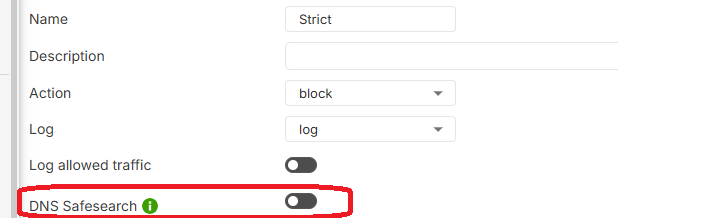
haven't had time yet to take this try, but i noticed that the issue stops if i disable DNS Safesearch on the profile that is being applied to other rules (strict)
 0
0



 Guru Member



 Zyxel Employee



 Master Member
Categories
- All Categories
- 442 Beta Program
- 3.1K Nebula
- 243 Nebula Ideas
- 6.8K Security
- 783 USG FLEX H Series
- 389 Security Ideas
- 1.8K Switch
- 87 Switch Ideas
- 1.5K Wireless
- 58 Wireless Ideas
- 7.2K Consumer Product
- 325 Service & License
- 527 News and Release
- 101 Security Advisories
- 31 Education Center
- 10 [Campaign] Zyxel Network Detective
- 5.3K FAQ
- 34 Documents
- 91 About Community
- 122 Security Highlight


