Web Page Blocked, But Not By USG500H?



 Freshman Member
USG500H
BPP content filter active. Blocked sites are supposed to get a denied access message of "Web access is restricted. Please contact the administrator."
CFO is trying to set up new company CC system with local bank.
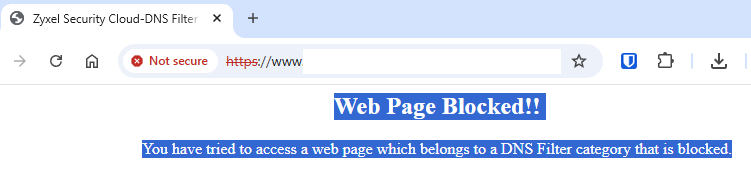
Attempts to navigate to the new CC management site return a different message:
"Web Page Blocked!!
You have tried to access a web page which belongs to a DNS Filter category that is blocked."
The tab has a Zyxel Security title:
I went so far as to temporarily disable the content filter, same result.
If I disconnect from wifi, my phone has no trouble accessing the page over cellular data.
I don't see anything in the firewall logs to indicate the traffic is being blocked.
Thoughts?
Accepted Solution
-
Hmm think I might of seen this too I have I VM for mail server and I see Edge just open and think Edge did a update but now I think about it I'm sure I saw the same you have.
The problem only seems to happen if DNS is to FLEX from what I can tell but should clear its self at some point. There is some thing odd that FLEX is doing with DNS that something is being done...
1




 Guru Member
All Replies
-
Hmm think I might of seen this too I have I VM for mail server and I see Edge just open and think Edge did a update but now I think about it I'm sure I saw the same you have.
The problem only seems to happen if DNS is to FLEX from what I can tell but should clear its self at some point. There is some thing odd that FLEX is doing with DNS that something is being done...
1 -
Sure enough, it was an ISP DNS thing.
I have two ISPs and was using DNS from only one of them. Added a DNS server from the second ISP and the site is no longer blocked.
0 -
I'm sure there is more to this…
0 -
You might be right about that.
Yesterday:
-Site was blocked as mentioned in OP.
-You suggested a DNS issue, which made sense.
-USG500H System > DNS & DDNS > DNS > Global Zone Forwarder had two entries, both from ISP A.
-Removed one, added a DNS server from ISP B.
-Site was immediately accessible. [shrug]*May have been blocked by Content Filter as a P2P Sharing Site, but I'm less confident about that as the message did not appear to be coming from the USG500H. I added a whitelist exception for the FQDN.
Today, site appears to be blocked again. Whitelist entry still in effect.
Have tried:
-Disabling content filter altogether
-Creating a policy route that directs all traffic to this FQDN over a specific ISP/WAN interface, started with ISP B, then ISP A, neither worked. Policy Route has been deactivated.
-Adding Cloudflare DNS 1.1.1.1
-Changing the DNS query from 'auto' to associated with the WAN interface for the corresponding ISP for the two ISP DNS server entries.No luck. Site still blocked.
Site is still accessible from my phone with wifi off.
The site blocked message for anything blocked by the Content Filter is configured:
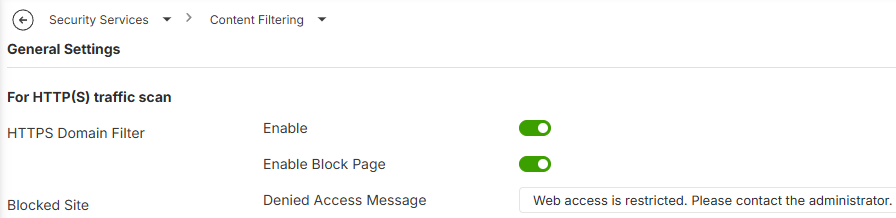
This is not the message displayed when this site is blocked.
Edit: Content filter log is empty.
0 -
Yes but the thing is I didn't even have a License for Content Filter.
I've not seem it happen again however
Try to redo my test in the link I posted to see if that still happens…oddly that now works
0
Categories
- All Categories
- 442 Beta Program
- 3.1K Nebula
- 241 Nebula Ideas
- 6.8K Security
- 755 USG FLEX H Series
- 380 Security Ideas
- 1.8K Switch
- 87 Switch Ideas
- 1.5K Wireless
- 58 Wireless Ideas
- 7.2K Consumer Product
- 321 Service & License
- 512 News and Release
- 99 Security Advisories
- 31 Education Center
- 10 [Campaign] Zyxel Network Detective
- 5.3K FAQ
- 34 Documents
- 90 About Community
- 119 Security Highlight


