Content Filter Blocking Everything After Firmware Update



 Freshman Member
USG500H firmware v1.38
Content filter Business Productivity Protection with only the following checked:
Potential Criminal Activities
Sexual Materials
Dating Personals
Nudity
Potential Hacking Computer Crime
Potential Illegal Software
Violence
P2P File Sharing
Pornography
Web Ads
I've created Allow exceptions for:
*.msftconnecttest.com (Microsoft heartbeat URL)
*.apple.com (Apple Music was being blocked)
Heartbeat service for non-Zyxel cloud management (switches)
CC management service (improperly classified as P2P)
Also being blocked per the Content Filter log:
connectivitycheck.gstatic.com
1d.tlu.dl.delivery.mp.microsoft.com
crl2.microsoft.com
dropbox.com
multiple xxx.digicert.com
ctldl.windowsupdate.com
c.pki.goog
The list just goes on and on with blocked URLs that simply do not fall under any of the categories we intend to block.
Prior to the firmware update, there were no entries in the Content Filter logs because none of our employees were surfing porn at work.
How do I get my content filter back under control without having to create exceptions for these background services from Microsoft, Google, digicert, etc.?
UPDATE: if anything, this issue is getting worse. I added an Allow exception for *.google.com after seeing multiple BLOCK entries in the Content Filter log. Even after adding that Allow exception, there are multiple *.google.com BLOCK entries in the Content Filter log. I have added at least a half dozen more Allow exceptions today as many sites that should not be blocked are being blocked.
All Replies
-
Hi @MeatPopsicle,
Please test again using the latest firmware and kindly let us know the results. Thank you.
Zyxel Tina
0 -
Firmware applied Saturday 8/15 just before 8:40AM.
Monday morning, Content Filter active, Allow exceptions still in place: numerous sites including URLs that are explicitly allowed, are being blocked. We use a web printing service for our warehouse handheld devices and that print service is being blocked indirectly as the certificate validation is being blocked.
Disbaled the Content Filter to get the warehouse printing back online.
I will send screenshots & logs by message.
0 -
[Update]
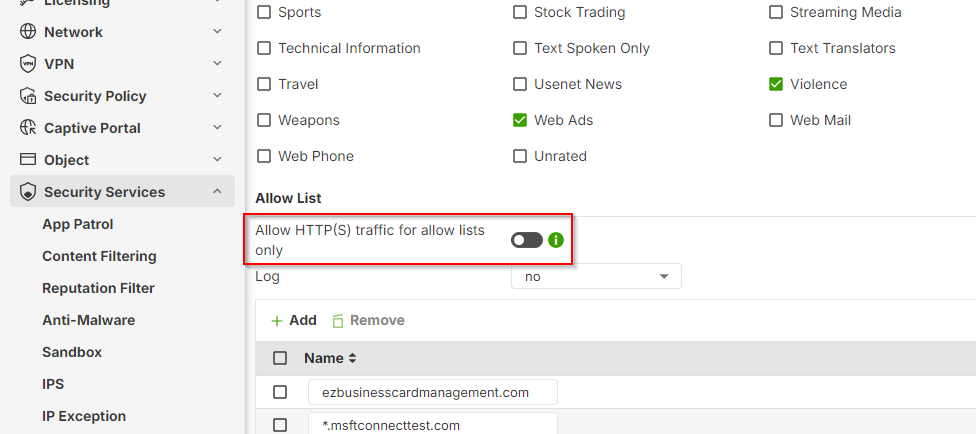
We've identified the root cause of the unexpected Content Filter blocking. It was due to the Allow HTTP(S) traffic for allow lists only setting being enabled in the Content Filter profile. This setting restricts access to only URLs explicitly defined in its allow list. Disabling this feature has resolved the issue.
Zyxel Tina
0





 Zyxel Employee
Categories
- All Categories
- 442 Beta Program
- 3.1K Nebula
- 243 Nebula Ideas
- 6.8K Security
- 783 USG FLEX H Series
- 389 Security Ideas
- 1.8K Switch
- 87 Switch Ideas
- 1.5K Wireless
- 58 Wireless Ideas
- 7.2K Consumer Product
- 325 Service & License
- 527 News and Release
- 101 Security Advisories
- 31 Education Center
- 10 [Campaign] Zyxel Network Detective
- 5.3K FAQ
- 34 Documents
- 91 About Community
- 122 Security Highlight


