Remote access vpn through site to site vpn



 Freshman Member
Hi,
Site A and B are conneted via site-to-site VPN.
I can connet to site A via Remote Access VPN.
I need to connect to a server in site B using my remote access to site A.
Is this possible using full tunnel configuration in the remote access setup?
/Håkan
Accepted Solution
-
Hi @Hakandenende ,
To achieve this, it does not rely on configuring the Remote Access VPN in Full Tunnel mode, but rather requires proper routing and security policy configurations on the devices.
Additionally, the USG FLEX H Series supports hybrid management, allowing users to manage the firewall either through the local web GUI or through Nebula Control Center. The configurations between the local GUI and Nebula are synchronized on H Series firewalls.
Therefore, we recommend referring to the following FAQ for instructions on how to configure Static route in Nebula for a Remote Access VPN to reach remote sites through a Site-to-Site VPN:
(Note: The FAQ demonstrates a scenario using Route-Based Site-to-Site VPN (VTI))You can also configure a Route-Based Site-to-Site VPN (VTI) and static routes via the local web management interface. Please ensure that static routes are configured on both sites.
Security Policies Check:
Please ensure that the firewall rules on both firewalls permit this cross-tunnel traffic:On Site A: Allow traffic from the Remote Access VPN zone (or IP pool) to the IPsec VPN zone (destined for Site B).
On Site B: Allow traffic from the IPsec VPN zone (specifically with the Remote Access IP pool as the source) to your local server's zone/subnet.If you have further questions, please provide the following details so we can assist you further:
- What are the firewall models and firmware versions for Site A and Site B? (Please confirm if they are on the latest firmware.)
- Which Remote Access VPN type are you using?
- Is your Site-to-Site VPN configured as Route-Based (VTI) or Policy-Based?
(Screenshots of your settings would be greatly appreciated, but please make sure to mask any sensitive information or send us via PM.)
0



 Zyxel Employee
All Replies
-
hello @Hakandenende
It's an easy thing to do with Nebula. Just allow the remote client to use VPN.
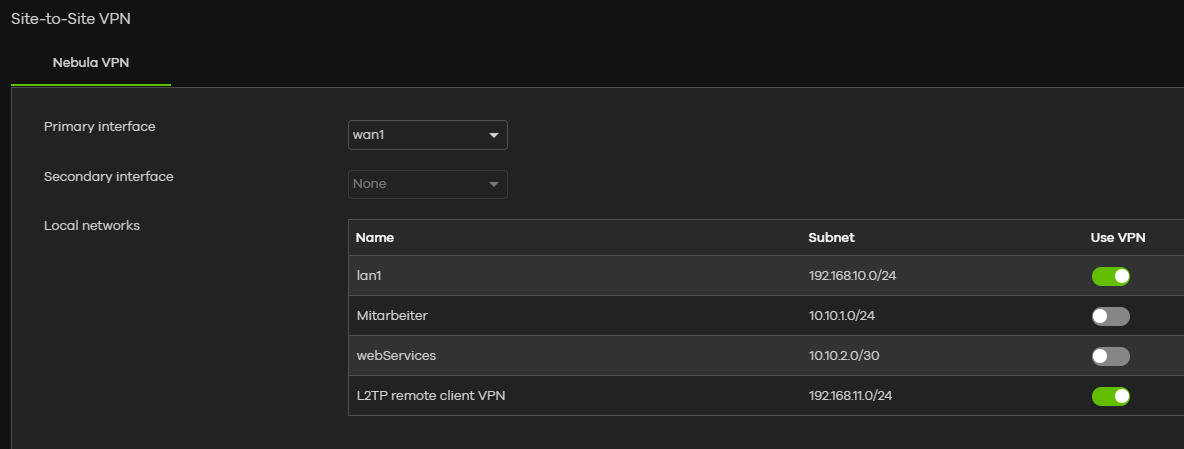
Not sure, how it will work on premise, but there's got to be a way.
0 -
Thanks Xydocq,
My sites are unfortunately on premise, maby there is a way…0 -
On the old models you could do routing rule to control Remote access vpn go down a site to site vpn.
But should still be possible to do I take it both ends use FLEX H?
So what should work is Phase 2 site to site you have a policy setup just add another for Remote access subnet and that should work
0 -
Hi @Hakandenende ,
To achieve this, it does not rely on configuring the Remote Access VPN in Full Tunnel mode, but rather requires proper routing and security policy configurations on the devices.
Additionally, the USG FLEX H Series supports hybrid management, allowing users to manage the firewall either through the local web GUI or through Nebula Control Center. The configurations between the local GUI and Nebula are synchronized on H Series firewalls.
Therefore, we recommend referring to the following FAQ for instructions on how to configure Static route in Nebula for a Remote Access VPN to reach remote sites through a Site-to-Site VPN:
(Note: The FAQ demonstrates a scenario using Route-Based Site-to-Site VPN (VTI))You can also configure a Route-Based Site-to-Site VPN (VTI) and static routes via the local web management interface. Please ensure that static routes are configured on both sites.
Security Policies Check:
Please ensure that the firewall rules on both firewalls permit this cross-tunnel traffic:On Site A: Allow traffic from the Remote Access VPN zone (or IP pool) to the IPsec VPN zone (destined for Site B).
On Site B: Allow traffic from the IPsec VPN zone (specifically with the Remote Access IP pool as the source) to your local server's zone/subnet.If you have further questions, please provide the following details so we can assist you further:
- What are the firewall models and firmware versions for Site A and Site B? (Please confirm if they are on the latest firmware.)
- Which Remote Access VPN type are you using?
- Is your Site-to-Site VPN configured as Route-Based (VTI) or Policy-Based?
(Screenshots of your settings would be greatly appreciated, but please make sure to mask any sensitive information or send us via PM.)
0





 Guru Member
Categories
- All Categories
- 442 Beta Program
- 3.1K Nebula
- 243 Nebula Ideas
- 6.8K Security
- 783 USG FLEX H Series
- 389 Security Ideas
- 1.8K Switch
- 87 Switch Ideas
- 1.5K Wireless
- 58 Wireless Ideas
- 7.2K Consumer Product
- 325 Service & License
- 527 News and Release
- 101 Security Advisories
- 31 Education Center
- 10 [Campaign] Zyxel Network Detective
- 5.3K FAQ
- 34 Documents
- 91 About Community
- 122 Security Highlight


