FLEX100H HTTPS traffic incorrectly NATed to LAN





 ZCNE Certified
We have a USG FLEX 100H (currently on firmware 1.39) with an IKEv2 Remote Access VPN configured in Full Tunnel Mode and Auto SNAT enabled for macOS clients using the native macOS VPN client and a .mobileconfig profile generated by the appliance.
Observed behavior:
- When a macOS client connects via IKEv2 VPN:
- The Mac can successfully reach the firewall itself and internal resources (routing from the Mac to the server works correctly).
- DNS queries from the Mac are correctly routed by the ZyWALL to the WAN and resolved as expected.
- However, HTTPS (TCP/443) traffic from the VPN client is not routed to the WAN. Instead, it is being redirected to a LAN host (a DVR) due to an existing NAT rule that forwards WAN port 443 to the DVR’s internal IP.
In practice, this means that once the VPN is up, all HTTPS browsing from the Mac is broken or misrouted to the DVR, while HTTP and other ports work normally.
Workaround found:
- We temporarily removed the WAN→LAN NAT rule that forwards TCP/443 to the DVR.
- After disabling this NAT entry, HTTPS traffic from the macOS IKEv2 client is correctly routed to the WAN and internet access works as expected.
Environment:
- Device: USG FLEX 100H series
- Firmware: 1.39 (latest available at the time of testing)
- VPN type: IKEv2 Remote Access VPN
- Client OS: macOS Sonoma (native VPN client,
.mobileconfigprofile) - NAT configuration: WAN→LAN port forwarding rule for TCP/443 to a DVR on the LAN
Could you please analyze this behavior on the FLEX H platform with IKEv2 Remote Access VPN?
This issue effectively breaks general HTTPS internet access for macOS VPN users whenever a WAN→LAN 443 forwarding rule exists, which is a common scenario (e.g., remote access to cameras, DVRs, or other services). A firmware fix or clear official guidance would be greatly appreciated.
We can provide configuration excerpts (NAT rules, VPN gateway, policy routes) and packet captures if needed.
Thank you in advance for your support.
All Replies
-
For the NAT rule is "External IP" set to any or object for the WAN interface?
0 -
Yes thats the problem you have set External IP: any you need to make address object address type "Interface IP" select WAN then set External IP to that address object
0 -
-
Hi @dpipro
Like @PeterUK and @Maverick87 mentioned, you need to fix the external IP for this scenario when you want to use 443 as the external port of the virtual server.
Zyxel Melen0 -
Why fix external IP need ? If the NAT setting is virtual server (port forwarding) without loopback enable.
This is very common use case.
My FLEX 200HP with 1.39 working fine.
WAN interface, external ip:any, port forward TCP 443 to internal web server.
Remote access VPN mode is full tunnel. Windows IKEv2 client from Internet can access the internal web server over the IKEv2 tunnel.
0 -
Hi @zyman2008,
The fact that
External IP = Anyworks correctly in your case is not necessarily contradictory to the issue reported by the other user.With IKEv2 Full Tunnel, traffic generated by the VPN client enters the firewall through the IPsec tunnel and is then routed towards the Internet and processed by Auto SNAT. Since the Virtual Server rule has
Incoming Interface = WAN, it would normally be expected to apply only to traffic entering through the WAN interface, not to traffic coming from the VPN tunnel.Therefore, it is perfectly plausible that in your case the Virtual Server rule (
443 → internal server) is not considered for IKEv2 traffic, and everything works as expected.The problematic behavior reported by the other user suggests that, under certain combinations of configuration, VPN client, or firmware, the NAT engine may evaluate the Virtual Server rule differently.
This is why our recommendation to set
External IPto the actual WAN IP can be seen as a way to remove any ambiguity. It makes the rule explicitly equivalent to:destination = my public IP :443 → internal serverrather than leaving the external IP set to
Any.So I would not say that
External IP = Anyis necessarily wrong or that it should always break IKEv2 Full Tunnel. Rather, specifying the WAN IP is a more precise configuration and reduces the possibility of the Virtual Server rule interfering with other NAT flows.0 -
Hmm...so I have not checked or tested the issue but it just seemed like the perfect reason and cause given what the user is seeing...so let me test for real and I get back to everyone....
update
After testing with NAT External IP: any I do see the users issue and setting External IP: address object address type "Interface IP" resolves the issue.
Have External IP: address object address type "Interface IP" is not a issue should the selected WAN IP changes as the address object address type "Interface IP" maps and update with the changed IP.
I have found its always recommend not to set the External IP to any.
But what could Zyxel do to some how make External IP to any work for VPN client to have internet access for port 443 with that given NAT rule? one fix could be a check box to exclude VPN IP pools for External IP.
1 -
In this way you exclude any other "possible" external IP from the WAN interface ;)
0



 Guru Member




 Master Member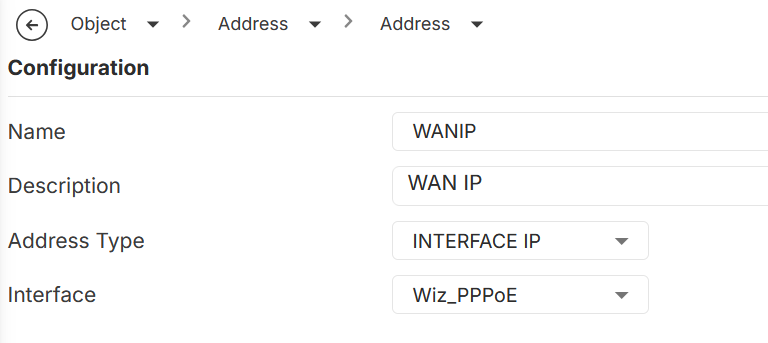


 Zyxel Employee
Categories
- All Categories
- 442 Beta Program
- 3.1K Nebula
- 243 Nebula Ideas
- 6.8K Security
- 783 USG FLEX H Series
- 389 Security Ideas
- 1.8K Switch
- 87 Switch Ideas
- 1.5K Wireless
- 58 Wireless Ideas
- 7.2K Consumer Product
- 325 Service & License
- 527 News and Release
- 101 Security Advisories
- 31 Education Center
- 10 [Campaign] Zyxel Network Detective
- 5.3K FAQ
- 34 Documents
- 91 About Community
- 122 Security Highlight


