[USG Flex H] - Multiple NAT rule for different interface





 Master Member
Hello,
I've an USG Flex H, and a "particular" request:
I've an Home Assistant instance reachable from internet: my intent is to use the same DDNS address and the same port to reach Home Assistant both from internet and lan.
For example:
- From internet:
- https://myaddress.no-ip.org:80443 —> 192.168.0.1:8443
- From LAN:
- https://myaddress.no-ip.org:80443 —> 192.168.0.1:8443
The problem is I would like to resolve "myaddress.no-ip.org" internally, without pass via WAN; for do this, I've created an internal DNS A Record that map "myaddress.no-ip.org" to 192.168.0.1
And here, there is the problem: the 192.168.0.1 is part of DomoNET VLAN Interface
So:
- From internet I use a DNAT from WAN to DomoNET and from 80443 to 8443
- From LAN I use a DNAT from LAN to DomoNET and from 80443 to 8443 (the 80443 on 192.168.0.1 is not open, so I need a DNAT to translate 80443 to 8443)
But… obviously, for complicate the things, I have also other interfaces, so I need to create "N" NAT rule for the "N" interfaces that I have.
How I can address this, without create "N" NAT rule?
Thank you
Best Answers
-
I mean you have created your own iusse in what you want by NAT changing the port and then not using the true https://myaddress.no-ip.org:8443 at home.
Most would do that or keep the myaddress.no-ip.org to WAN IP and use NAT loopback.
And really changing the port does nothing for security so what you can do is change Home Assistant port to 80443 and NAT for External Port and Internal Port port to 80443
other then that make more NAT rules
1 -
Hi @Maverick87 ,
That's exactly the right way to solve this — what you've built is the standard "split-horizon DNS + NAT loopback (hairpin NAT)" pattern, and it's a well-supported approach on USG FLEX H (and firewalls generally), not a workaround with hidden downsides.
Why it works: your DDNS name resolves differently depending on where the query comes from (public IP from WAN, 192.168.0.1 via your internal A record), and the loopback-enabled NAT rule lets internal clients hit the router's "external" address and still get redirected to 192.168.0.1 correctly.
On safety — this is fine as long as you keep in mind: Check your security policy still enforces the access you intend between zones. Loopback NAT only handles the address translation; if VLANs weren't supposed to reach 192.168.0.1 before, make sure the security policy for that interface still reflects that intent.
Zyxel_Judy
0




 Guru Member




 Zyxel Employee
All Replies
-
so why not use https://myaddress.no-ip.org:8443 for from LAN
0 -
Because the external url is :80443, everytime I need to be "external" (not at home), I need to change the port.
Instead with a "fake" NAT rule, I not needed to change the port between inside and outside home.
And the problem here, that I need to create "N" "fake" NAT rule, for the "N" interfaces (or at least, mostly LAN and WLAN… then I have also the problem of P2 that is not anymore bridged with others ports… so LANP2, LANP3_P12, WAN and WLAN, also for every single service exponed — for now 2)
0 -
so use "external" (not at home)
https://myaddress.no-ip.org:80443
and
at home
1 -
Yes, but I wouldn't change the port everytime :)
0 -
I mean you have created your own iusse in what you want by NAT changing the port and then not using the true https://myaddress.no-ip.org:8443 at home.
Most would do that or keep the myaddress.no-ip.org to WAN IP and use NAT loopback.
And really changing the port does nothing for security so what you can do is change Home Assistant port to 80443 and NAT for External Port and Internal Port port to 80443
other then that make more NAT rules
1 -
Thank you Peter; an alternative can be enable a multi-selection on NAT configuration for the incoming interface (All — All except WAN — single selection), but this require a background modification of the configuration
0 -
Sure but keep in mind NAT rules for LAN has consequences
0 -
Yes sure…
@Zyxel_Melen, @Zyxel_Judy, @Zyxel_Luna can be feasible this request? Implement an "All" and "All except WAN" incoming interface into the NAT configuration?
Thank you
0 -
-
Hello @Zyxel_Judy, @PeterUK,
I think that I've resolved, with two NAT rule, in this way:
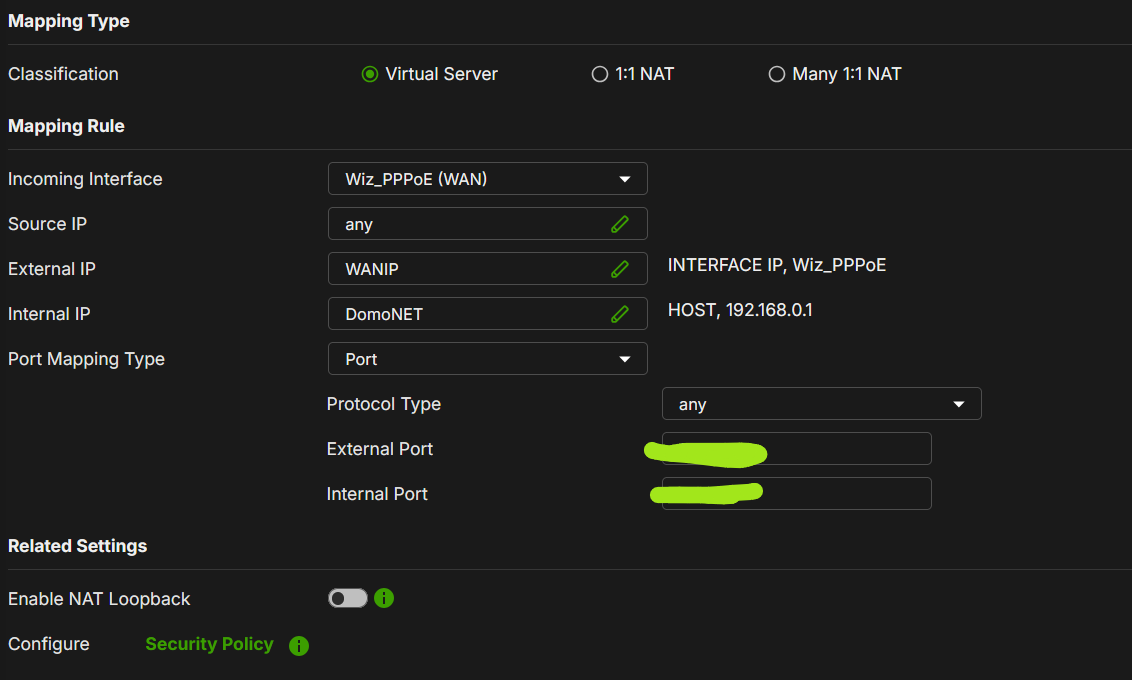
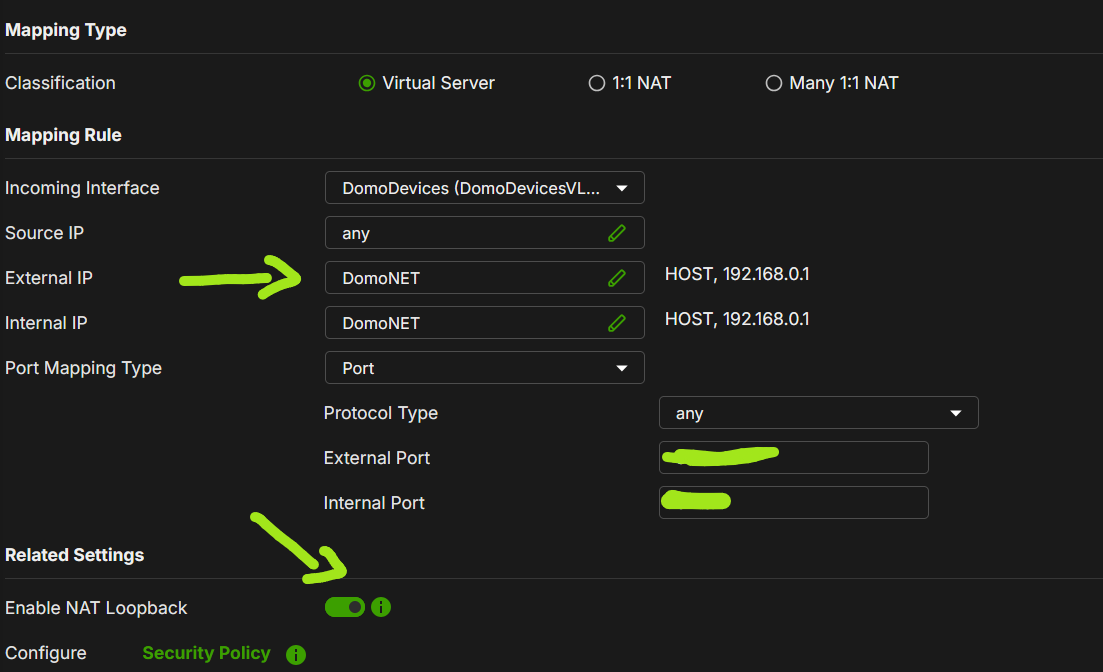

So, I use always "https:// DDNS:<external_port>", then:
- If I'm not at home, DDNS are resolved externally with WANIP and via NAT_1, I can use the service (from WAN → WANIP to 192.168.0.1)
- If I'm at home:
- My external DDNS, is resolved internally as 192.168.0.1 (via DNS A Record)
- Using an NAT Rule with Loopback ON and External IP as 192.168.0.1 I obtain:
- Any client on different Incoming Interface can use the NAT rule (loopback is ON) → I used "DomoDevices" but I can use any other interface
- This rule take a request for 192.168.0.1:<external_port> (really DDNS resolved internally) and translate it to 192.168.0.1:<internal_port>Seems that in this way, all works.
There are any suggestion on this?
Can works safety in this way?
Is the correct way to implement this request?Thank you
1
Categories
- All Categories
- 442 Beta Program
- 3.1K Nebula
- 243 Nebula Ideas
- 6.8K Security
- 782 USG FLEX H Series
- 387 Security Ideas
- 1.8K Switch
- 87 Switch Ideas
- 1.5K Wireless
- 58 Wireless Ideas
- 7.2K Consumer Product
- 324 Service & License
- 527 News and Release
- 101 Security Advisories
- 31 Education Center
- 10 [Campaign] Zyxel Network Detective
- 5.3K FAQ
- 34 Documents
- 91 About Community
- 121 Security Highlight


