Text field enabled in two-factor authentication (2FA)





 Ally Member
When you enter the url to enter the google authenticator OTP for the 2FA of the firewalls you cannot just digit the 6 numbers but you have to click in the field (or press tab) to activate the text field.
Moreover, after inserting the OTP you cannot hit enter to go ahead but you have to click on the green button.
You should enable that field by default and allow to send the OTP with ENTER so everybody will save 2 clicks (not to mention all the users who start typing without knowledge that they are writing nothing), this is something technically possibile since, for example, when you browse the main google page it has the search text field enabled.
Thank you
Comments
-
Hi @QuiteSmart ,
Since you mentioned the green button, we’re assuming you’re using the USG FLEX H firewall with this screen.
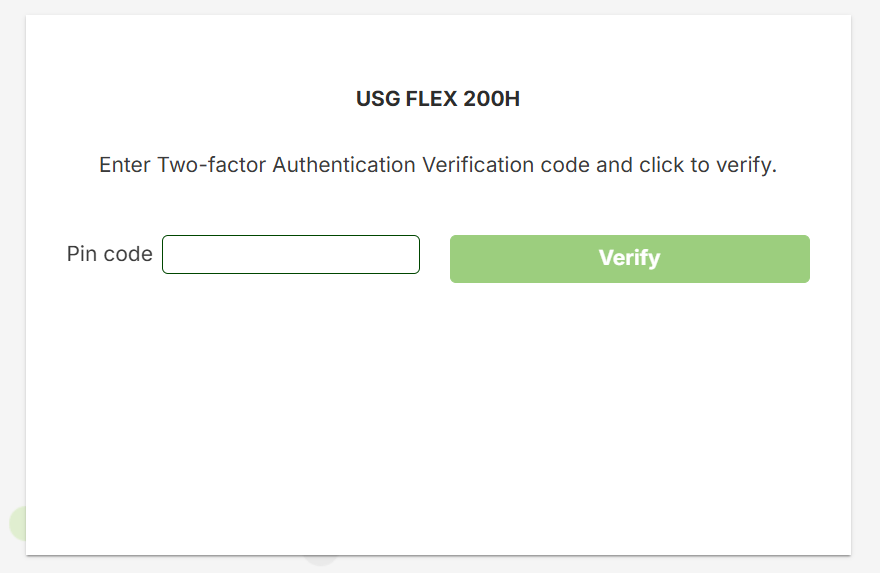
We tested with firmware 1.39 on MS Edge and Google Chrome: on the “Enter Two-factor Authentication Verification code and click to verify” screen, we were able to type the OTP immediately, without needing to click into the field (or press Tab) to activate it. We could also press Enter to log in, without needing to click the “Verify” green button.
If you test with the same environment and still see the original symptom, please share your browser name and a screen recording of the login process so we can check further.
Zyxel_Judy
1 -
Hello, thank you for your fast reply.
We have to types of 2FAs:
- the one for the admin entering the firewall, this works without any problem (and it is the one of your screenshot if i see it well)
- the one for the users entering a VPN. After the user/password connection via openSSL or IPSec if 2FA is enabled you have to browse to http(s)://anyinternalfirewallip:2FAport for example http://192.168.1.1:8000
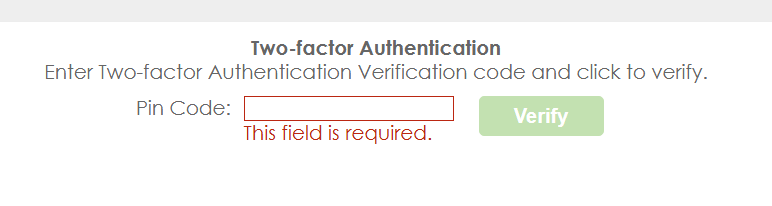
this happens to me using Chrome Version 155.0.8059.40 (Build ufficiale) (a 64 bit)
0 -
Hi @QuiteSmart ,
Thank you for the detailed information. We were able to reproduce the symptom with VPN 2FA, and we’ll evaluate it further.Zyxel_Judy
0




 Zyxel Employee
Categories
- All Categories
- 442 Beta Program
- 3.1K Nebula
- 242 Nebula Ideas
- 6.8K Security
- 777 USG FLEX H Series
- 387 Security Ideas
- 1.8K Switch
- 87 Switch Ideas
- 1.5K Wireless
- 58 Wireless Ideas
- 7.2K Consumer Product
- 324 Service & License
- 526 News and Release
- 101 Security Advisories
- 31 Education Center
- 10 [Campaign] Zyxel Network Detective
- 5.3K FAQ
- 34 Documents
- 91 About Community
- 121 Security Highlight


