NWA130BE Standalone – Hardcoded ICMP connectivity check to Google DNS

 Freshman Member
Hello,
While investigating an issue with the firmware update check on a NWA130BE in standalone mode, I noticed that the access point sends an ICMP Echo Request to 8.8.8.8 before attempting to check for firmware updates.
Since my firewall intentionally blocks ICMP traffic to public DNS servers, the AP incorrectly reports that it is not connected to the Internet.
I would like to understand why the device relies on a hardcoded third-party IP address to determine Internet connectivity.
Wouldn't it be more appropriate to verify connectivity directly against Zyxel's own firmware servers, especially since those are the services the AP actually needs to access?
Furthermore:
Is 8.8.8.8 hardcoded in the firmware?
Is there any way to configure an alternative connectivity-check destination?
Could this preliminary ICMP check be removed or made optional?
Using a third-party service as a mandatory connectivity dependency seems unnecessarily restrictive, particularly in networks with strict firewall policies.
I would appreciate any technical clarification.
Kind regards
All Replies
-
Hi @phpone,
Welcome to the Zyxel Community!
To answer your questions:
- In Standalone mode, the AP sends an ICMP ping to Google DNS (8.8.8.8) before checking for firmware updates, to confirm that it can reach the Internet. Using ICMP to a well-known public DNS server is a common way to check external connectivity.
- Is it hardcoded? Yes, this behavior is built into the firmware.
- Also, we confirm that currently there is no option in either the GUI or the CLI to change the destination or to turn this check off.
We understand that checking connectivity directly against Zyxel’s firmware servers, or making this check configurable or optional, would be a reasonable improvement. We will submit your request to the relevant team for evaluation.
[Workaround]
For now, please manually update the firmware locally to resolve this issue. You can download the latest NWA130BE firmware from the Zyxel Download Library and upload it to the device manually.
Maintenance > File Manager > Firmware Package
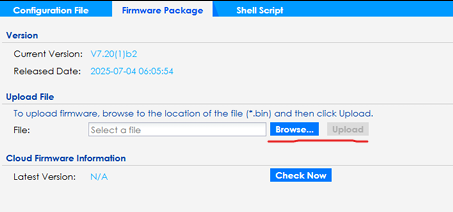
In the meantime, we have created an idea post to better track this request. If you find the idea useful, please feel free to leave a comment or vote for it.
Thank you for your suggestion and support.
Zyxel Tina
0



 Zyxel Employee
Categories
- All Categories
- 442 Beta Program
- 3.1K Nebula
- 244 Nebula Ideas
- 6.9K Security
- 807 USG FLEX H Series
- 392 Security Ideas
- 1.8K Switch
- 88 Switch Ideas
- 1.5K Wireless
- 60 Wireless Ideas
- 7.3K Consumer Product
- 333 Service & License
- 541 News and Release
- 106 Security Advisories
- 31 Education Center
- 10 [Campaign] Zyxel Network Detective
- 5.5K FAQ
- 34 Documents
- 89 About Community
- 124 Security Highlight