Nebula Switch Port Isolation Configuration Guide

 Zyxel Employee
What is Switch Port Isolation?
Switch Port Isolation is a security feature on network switches that limits direct communication between specific switch ports.
When this feature is enabled, the selected ports cannot send or receive traffic directly with each other. However, they can still communicate through an uplink port or any other port that is not isolated.
Version Information
The screenshots and steps in this guide are based on Nebula Control Center version 19.00.

Benefits of Port Isolation
- Enhanced Security:
Prevents lateral movement between internal users and reduces the risk of malware spreading within the network (e.g., ransomware). - Better Traffic Management:
Eliminates unnecessary peer-to-peer traffic and helps improve overall network performance (e.g., preventing broadcast storms). - Flexible Deployment:
Suitable for environments that require tenant or user separation, such as shared offices, dormitories, or different departments within an organization.
Recommended Use Cases
- Public or Shared Networks:
For example, public WiFi hotspots where users should not communicate with each other to protect privacy and security. - Enterprise Segmentation:
Separating traffic between different departments or systems inside a company to prevent data leakage. - Multi-Tenant Environments:
Ensures traffic separation between different tenants using the same switch infrastructure.
Configuration Guide
Follow the steps below to correctly enable Port Isolation on your Nebula Switch:
First, go to Site-wide > Configure > Switches > Switch ports.
We recommend using the filter together with the Select All option to quickly choose and edit the ports you want to configure.
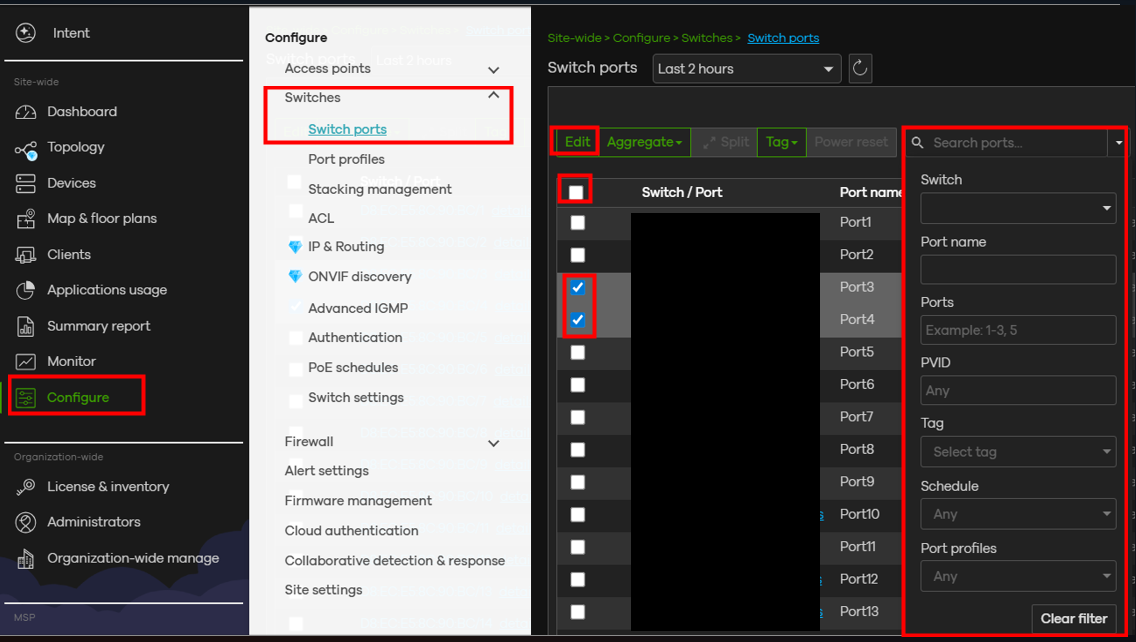
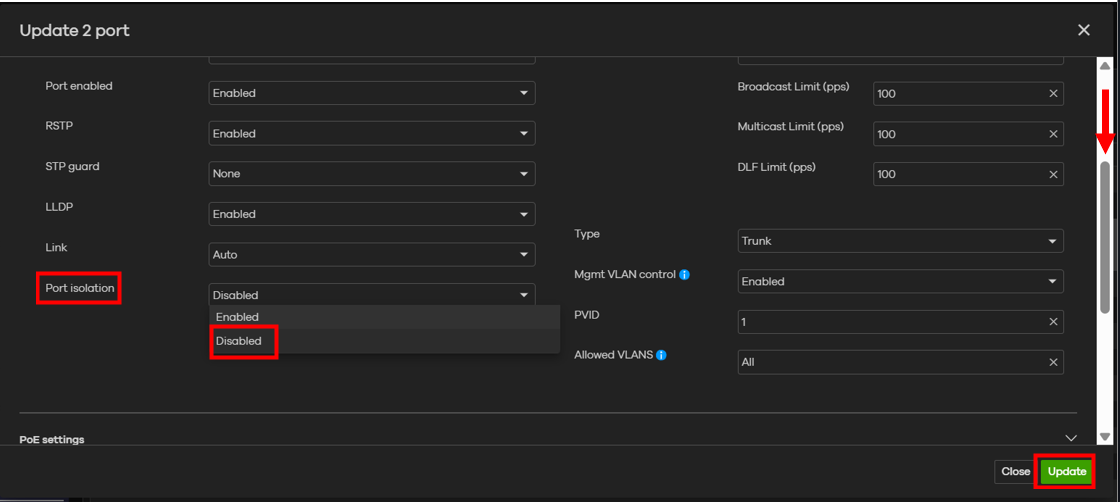
After entering the port editing page, scroll down and locate the Port isolation setting.
Enable the feature and click Update.
⚠ Important Note:
Do not enable port isolation on the uplink port.
If the uplink port is isolated, all users will lose access to the Internet because traffic will no longer pass through the uplink.
After completing the configuration, you can test whether port isolation is working properly by verifying that the devices on the isolated ports cannot communicate with each other.
Categories
- All Categories
- 442 Beta Program
- 3.1K Nebula
- 243 Nebula Ideas
- 6.8K Security
- 781 USG FLEX H Series
- 387 Security Ideas
- 1.8K Switch
- 87 Switch Ideas
- 1.5K Wireless
- 58 Wireless Ideas
- 7.2K Consumer Product
- 324 Service & License
- 527 News and Release
- 101 Security Advisories
- 31 Education Center
- 10 [Campaign] Zyxel Network Detective
- 5.3K FAQ
- 34 Documents
- 91 About Community
- 121 Security Highlight