Why can’t DNS forwarding traffic receive a response through the VPN tunnel?





 Zyxel Employee
Scenario:
I have configured a Site-to-Site VPN tunnel (Route-Based VPN) as shown in the topology below.
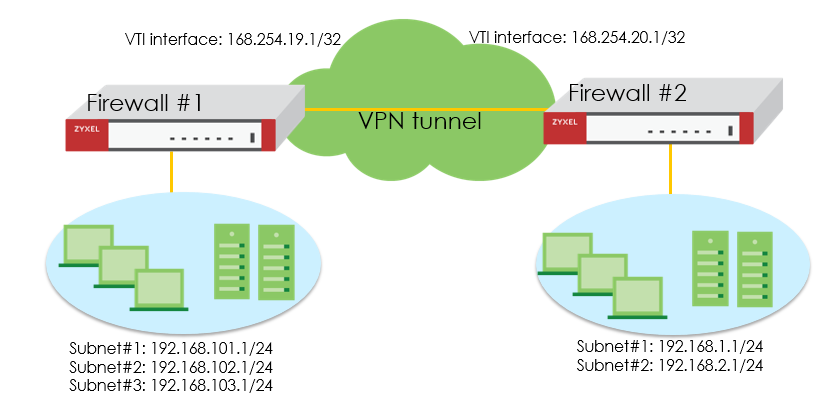
I configured DNS forwarding on Firewall #2, and the DNS server IP is 192.168.101.1.
However, Firewall #2 cannot receive DNS responses from Firewall #1.
How can this issue be resolved?
Reason:
When creating a Site-to-Site VPN using Route-Based VPN, the firewall automatically generates a VTI interface.
In many cases, the VTI interfaces on both firewalls belong to different IP subnets.
Because of this, the initial DNS query sent from Firewall #2 uses the VTI interface’s IP as its source IP (e.g., 169.254.20.1).
Firewall #1 receives the packet, but it cannot reply because it has no routing entry for the source IP of Firewall #2’s VTI interface.
As a result, DNS response packets cannot return to Firewall #2.
Answer:
You can resolve this problem in two ways:
(1) Create a static routing rule on Firewall #1, so Firewall #1 knows how to return traffic to Firewall #2’s VTI IP:
Destination: 169.254.20.1/32, Next Hop: VTI interface
This allows DNS response packets to route correctly back through the VPN tunnel.
(2) Configure both VTI interfaces to use the same IP subnet
Example:
Firewall #1 VTI IP: 169.254.19.1/24
Firewall #2 VTI IP: 169.254.19.2/24
When both VTI interfaces belong to the same IP subnet, the firewalls can automatically route traffic between each other without needing additional static routes.
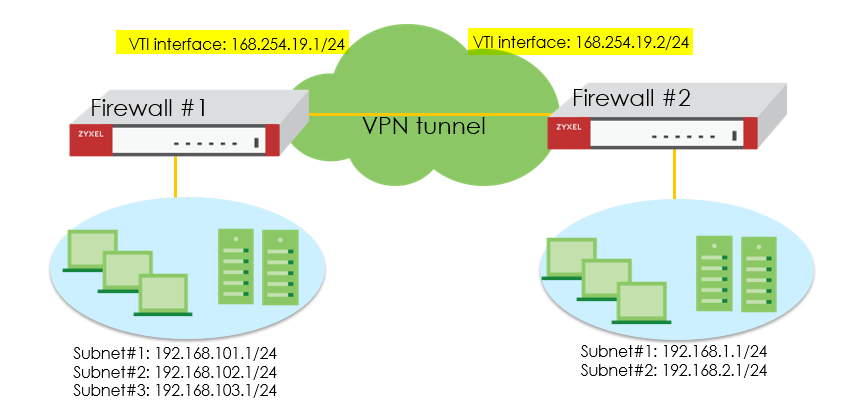
After applying either solution, DNS response packets From Firewall #1 can successfully return to Firewall #2 through the VPN tunnel.
Categories
- All Categories
- 442 Beta Program
- 3.1K Nebula
- 242 Nebula Ideas
- 6.8K Security
- 779 USG FLEX H Series
- 387 Security Ideas
- 1.8K Switch
- 87 Switch Ideas
- 1.5K Wireless
- 58 Wireless Ideas
- 7.2K Consumer Product
- 324 Service & License
- 527 News and Release
- 101 Security Advisories
- 31 Education Center
- 10 [Campaign] Zyxel Network Detective
- 5.3K FAQ
- 34 Documents
- 91 About Community
- 121 Security Highlight