Why is my device not connected to SecuReporter?
Options

Zyxel_Emily
Posts: 1,492  Zyxel Employee




Zyxel Employee
in Other Topics
Question:
Why is my device not connected to SecuReporter even if the feature is enabled on Nebula?
Answer:
If you see the message "Device Disconnected" on SecuReporter for your USG FLEX H, it might indicate that the SecuReporter service on the device is disabled. For the device logs to be sent to SecuReporter, the service needs to be activated both locally and in the Nebula settings.
Steps to Enable SecuReporter on the Device:
- Log in to your device's web GUI.
- Navigate to Log & Report > SecuReporter.
- Enable the SecuReporter service.
- Verify that the device is now connected to the SecuReporter portal.
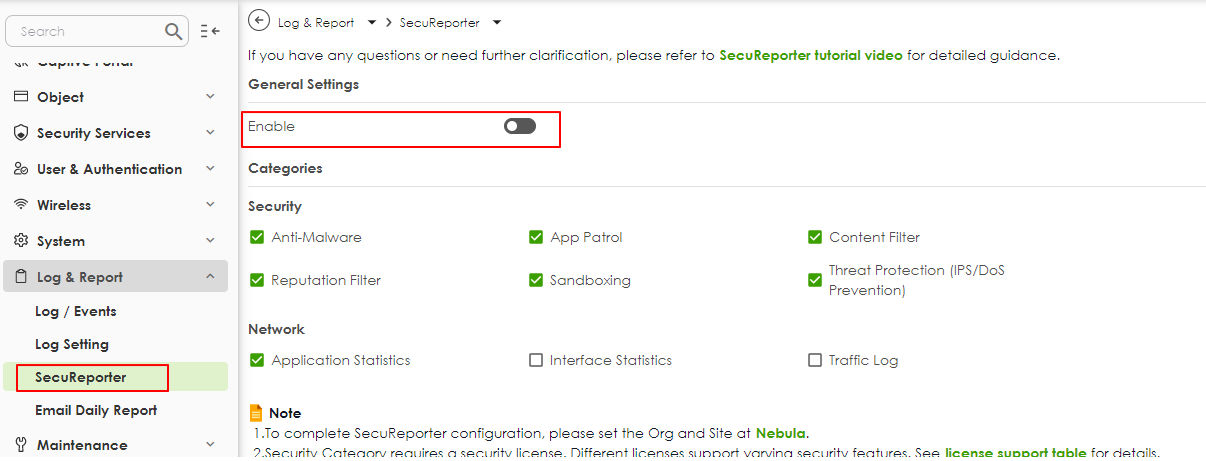
Once enabled, your device will begin uploading logs to SecuReporter. Ensure that your device is online, and the connection remains stable for uninterrupted log updates.
Tagged:
0
Categories
- All Categories
- 442 Beta Program
- 3K Nebula
- 234 Nebula Ideas
- 6.7K Security
- 693 USG FLEX H Series
- 365 Security Ideas
- 1.8K Switch
- 87 Switch Ideas
- 1.4K Wireless
- 56 Wireless Ideas
- 7.1K Consumer Product
- 312 Service & License
- 508 News and Release
- 97 Security Advisories
- 31 Education Center
- 10 [Campaign] Zyxel Network Detective
- 5.1K FAQ
- 34 Documents
- 89 About Community
- 114 Security Highlight