Why does the "file is reserved" error appear when uploading a configuration file in the setup wizard
Options

Zyxel_Emily
Posts: 1,499  Zyxel Employee




Zyxel Employee
in Maintenance
Question:
Why does the "file is reserved" error appear when uploading a backup configuration file in the setup wizard?
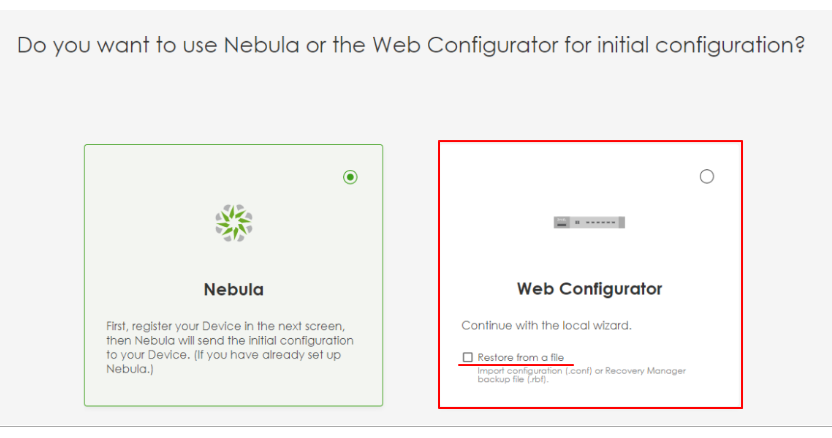
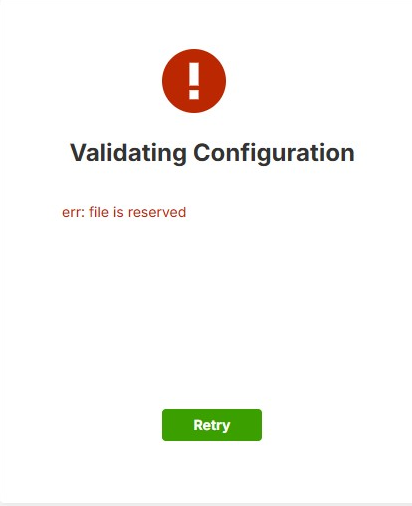
Answer:
The "file is reserved" error occurs because the uploaded configuration file is a system-reserved filename used internally by Zyxel firewalls for the current configuration. Uploading a file with the same name may cause conflicts with the system's reserved processes.
How to resolve the issue:
- Rename your configuration file to a unique and different name (e.g., myconfig.conf).
- Access the setup wizard.
- Select the "Restore from a file" option.
- Upload the renamed configuration file.
0
Categories
- All Categories
- 442 Beta Program
- 3.1K Nebula
- 235 Nebula Ideas
- 6.7K Security
- 734 USG FLEX H Series
- 375 Security Ideas
- 1.8K Switch
- 87 Switch Ideas
- 1.5K Wireless
- 58 Wireless Ideas
- 7.1K Consumer Product
- 319 Service & License
- 511 News and Release
- 99 Security Advisories
- 31 Education Center
- 10 [Campaign] Zyxel Network Detective
- 5.2K FAQ
- 34 Documents
- 90 About Community
- 117 Security Highlight