What’s the Behavior of Nebula Upgrading Firmware?

 Zyxel Employee



Question:
What’s the Behavior of Nebula Auto-Upgrading Firmware in Monitor Mode? Why does the Nebula system auto-upgrade firmware when my device is in Monitor Mode?
Answer:
When a Zyxel firewall is connected to Nebula—regardless of whether it is in Nebula Mode or Monitor Mode—the firmware management settings in Nebula determine how firmware updates are handled.
By default, Nebula enables Scheduled Firmware Upgrade, which automatically updates the device to the latest stable or preferred firmware version.
If you do not want your device to upgrade automatically, you can adjust the settings as follows:
Go to Site-wide > Configure > Firmware Management in the Nebula portal.
Select “Ignore upgrade” to disable automatic firmware updates.
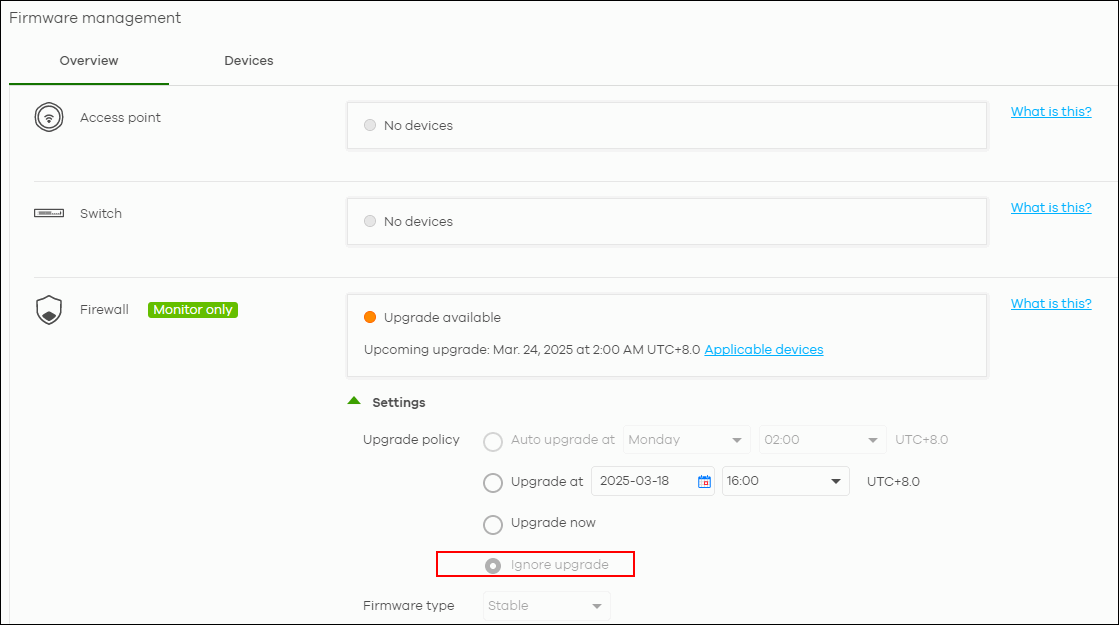
In certain situations, Nebula may force a firmware update to fix critical vulnerabilities, even if the device is running a custom firmware version (such as DateCode Firmware or DF builds). This is done to enhance device security and maintain platform integrity.
Categories
- All Categories
- 442 Beta Program
- 3.1K Nebula
- 237 Nebula Ideas
- 6.8K Security
- 746 USG FLEX H Series
- 377 Security Ideas
- 1.8K Switch
- 87 Switch Ideas
- 1.5K Wireless
- 58 Wireless Ideas
- 7.2K Consumer Product
- 319 Service & License
- 512 News and Release
- 99 Security Advisories
- 31 Education Center
- 10 [Campaign] Zyxel Network Detective
- 5.3K FAQ
- 34 Documents
- 91 About Community
- 119 Security Highlight