How do I enable Dynamic Channel Selection (DCS)?
Options

Zyxel_Jami
Posts: 245  Zyxel Employee




Zyxel Employee
in Radio
To enable Dynamic Channel Selection (DCS) in the Nebula Control Center (NCC), go to:
Site-wide > Configure > Access points > Radio settings > DCS setting
Switch the option to “DCS time interval” or “DCS schedule” to activate DCS.
You can then:
- set a time interval, or
- Choose a day/time for DCS to run
- and adjust the preferred DCS options as needed.
Finally, click “Save” and wait about 1–2 minutes for the changes to take effect.
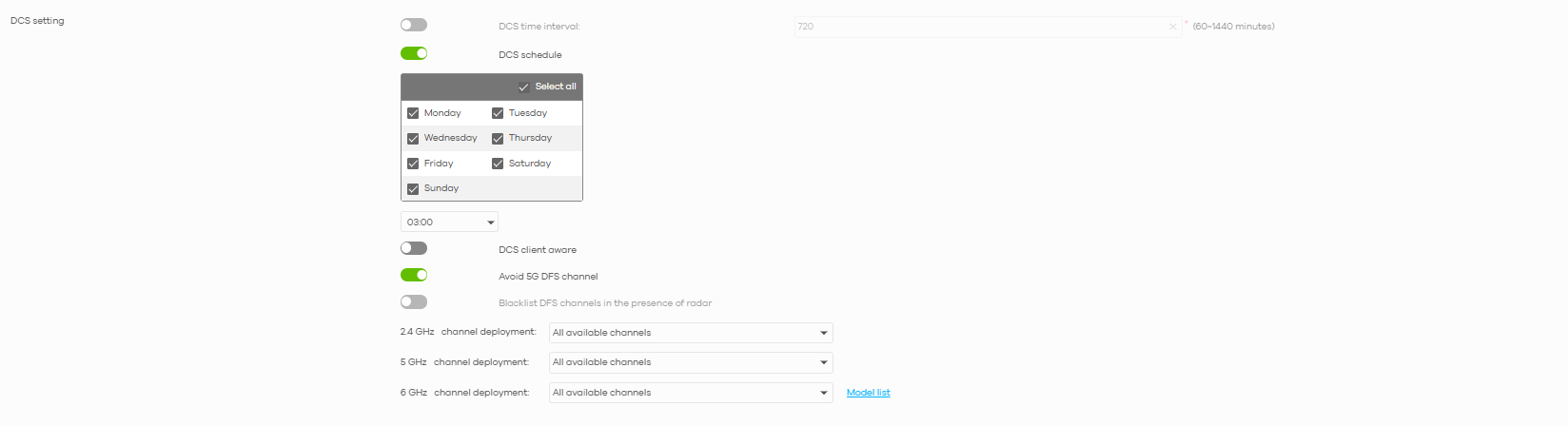
DCS helps optimize WiFi performance by automatically selecting the best channel for your wireless environment.
0
Categories
- All Categories
- 442 Beta Program
- 3.1K Nebula
- 234 Nebula Ideas
- 6.7K Security
- 731 USG FLEX H Series
- 372 Security Ideas
- 1.8K Switch
- 87 Switch Ideas
- 1.5K Wireless
- 57 Wireless Ideas
- 7.1K Consumer Product
- 319 Service & License
- 511 News and Release
- 99 Security Advisories
- 31 Education Center
- 10 [Campaign] Zyxel Network Detective
- 5.2K FAQ
- 34 Documents
- 89 About Community
- 116 Security Highlight