I can’t find the Channel Utilization menu. How do I check it?
Options

Zyxel_Jami
Posts: 246  Zyxel Employee




Zyxel Employee
in Other Topics
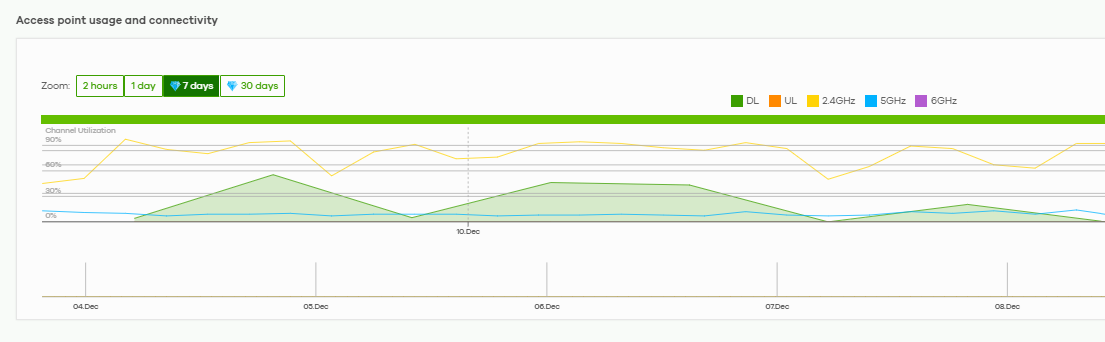
To view Channel Utilization in Nebula, follow these steps:
- Go to Site-wide > Devices > Access points.
- Select the AP you want to inspect.
- In the AP detail page, scroll to the Access point usage and connectivity graph.
- Hover your mouse over the graph to see utilization values over time.
Color indicators:
- Yellow = 2.4 GHz channel utilization
- Blue = 5 GHz channel utilization
- Purple = 6 GHz channel utilization
0
Categories
- All Categories
- 442 Beta Program
- 3.1K Nebula
- 237 Nebula Ideas
- 6.8K Security
- 745 USG FLEX H Series
- 377 Security Ideas
- 1.8K Switch
- 87 Switch Ideas
- 1.5K Wireless
- 58 Wireless Ideas
- 7.2K Consumer Product
- 319 Service & License
- 512 News and Release
- 99 Security Advisories
- 31 Education Center
- 10 [Campaign] Zyxel Network Detective
- 5.3K FAQ
- 34 Documents
- 91 About Community
- 119 Security Highlight