Where can I disable the intra-BSS traffic blocking feature?
Options

Zyxel_JoyLee
Posts: 172  Zyxel Employee


Zyxel Employee
in SSID
You can enable or disable the Intra-BSS Traffic Blocking feature by navigating to:
Site-wide > Configure > Access Points > SSID Advanced Settings
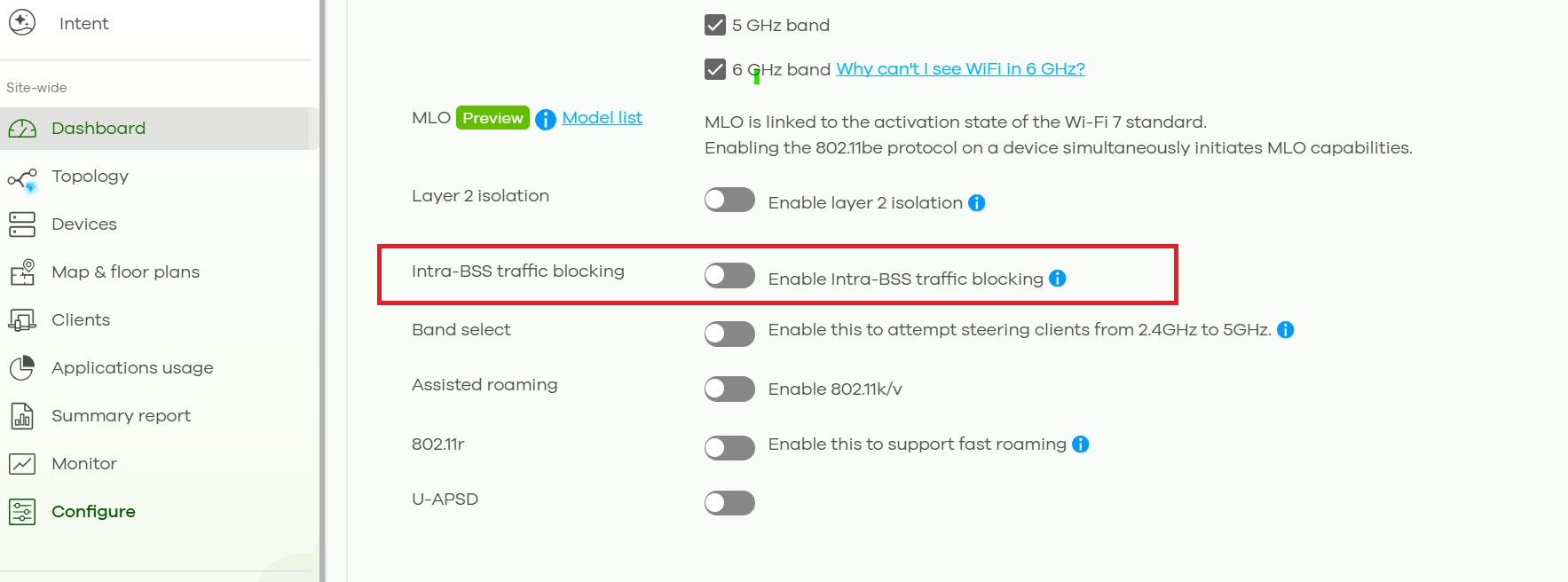
However, if Intra-BSS Traffic Blocking is enabled together with Layer 2 Isolation because the Guest Network feature is enabled under:
Site-wide > Configure > Access Points > SSID Settings

Then you will need to disable the Guest Network feature first before you can disable Intra-BSS Traffic Blocking.
0
Categories
- All Categories
- 442 Beta Program
- 3K Nebula
- 234 Nebula Ideas
- 6.7K Security
- 693 USG FLEX H Series
- 365 Security Ideas
- 1.8K Switch
- 87 Switch Ideas
- 1.4K Wireless
- 56 Wireless Ideas
- 7.1K Consumer Product
- 312 Service & License
- 508 News and Release
- 97 Security Advisories
- 31 Education Center
- 10 [Campaign] Zyxel Network Detective
- 5.1K FAQ
- 34 Documents
- 89 About Community
- 114 Security Highlight