How to check my Organization ID in Zyxel Nebula?
Options

Zyxel_HsiuTe
Posts: 63  Zyxel Employee




Zyxel Employee
Q:
How to check my Organization ID in Zyxel Nebula?
A:
There are two ways to check your Organization ID in Zyxel Nebula:
1. Check via the URL
After logging in to the Nebula Control Center (NCC), you can find the Organization ID directly in the browser URL.
2. Check via Organization Settings
Go to Organization-wide > Organization-wide Manage > Organization Settings.
In the Organization Information section, locate the Organization ID field.
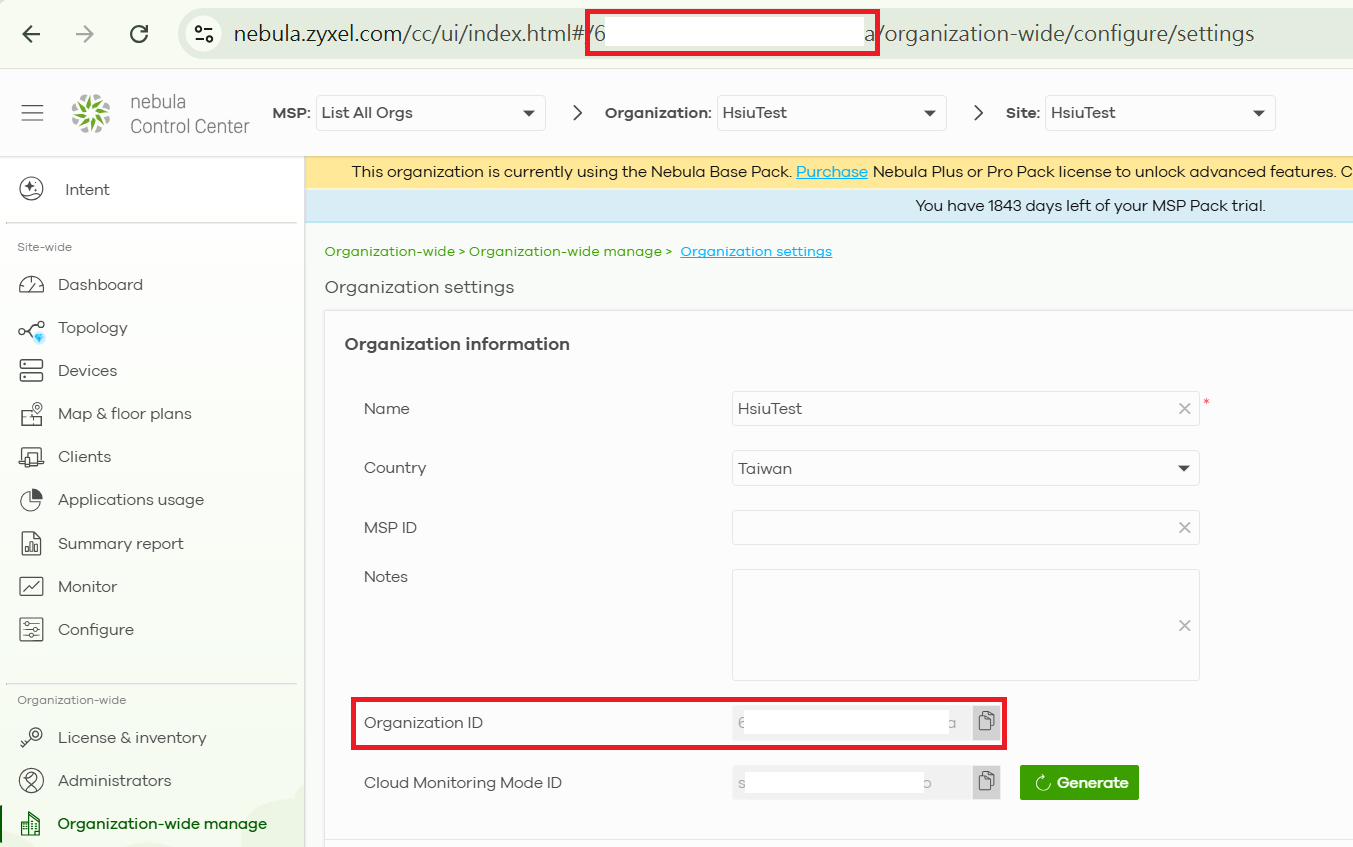
0
Categories
- All Categories
- 442 Beta Program
- 3.1K Nebula
- 234 Nebula Ideas
- 6.7K Security
- 731 USG FLEX H Series
- 372 Security Ideas
- 1.8K Switch
- 87 Switch Ideas
- 1.5K Wireless
- 57 Wireless Ideas
- 7.1K Consumer Product
- 319 Service & License
- 511 News and Release
- 99 Security Advisories
- 31 Education Center
- 10 [Campaign] Zyxel Network Detective
- 5.2K FAQ
- 34 Documents
- 89 About Community
- 117 Security Highlight