[2026 January Tips & Tricks] Why It’s Time to Move Your VPN Encryption to AES-GCM


 Zyxel Employee

AES-GCM (Galois/Counter Mode) is currently the gold standard for encryption in modern VPNs (like IPsec and TLS). In this short blog we will walk through AES-GCM with you and most importantly help you adapt to the latest technology to stay safe.
AES-GCM is an AEAD (Authenticated Encryption with Associated Data) algorithm. This is the most important concept to grasp.
- Old Way (AES-CBC): In older VPN configurations, encryption and authentication were two separate steps. You would use AES-CBC to hide the data (confidentiality) and a separate hash like SHA-256 (HMAC) to make sure no one tampered with it (integrity). This "stitch-them-together" approach led to many implementation errors and vulnerabilities.
- New Way (AES-GCM): GCM handles both encryption and integrity verification in a single, highly efficient operation. It ensures that the data is encrypted and that it hasn't been tampered with, all at once.
As a result, AES-GCM is way superior to older modes like AES-CBC for two main reasons: performance and security.
💡Performance
The biggest practical difference among AES-GCM vs AES-CBC:
- AES-CBC (serial): CBC stands for "Cipher Block Chaining." To encrypt Block 2, you must wait for Block 1 to finish, because the result of Block 1 is fed into Block 2. This is a serial process. You cannot encrypt the next block until the previous one is done.
- AES-GCM (parallel): GCM uses "Counter Mode" for encryption. It turns the block cipher into a stream cipher using a counter. That means Block 1, Block 2, and Block 100 can all be encrypted simultaneously.
Because of this parallelism, AES-GCM can fully utilize modern multi-core CPUs and hardware acceleration instructions (like AES-NI on Intel/AMD or ARM Crypto extensions), often resulting in faster throughput compared to CBC on the same hardware.
🛡️Security
AES-CBC requires data to be split into fixed blocks (16 bytes). If your data isn't exactly 16 bytes, you have to add "padding" to fill the empty space.
- The problem: If a VPN firewall leaks slight timing differences or error messages when it encounters "bad padding," a hacker can trick the server into decrypting the traffic byte-by-byte. These are called Padding Oracle Attacks (famous examples include "Lucky 13" and "POODLE").
- Way out: AES-GCM is a stream cipher mode. It does not use padding at all. Therefore, it is completely immune to padding oracle attacks.
AES-GCM is commonly adapted in the industry and becomes the dominant standard in:
- TLS 1.3: The latest standard for web security (HTTPS) mandates the use of AEAD ciphers like AES-GCM. It completely dropped support for older CBC modes.
- IPsec / IKEv2: Almost all modern enterprise firewalls (Palo Alto, Fortinet, Cisco) and OS implementations (Windows, macOS, Linux) prioritize AES-GCM in their default proposals.
- Compliance: Governments (e.g., the US NSA's "CNSA Suite") generally require AES-GCM for protecting classified data.
🔔Why Zyxel encourage our customers to change to AES-GCM?
If your firewall (or the VPN client) does not utilize AES-GCM, three things will happen, ranging from "annoying" to "critical failure":
- Performance degradation
The connection will fall back to an older cipher like AES-CBC. Because CBC cannot be parallelized, your VPN throughput will drop significantly, and the CPU usage on your gateway will spike. A router that can do 1Gbps on GCM might struggle to do 300Mbps on CBC.
2. Connection failure (proposal mismatch)
If the remote peer (e.g., a strict cloud provider, a high-security partner, or a modern client) has a security policy that enforces AEAD/GCM-only, the connection will fail to establish entirely. You will see "Phase 2 Proposal Mismatch" or "No Proposal Chosen" errors in your logs.
3. Security vulnerability
You are forced to use AES-CBC. Unless your implementation of CBC is patched perfectly against "Lucky 13" and other padding attacks (which is difficult to achieve), your traffic could theoretically be intercepted and decrypted by a sophisticated attacker on the path.
📣Call to action
Always configure your VPN Phase 2 (IPsec) proposals to prioritize AES-GCM-128 (or 256) over all other options. Only keep AES-CBC enabled as a fallback for legacy devices that literally cannot speak anything else.
Let’s walk through steps to select AES-GCM in VPN settings of the USG FLEX H series firewall.
📌Note. uOS v1.37 is required to unlock the AES-GCM support. Upgrade the firmware before proceeding to configure AES-GCM.
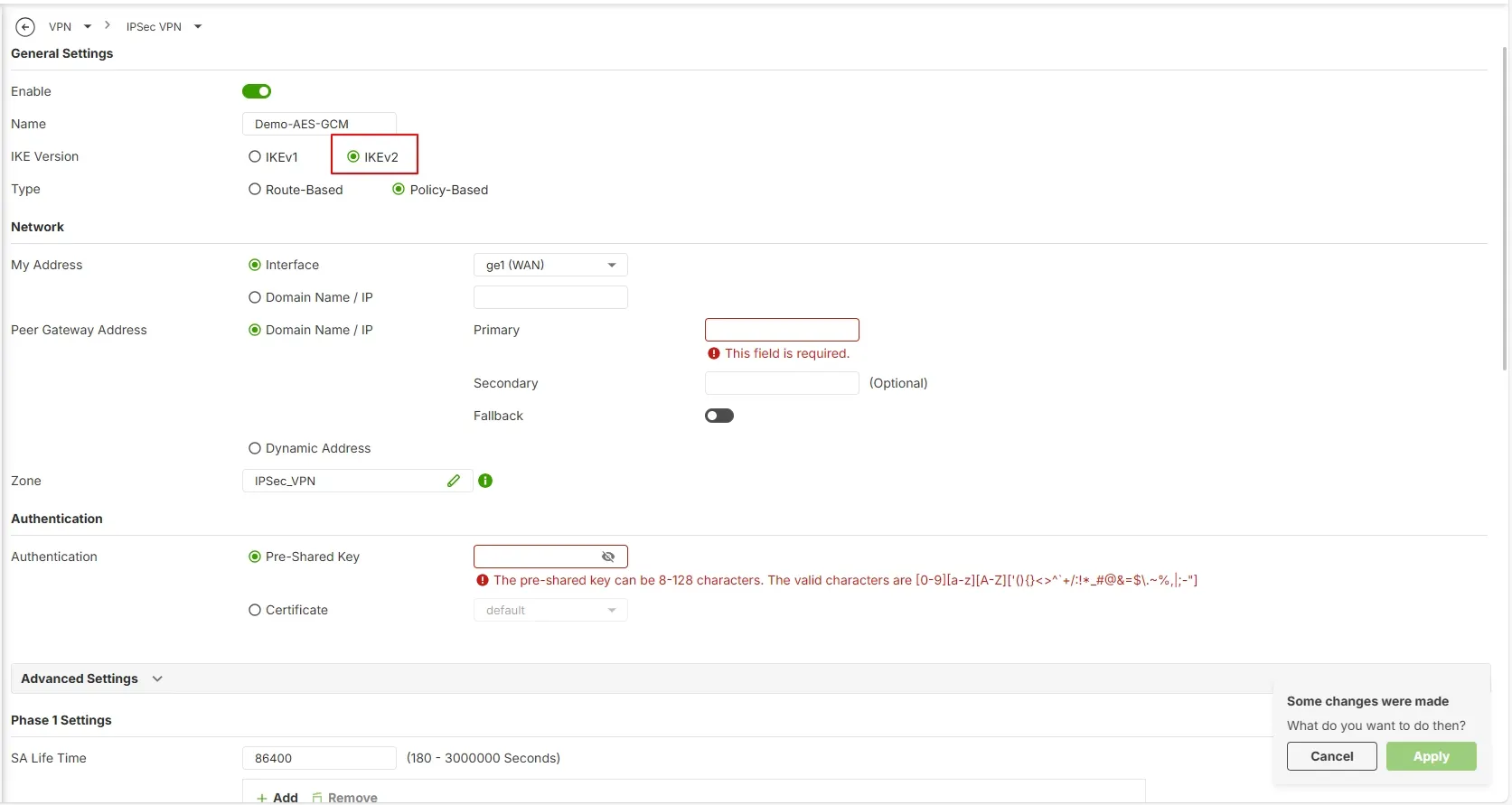
- Surf to the VPN > IPSec VPN settings page, in the IKE version choose “IKEv2”.
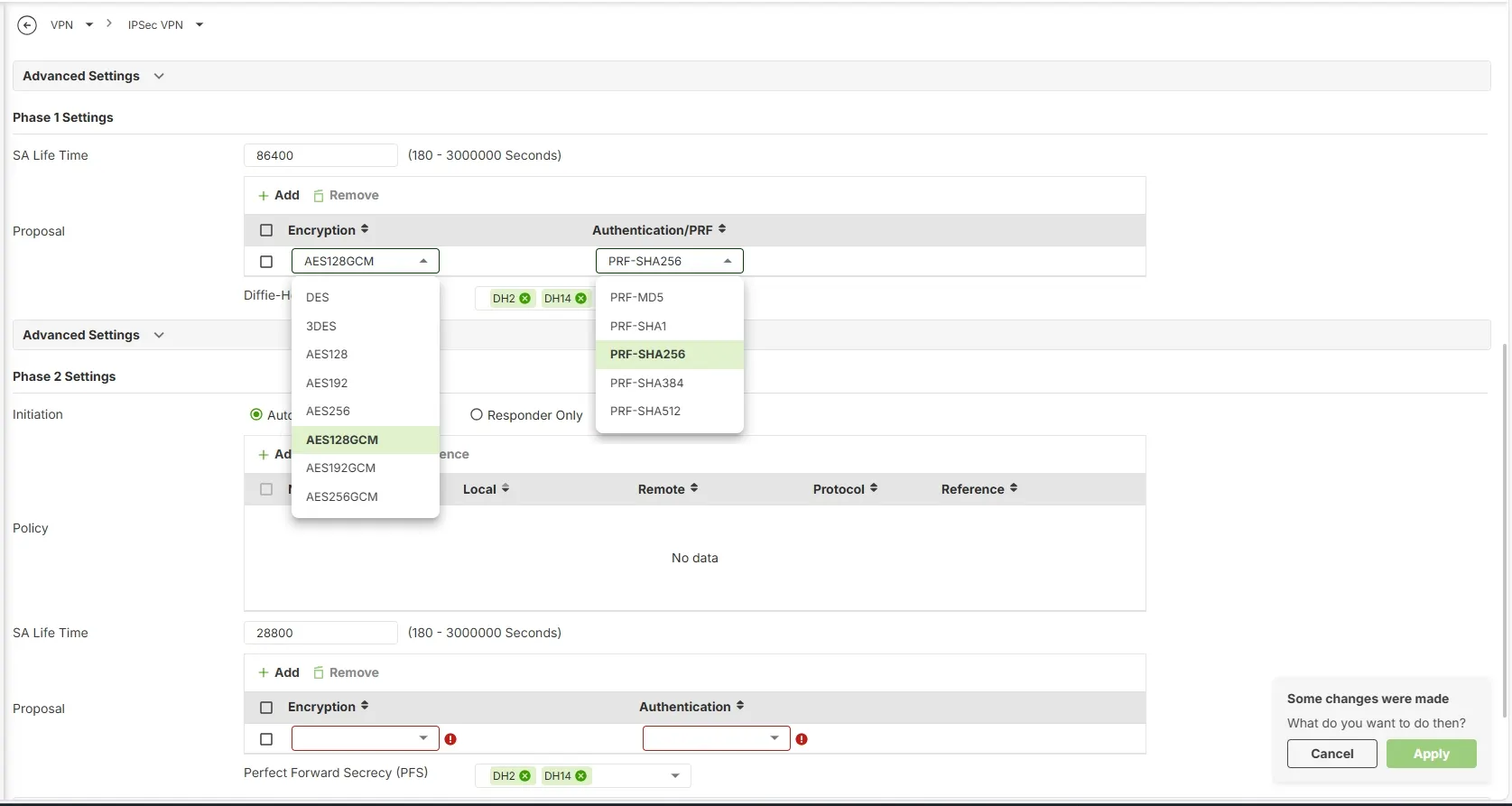
2. In the Phase 1 settings page, from the drop down list choose “AES128GCM” under the Encryption column, and “PRF-SHA256” under Authentication/PRF column.
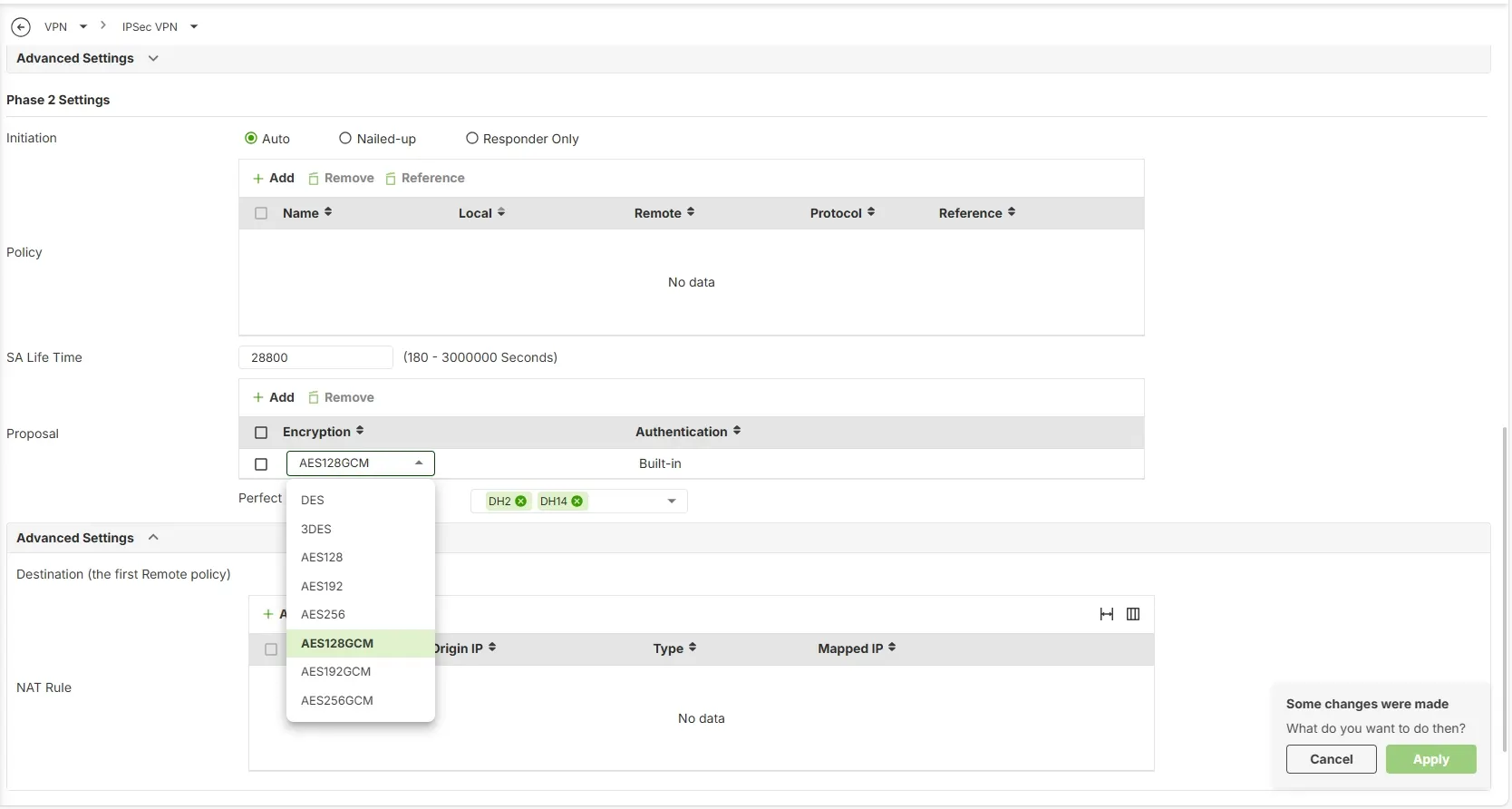
3. In the Phase 2 settings page, from the drop down list choose “AES128GCM” under the Encryption column.
💭Take the Next Step
If you haven’t enabled AES-GCM yet, now is the time. Upgrade to uOS v1.37 and configure AES-GCM in your Phase 2 VPN settings to unlock better performance and stronger security. We’d love to hear how the transition goes and what benefits you see in your VPN deployments.
Comments
-
Hi Zyxel-Team,
do you expect an implementation of AES-GCM in the ATP-Series ? Actually we have an ATP 700 in our HQ and there's a VPN Connection to an Phone Provider we use for some Years. In December the Provider told me we must upgrade our Config to GCM, otherwise we will lost the Connection in March.
0 -
Hi @Tunox
After checking with our product team, the ATP series, also USG FLEX series, won't implement AES_GCM.
If you have this requirement, we recommend migrating to USG FLEX H series.
Zyxel Melen0 -
it is just for site to site vpn ? or also for remote vpn ?
0



 Freshman Member






 Ally Member
Categories
- All Categories
- 442 Beta Program
- 3.1K Nebula
- 243 Nebula Ideas
- 6.8K Security
- 781 USG FLEX H Series
- 387 Security Ideas
- 1.8K Switch
- 87 Switch Ideas
- 1.5K Wireless
- 58 Wireless Ideas
- 7.2K Consumer Product
- 324 Service & License
- 527 News and Release
- 101 Security Advisories
- 31 Education Center
- 10 [Campaign] Zyxel Network Detective
- 5.3K FAQ
- 34 Documents
- 91 About Community
- 121 Security Highlight