XGS1935-28 loosing parts of settings after a reboot




 Freshman Member
The Switch is in standalone mode.
Boot Version ZyNOS F/W Version
V1.00 | 05/30/2024 V4.90(ACJW.0) | 07/02/2024
When I reboot, some Switch settings get lost.
All Green Ethernet settings are set to off. Was on while save config
Also the CPU Protection settings are disabled.
Bug or feature?
EDIT_1: I see there is a newer firmware.
EDIT_2: Same problem, CPU Protection and Green Ethernet disabled after reboot with V4.90(ACJW.2).
Accepted Solution
-
[Update]
We confirm that this bug fix will be included in the next official firmware update. Please stay tuned to our News & Release section when the firmware becomes available for download. Thank you for your understanding and patience!
Zyxel Tina
0





 Zyxel Employee
All Replies
-
Hi @Tzunami,
When your XGS1935 switch loses settings after a reboot, it's typically because the running configuration wasn't saved to the startup configuration.
From my testing after making changes (like Green Ethernet or CPU Protection settings), clicking Apply followed by Save successfully stores the configuration. The settings persist after reboot with no issues.
In standalone mode, after making any changes, you must click the "Save" button on the top navigation panel.

This action writes the current running configuration to the startup configuration, ensuring that your settings persist after a reboot. If you only click Apply to save changes, they will be stored only in run-time memory and lost when the switch is turned off or loses power. Therefore, please ensure you save your config correctly.
Zyxel Tina
0 -
-
Negative! This is exactly what I do.
For information, NCC is completely disabled (disabled directly as first and i have not used one of the qr codes).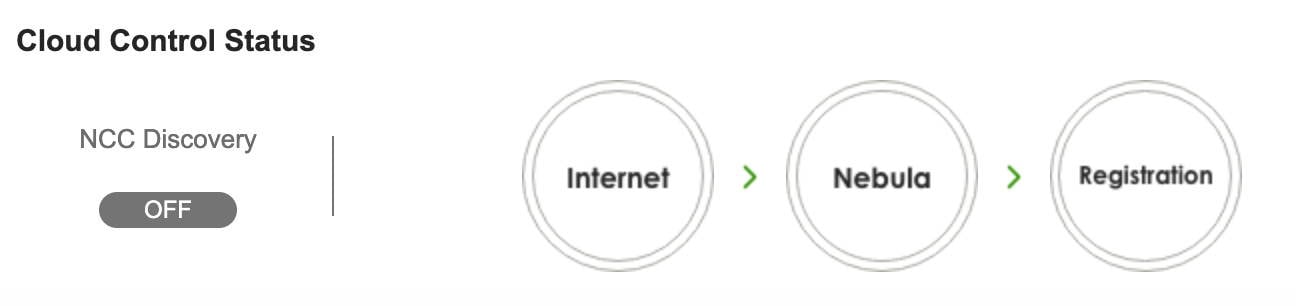
I download the settings with configuration backup and all is inside the file.
But when I restart the switch, I get the wizzard (who was also disabled) and the described funtions are set to OFF.Here a part of the config file backup:
Product Name = XGS1935-28
; Firmware Version = V4.90(ACJW.2) | 08/28/2025
; SysConf Engine Version = 1.2
; Config last updated = 19:16:03 (UTC+01:00) 2026-01-06…
interface port-channel 1
name "USG Flex 200"
qos priority 1
broadcast-limit
broadcast-limit 1000
loopguard
cpu-protection cause ARP rate-limit 192
cpu-protection cause BPDU rate-limit 192
cpu-protection cause IGMP rate-limit 192
green-ethernet eee
green-ethernet auto-power-down
green-ethernet short-reach
exit
interface port-channel 2
qos priority 1
broadcast-limit
broadcast-limit 1000
loopguard
cpu-protection cause ARP rate-limit 192
cpu-protection cause BPDU rate-limit 192
cpu-protection cause IGMP rate-limit 192
green-ethernet eee
green-ethernet auto-power-down
green-ethernet short-reach
exit0 -
Hi @Tzunami,
To help us reproduce the issue and investigate further, could you please collect the TechSupport Info file and provide it to us via private message?
[Switch] How to collect the Tech-support Info on V4.80 firmware version and newer? — Zyxel Community
Zyxel Tina
0 -
Sended the file to you.
0 -
Looks like I found a funny bug inside your software.
The problem inside the thread is only present if you don't complete the wizard one time for the config. After using the wizard, the config is working normally. If you now load a config that was created without the finished wizard, you get this problem again.
Example:
config 1 (wizard compleeted): all settings working well.
reboot into config 2 (wizard never used): Green Ethernet, Errdisable Detect disabled.
Activate Green Ethernet, Errdisable Detect and save to config 2
reboot into config 2 (wizard never used): Green Ethernet, Errdisable Detect disabled.
reboot into config 1 (wizard completed): all settings working well.
reboot into config 2 (wizard never used): Green Ethernet… disabled
Now complete the wizzard in config 2 (you will loose some setting you made before). After this you can activate Green Ethernet, Errdisable Detect and make your settings, and all will be working well.
EDIT: I'm going crazy.
If you now use the wizard again (I have used VLAN) you will loose some settings and get back the problem for all your configs.
0 -
Command back, Forget the last post. I have found the problematic setting!
This disables Green Ethernet, Errdisable Detect!
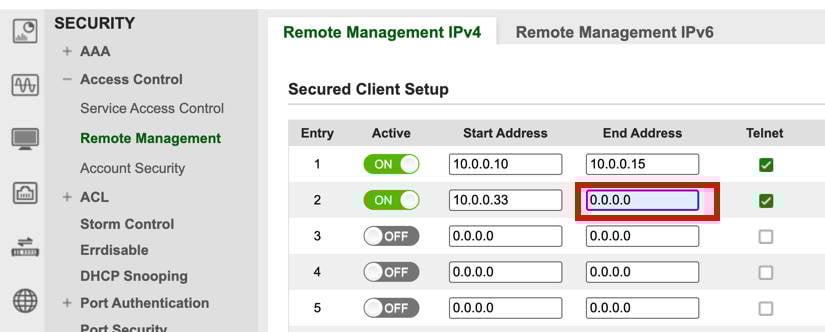
If you have a single address, it must be set up like this, or you've got my problems:
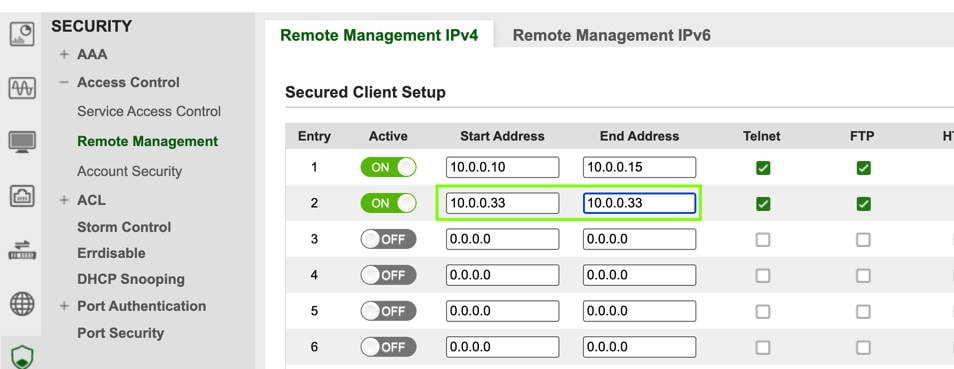 0
0 -
[Update]
We confirm that this bug fix will be included in the next official firmware update. Please stay tuned to our News & Release section when the firmware becomes available for download. Thank you for your understanding and patience!
Zyxel Tina
0
Categories
- All Categories
- 442 Beta Program
- 3.1K Nebula
- 242 Nebula Ideas
- 6.8K Security
- 779 USG FLEX H Series
- 387 Security Ideas
- 1.8K Switch
- 87 Switch Ideas
- 1.5K Wireless
- 58 Wireless Ideas
- 7.2K Consumer Product
- 324 Service & License
- 527 News and Release
- 101 Security Advisories
- 31 Education Center
- 10 [Campaign] Zyxel Network Detective
- 5.3K FAQ
- 34 Documents
- 91 About Community
- 121 Security Highlight


