How do I configure password complexity on the USG Flex H?
Options

Zyxel_Jeff
Posts: 1,396  Zyxel Employee




Zyxel Employee
in Maintenance
Question :
How do I configure password complexity on the USG Flex H?
Answer :
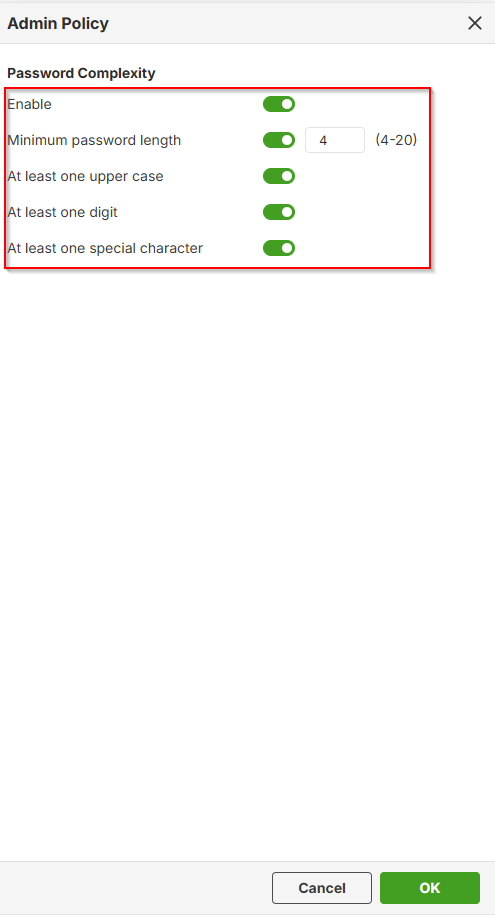
Please navigate to User & Authentication > User/Group > Password Policy Settings > Setting.

Configure the following options:
- Minimum password length
- At least one uppercase letter
- At least one digit
- At least one special character
0
Categories
- All Categories
- 442 Beta Program
- 3K Nebula
- 234 Nebula Ideas
- 6.7K Security
- 693 USG FLEX H Series
- 365 Security Ideas
- 1.8K Switch
- 87 Switch Ideas
- 1.4K Wireless
- 56 Wireless Ideas
- 7.1K Consumer Product
- 312 Service & License
- 508 News and Release
- 97 Security Advisories
- 31 Education Center
- 10 [Campaign] Zyxel Network Detective
- 5.1K FAQ
- 34 Documents
- 89 About Community
- 114 Security Highlight