[USG Flex H] - Cannot use Policy Control between devices in the same Zone





 Master Member
Hello everyone,
I've the Zyxel NWA130BE as AP and I've created a VLAN zone for smart devices.
Between the AP and the USG Flex 200HP I've a third party 2.5Gbit Switch that manage the VLAN (as switching).
This is the VLAN configuration into the switch:

And this is the VLAN definition into the FW:

The "turning" table is:
- The device is connected to the AP, the AP have an SSID with VLAN ID 20.
- The AP "route" the traffic into the switch on port "mg2" (the mg2 port have the VLAN ID 20)
- mg2 "route" it's tagged traffic into mg1 (firewall uplink)
- Into the p2 of the firewall arrive a packet tagged with VLAN ID 20 and "route" it into the DomoDevicesVLAN zone
All works perfectly, but in this situation I'm unable to manage the traffic, because two devices into the same VLAN is auto-managed by the switch. For example the device with IP 192.168.0.2 can communicate directly with 192.168.0.3 because appartain at the same segment and this communication is directly managed by the switch. The packets between those this devices not passing throught the firewall and I cannot manage/block/allow it.
How I can manage the traffic between devices into the same subnet?
Thank you
Accepted Solution
-
Hi @Maverick87
Please hold on. I think this issue is less related with the firewall since the PC and the printer are connected to the same AP and same SSID. In this case, AP will directly forward the traffic to each other because it can find these clients on its client/station list. It don't need to pass to the firewall since they are in the same IP subnet. The communication doesn't need routing, just only forwarding.
However, you mentioned that the Intra-BSS traffic blocking function is not working; this is strange, AP should block the communication. Could you help to take a screenshot for the station info or collect a diagnostic file? So I can check the config and the station info.
0



 Zyxel Employee
All Replies
-
Hi @Maverick87,
You're encountering a common scenario when devices within the same VLAN communicate directly through the switch, bypassing the firewall. To enforce policy control between devices in the same subnet, you can leverage the "Bridge Interface" feature on your USG FLEX 200HP.
Here’s a step-by-step guide to configure this:
Create a Bridge Interface:
- In the USG FLEX H series, navigate to the
Interfacessection. - Select the
Bridgeoption to create a new bridge interface. - Choose the ports connected to your smart devices VLAN (e.g., the port connected to your third-party switch) to be part of this bridge.
- Set the
Interface RoleasInternal. This is crucial for internal segmentation.
- In the USG FLEX H series, navigate to the
Apply Security Policies:
- Once the bridge interface is configured, you can then define firewall policies to control traffic between devices within that bridged segment. This setup allows Layer 2 connectivity within the same subnet while enabling the firewall to manage traffic flow and apply security policies.
By implementing a bridge interface, the USG FLEX 200HP will be able to inspect and control traffic even between devices that are logically in the same subnet but are now physically separated by the firewall's bridged ports.
To further assist with your setup, please provide the following:
- Current Firmware Version of your USG FLEX 200HP.
- A Network Topology Diagram illustrating the physical connections between your NWA130BE, the third-party switch, and the USG FLEX 200HP, including which ports are used.
- Screenshots of your current Firewall Policy Control rules related to the DomoDevicesVLAN zone.
This AI response aims to provide initial troubleshooting steps and identify information needed for further diagnosis. Feel free to share additional details based on the suggestions above — this will help community members offer more targeted assistance.
If you have feedback or idea about this AI assistant, share them in Community Feedback.0 -
Hi @Zyxel_Barry ,
thank you for your support. A question about the bridge interface.
In this way, the VLAN is not anymore managed but the firewall right? I see that for create a bridge interface, is necessary to disable the IP for the members of the bridge.
Otherwise:
- I need to create a VLAN Interface into the firewall with zone "None" and unassign IPs
- Create a bridge with this VLAN assigning the zone "DomoDevicesVLAN" and IP (with DHCP Server enabled)
Is this the correct procedure?
I mean, it's the Bridge that define the IPs and the Zone, right? As bridge, "mask" the real VLAN, so into the VLAN definition I not specify the IP class and zone, right? Or also for the VLAN I need to specify the zone?Thank you
0 -
So, OK I've tried to configure a bridge without success.
- I've created a VLAN Interface with ID 10 without IPs
- I've created a Bridge interface for the VLAN using the zone "WLAN" and with DHCP.
- I've created a test Policy Control to deny all traffic from WLAN zone to WLAN zone


Now, I have two devices into this VLAN: a PC and a Printer
From the PC I can ping the printer and also browse the internal server, 0 hits and 0 logs for this Policy Control rule.
The SSID AP is this (NWA130BE):
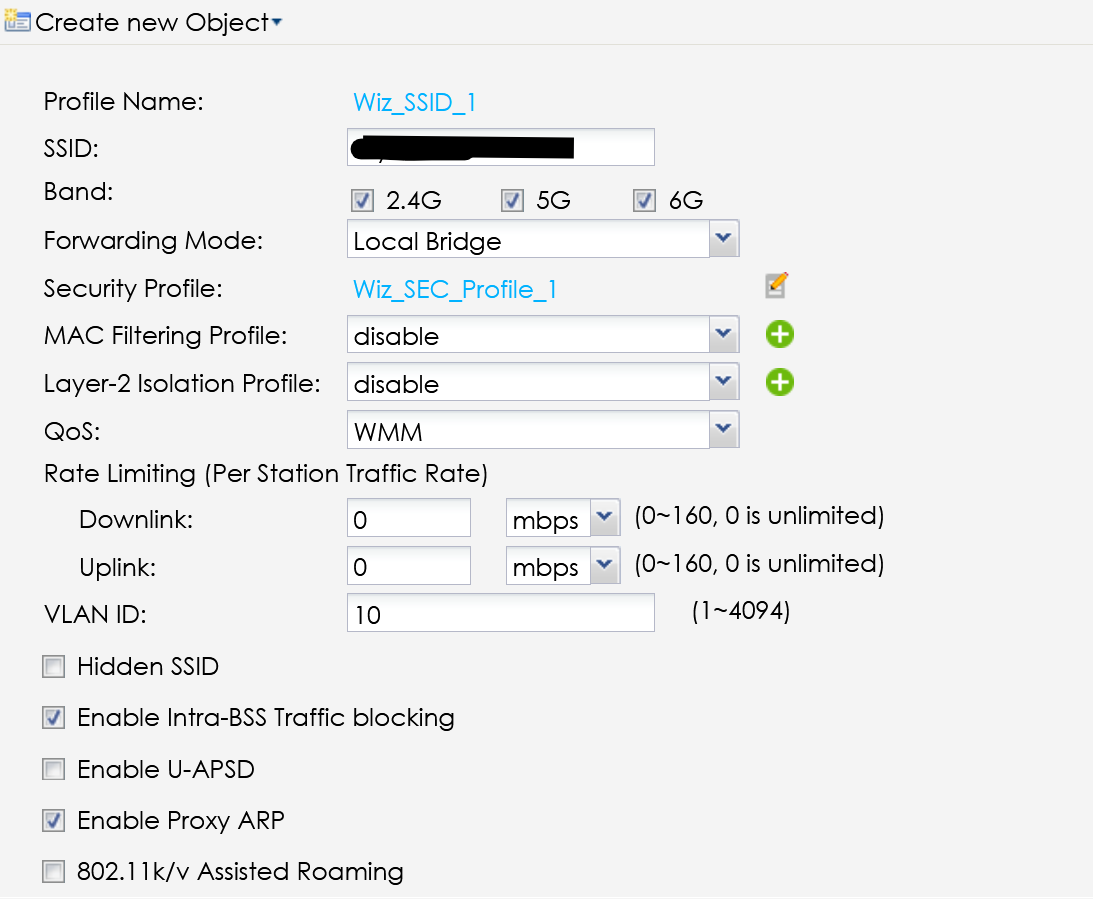
The VLAN into the 2.5Gbit switch is configured in this way:

The current firewall firmware is the lastest as the AP as the switch, and the network topology is:
Firewall port p2 —> 2.5Gbit Switch MG1
AP port uplink —> 2.5Gbit Switch MG2So the MG2 port (AP) can tag VLAN 10 that redirect to the MG1 (firewall uplink) tagged
I missunderstaing somethings?
0 -
Is the switch layer 3? and devices have its gateway point to it then switch point to USG as gateway?
also I think you would need proxy ARP unchecked
0 -
Hi @PeterUK ,
the switch is an L2/L3 level (I don't know if I can post the model).
Can ack as switching (bridge) and as routing (at the moment the VLAN is implemented into the switching part — VLAN Bridged).The IP configuration is taken from the firewall, so the switch ack as "paper pusher", take the request from the AP VLAN and redirect it to the firewall.
The bridge interface is configured in this way: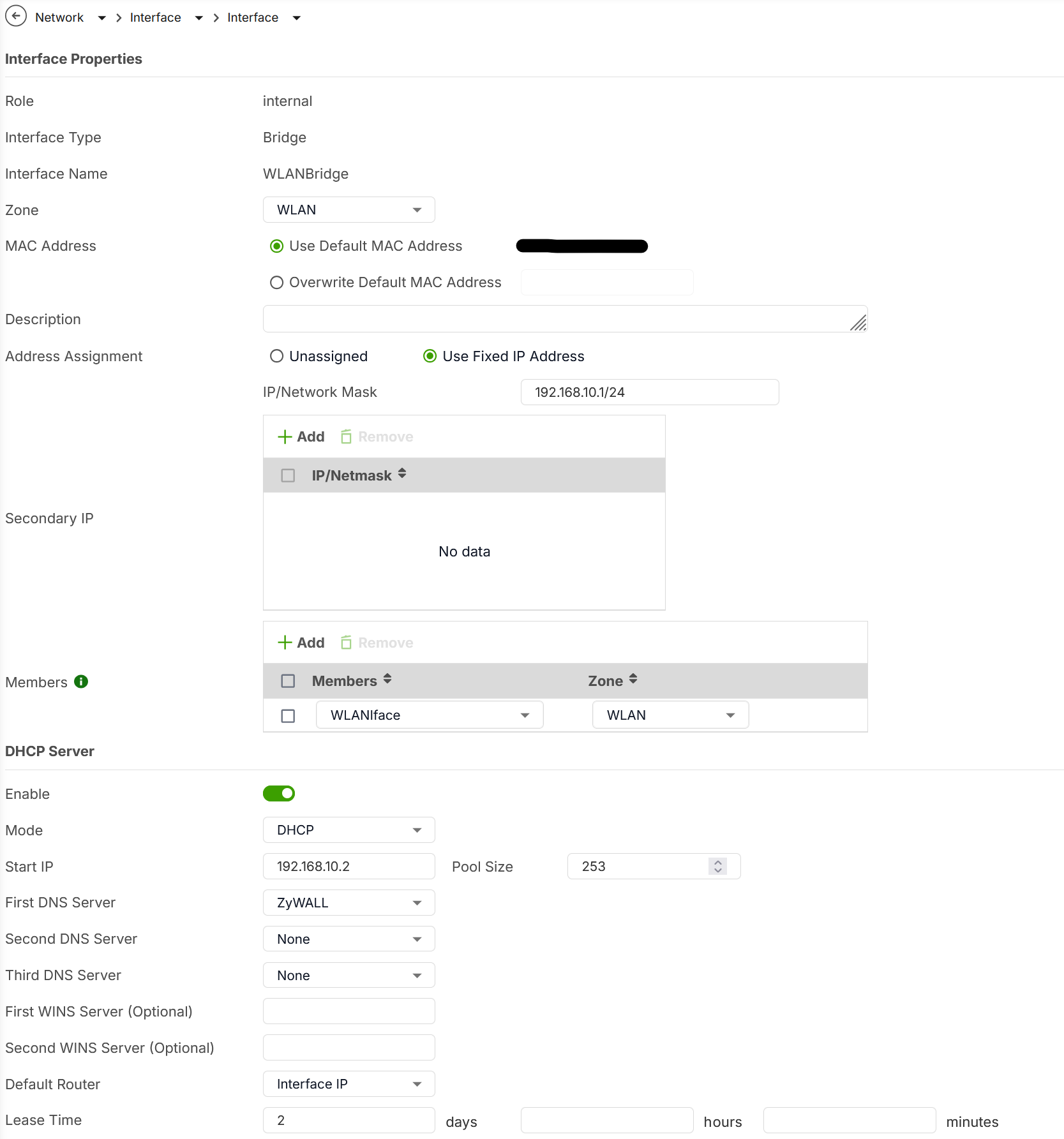
The switch part is this:
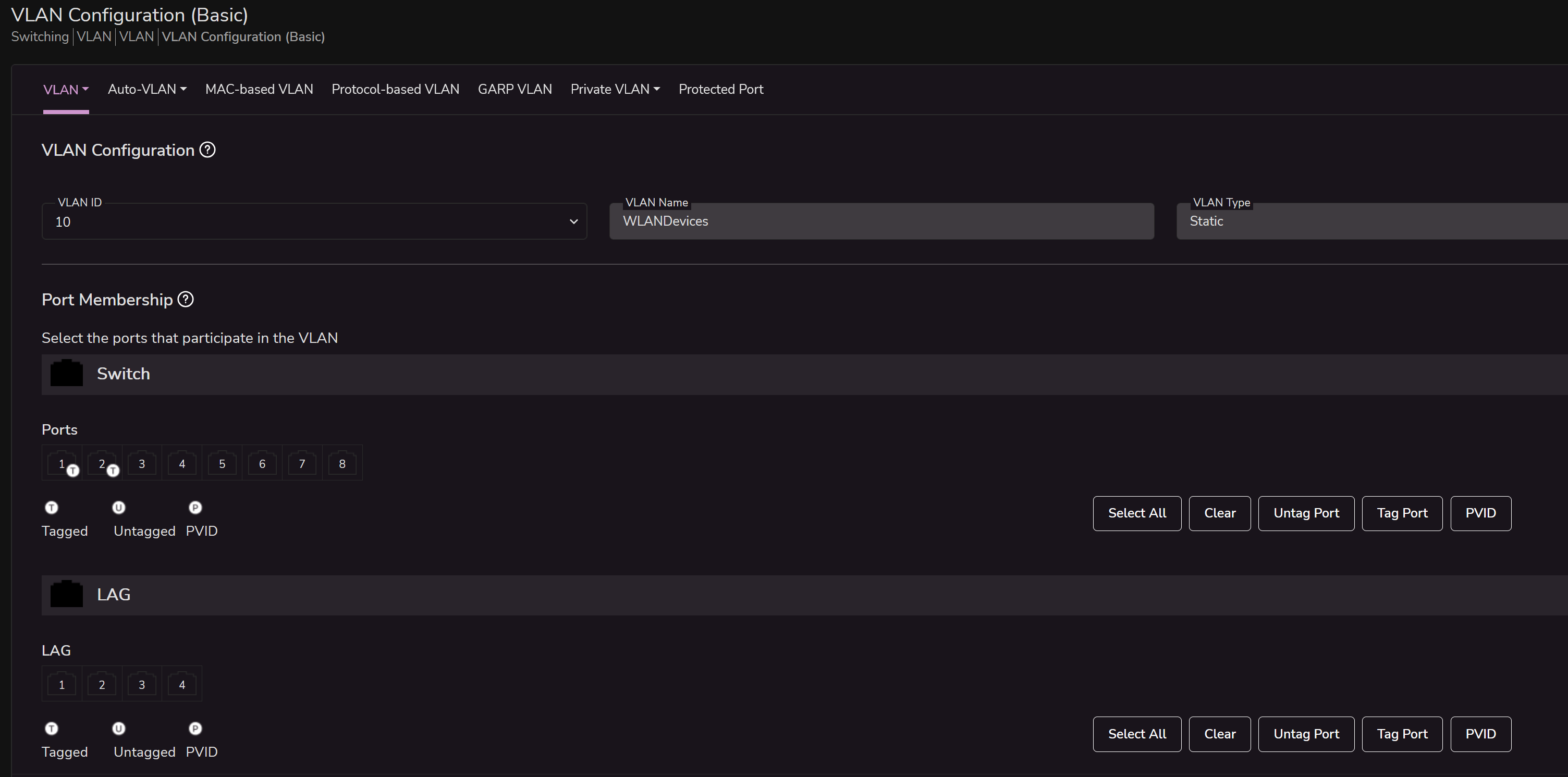
As you can see, in the "switching" part, I can define a VLAN Tag and I can only define what ports are parts of this VLAN. In this example, the VLAN 10 is tagged only for the port 1 and 2 as Tagged.
I've tried to disable the Proxy ARP into the AP SSID but nothing change.
Thank you
0 -
For testing have two PC on the same SSID VLAN 20 (it is unclear what VLAN you mean you say 20 then show 10?) have one PC setup with Wireshark and filter ARP then by CMD do ARP -d then do ping to that other PC.
Wireshark will show who had IP tell this IP then a reply other IP is at this MAC you then want to see at layer 2 what MAC it was sent by as source.
0 -
It's only an example the VLAN ID is 10 for example (not would "touch" the Smart devices VLAN without testing), so I create an bridge for another VLAN.
Anyway, this not resolve my problem, because without wireshark I can test it with a ping or browse my printer web server.
With the rule:
- From: VLAN
- To: VLAN
- Deny ALL
the traffic must be blocked for pings but also for communication with the internal web server.
0 -
ARP is how devices connect so we need to know how like 192.168.0.2 gets a reply for 192.168.0.3 such that if 192.168.0.3 is the source MAC that 192.168.0.2 receives then sends traffic too or by some other MAC
0 -
Or may be I misunderstood what your trying to do?
Did you want like 192.168.0.2 to connect to 192.168.0.3 but have the USG control the traffic?
0 -
OK, if I launch the Wireshark tool and ask who is the 192.168.10.250 (the printer), the reply is tell 192.168.10.4 (the IP address of the PC) and then reply the printer with the MAC Address.
After that I have a who has 192.168.10.4? Tell 192.168.10.1 (the Firewall bridge interface) and the reply is the MAC Address of the PC.
0







 Guru Member
Categories
- All Categories
- 442 Beta Program
- 3.1K Nebula
- 241 Nebula Ideas
- 6.8K Security
- 759 USG FLEX H Series
- 380 Security Ideas
- 1.8K Switch
- 87 Switch Ideas
- 1.5K Wireless
- 58 Wireless Ideas
- 7.2K Consumer Product
- 321 Service & License
- 520 News and Release
- 100 Security Advisories
- 31 Education Center
- 10 [Campaign] Zyxel Network Detective
- 5.3K FAQ
- 34 Documents
- 90 About Community
- 119 Security Highlight


