Synchronization of License Expiration Dates in NCC

 Zyxel Employee



Question: Why can’t I synchronize all license expiration dates in my organization using the 'Target Expiration Date' feature?
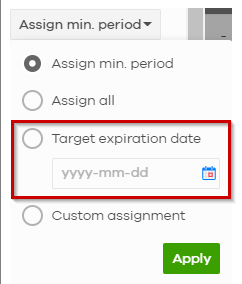
Answer: The 'Target Expiration Date' feature in Nebula Control Center (NCC) is designed to help identify licenses within your organization that expire after your specified date. However, it does not adjust or unify licenses to match the exact target expiration date you input. Instead, it ensures license assignment based on available licenses that already meet the expiration criteria.
If you are aiming to synchronize all license expiration dates to a specific timeline for your entire organization, this functionality is currently not supported. Licenses operate on their own expiration timelines based on their activation dates and durations.
We appreciate your understanding and encourage you to reach out to technical support if further assistance or explanation is needed.
Tip: To manage this effectively, schedule renewal reminders and plan license allocation accordingly to streamline expiration dates.
Categories
- All Categories
- 442 Beta Program
- 3K Nebula
- 232 Nebula Ideas
- 132 Nebula Status and Incidents
- 6.7K Security
- 691 USG FLEX H Series
- 365 Security Ideas
- 1.8K Switch
- 87 Switch Ideas
- 1.4K Wireless
- 56 Wireless Ideas
- 7.1K Consumer Product
- 312 Service & License
- 505 News and Release
- 97 Security Advisories
- 31 Education Center
- 10 [Campaign] Zyxel Network Detective
- 5.1K FAQ
- 34 Documents
- 89 About Community
- 112 Security Highlight