SecuExtender VPN Client

 Freshman Member

All Replies
-
Hi @Aballo,
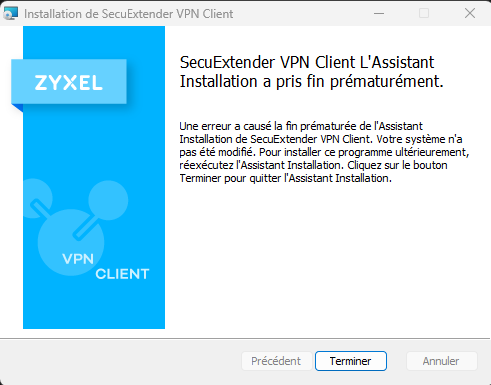
I understand you're encountering an error during the installation of SecuExtender VPN Client version 7.7.50.008, where the installation ends prematurely. This typically indicates an underlying system or software conflict.
Here are some steps you can take to troubleshoot this issue:
- Run as Administrator: Ensure you are running the SecuExtender installer with administrator privileges. Right-click the installer file and select "Run as administrator." This can resolve permission-related issues that might cause premature installation termination.
- Temporarily Disable Firewall/Antivirus: Your firewall or antivirus software might be interfering with the installation process. Temporarily disable them and try the installation again. Remember to re-enable them after the installation is complete.
- Check for Conflicting Software: Other VPN clients or network-related software might conflict with SecuExtender. Try uninstalling any other VPN software before attempting to install SecuExtender.
- Check System Compatibility: While version 7.7.50.008 is the latest for Windows, ensure your operating system meets the general requirements for SecuExtender. SecuExtender typically supports Intel-based Windows 10/11 (32- and 64-bit) operating systems.
- Re-download the Installer: The downloaded file might be corrupted. Try downloading the SecuExtender VPN Client 7.7.50.008 installer again from the official Zyxel website and then attempt the installation.
To help me further investigate the issue if the problem persists, please provide the following information:
- Operating System Version: Please specify the exact version and build of your Windows operating system (e.g., Windows 10 Home 22H2, Windows 11 Pro 23H2).
- Error Message Screenshots: You've provided one, but if any other error messages appear during or after these troubleshooting steps, please include screenshots.
- System Event Logs: Check your Windows Event Viewer for any error logs related to the SecuExtender installation. These can provide more specific details about why the installation failed.
This AI response aims to provide initial troubleshooting steps and identify information needed for further diagnosis. Feel free to share additional details based on the suggestions above — this will help community members offer more targeted assistance.
If you have feedback or idea about this AI assistant, share them in Community Feedback.0 -
Bonjour @Aballo
Veuillez suivre les étapes mentionnées par Barry : exécuter en tant qu’administrateur, désactiver temporairement le pare-feu/l’antivirus ou télécharger à nouveau le programme d’installation. Avez-vous rencontré le même problème lors de l’installation d’autres logiciels ? Si oui, il se peut que le programme d’installation de Windows présente des problèmes.
Hi
Please check the steps that Barry mentioned: Run as Administrator, Temporarily Disable Firewall/Antivirus, or Re-download the Installer. Also, did you encounter the same issue when installing other software? If so, you might need to check if the Windows installer have any issues.
Zyxel Melen0

 Zyxel Community Virtual Assistant






Categories
- All Categories
- 442 Beta Program
- 3K Nebula
- 232 Nebula Ideas
- 132 Nebula Status and Incidents
- 6.7K Security
- 691 USG FLEX H Series
- 365 Security Ideas
- 1.8K Switch
- 87 Switch Ideas
- 1.4K Wireless
- 56 Wireless Ideas
- 7.1K Consumer Product
- 312 Service & License
- 505 News and Release
- 97 Security Advisories
- 31 Education Center
- 10 [Campaign] Zyxel Network Detective
- 5.1K FAQ
- 34 Documents
- 89 About Community
- 112 Security Highlight


