[USG FLEX H] How to download configuration file via Local WEB GUI?
Options

Zyxel_Tina
Posts: 1,045




 Zyxel Employee
Zyxel Employee
At times, you may be asked to provide the configuration file for further troubleshooting. This article will guide you through the process:
- Access the local Web GUI.
- Navigate to Maintenance > Firmware/File Manager > Configuration File.
- Select
startup-config.confand then click theDownloadbutton.
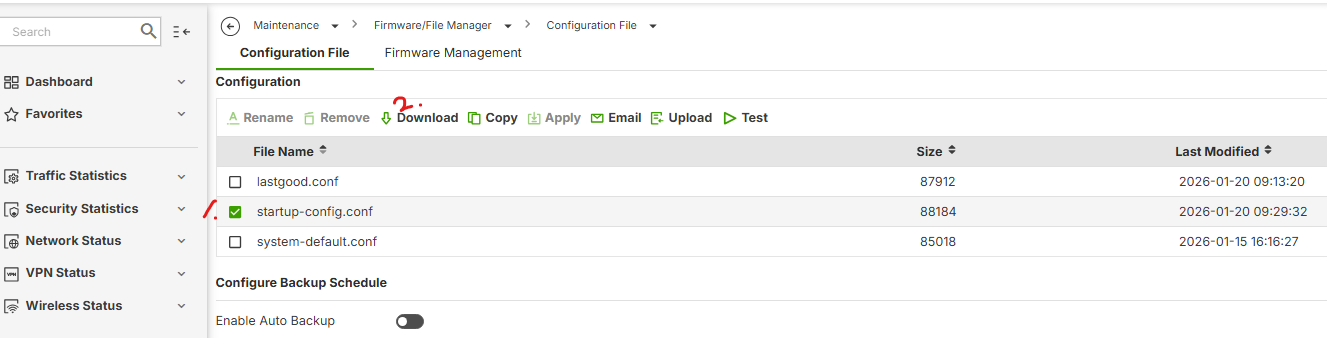
For more details on the different firewall configuration files and their meanings, please refer to this article.
Zyxel Tina
0
Categories
- All Categories
- 442 Beta Program
- 3.1K Nebula
- 242 Nebula Ideas
- 6.8K Security
- 779 USG FLEX H Series
- 387 Security Ideas
- 1.8K Switch
- 87 Switch Ideas
- 1.5K Wireless
- 58 Wireless Ideas
- 7.2K Consumer Product
- 324 Service & License
- 527 News and Release
- 101 Security Advisories
- 31 Education Center
- 10 [Campaign] Zyxel Network Detective
- 5.3K FAQ
- 34 Documents
- 91 About Community
- 121 Security Highlight