[USG Flex 200HP] - After firmware update, it's reboot randomly

 Ally Member

Hello everyone,
I've updated the USG Flex 200HP firewall to the latest firmware (1.37 ABXE.0), and for some reason it's reboot randomly.
One or two times per day after the firmware update, the firewall reboot inexplicably. Yesterday night I watching a streaming movie on TV and it's rebooted alone, with only this TV connected in LAN.
Anyone that have this experience?
All Replies
-
Hi @Maverick87,
I understand that your USG Flex 200HP is experiencing random reboots after updating to firmware version 1.37 ABXE.0. This can be disruptive, especially when using the network.
To help diagnose and resolve this issue, please follow these steps:
Enable Kernel-level Logging:
- Prepare a PC and connect it to your USG Flex 200HP firewall using a console cable.
- Access the Command Line Interface (CLI).
- Enter the command
cmd debug kernel console-level 8to activate console-level 8 logging. Keep this console log running to capture data when the next reboot occurs.
Collect Diagnostic Log:
- After the device reboots, navigate to
Maintenance > Diagnostics > Diagnosticsin the Web GUI. - Click "Collect Now" to gather the diagnostic log (diag-info).
- If the device becomes unresponsive before you can collect the diag-info, try connecting a console cable and checking if the console is still working. You can also send a break command (
send break +xin TeraTerm) before manually restarting the device and collect the diag-info afterward.
- After the device reboots, navigate to
Provide Information for Zyxel Support:
- Please provide the collected console log and the diagnostic log files to the Zyxel Support Team for further investigation.
- To expedite the troubleshooting process, please enable Zyxel Support Access via
Help > Support Requestin your Nebula console. - Provide your Organization and Site name in Nebula. This will allow the Zyxel support team to directly view your cloud environment configuration.
These steps will provide crucial information to understand why your firewall is rebooting unexpectedly.
This AI response aims to provide initial troubleshooting steps and identify information needed for further diagnosis. Feel free to share additional details based on the suggestions above — this will help community members offer more targeted assistance.
If you have feedback or idea about this AI assistant, share them in Community Feedback.0 -
Hi @Zyxel_Barry,
can you tell me how to manage the firewall with the console cable?It's sufficient to attach an ethernet cable to the console? What is the IP release in this case? How I can access to the management console? Where I can find the username/password for access to the console?
Can I use the Web Console launching it via web gui, instead of the Management Console via Console port?
Thank you and sorry :)
Valerio
0 -
Hi @Maverick87
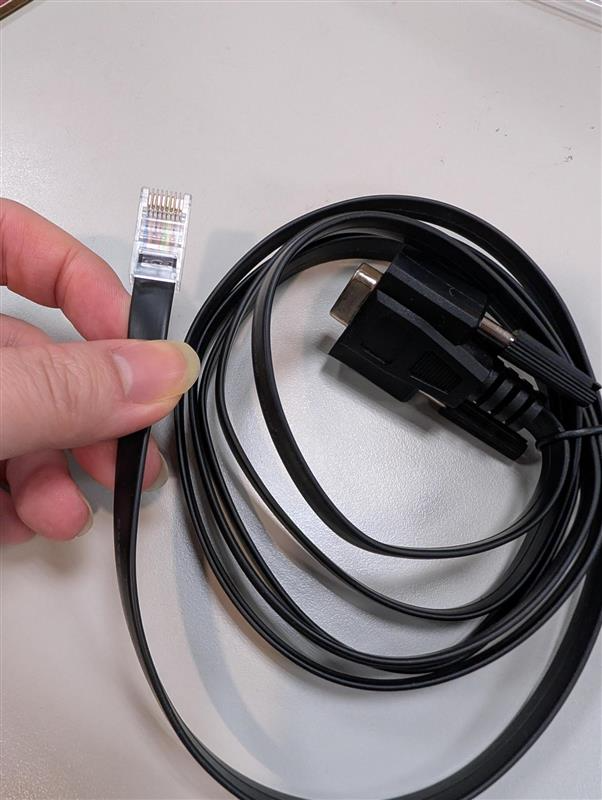
No, the console cable is RJ45 - DB9, which should include in the device box.
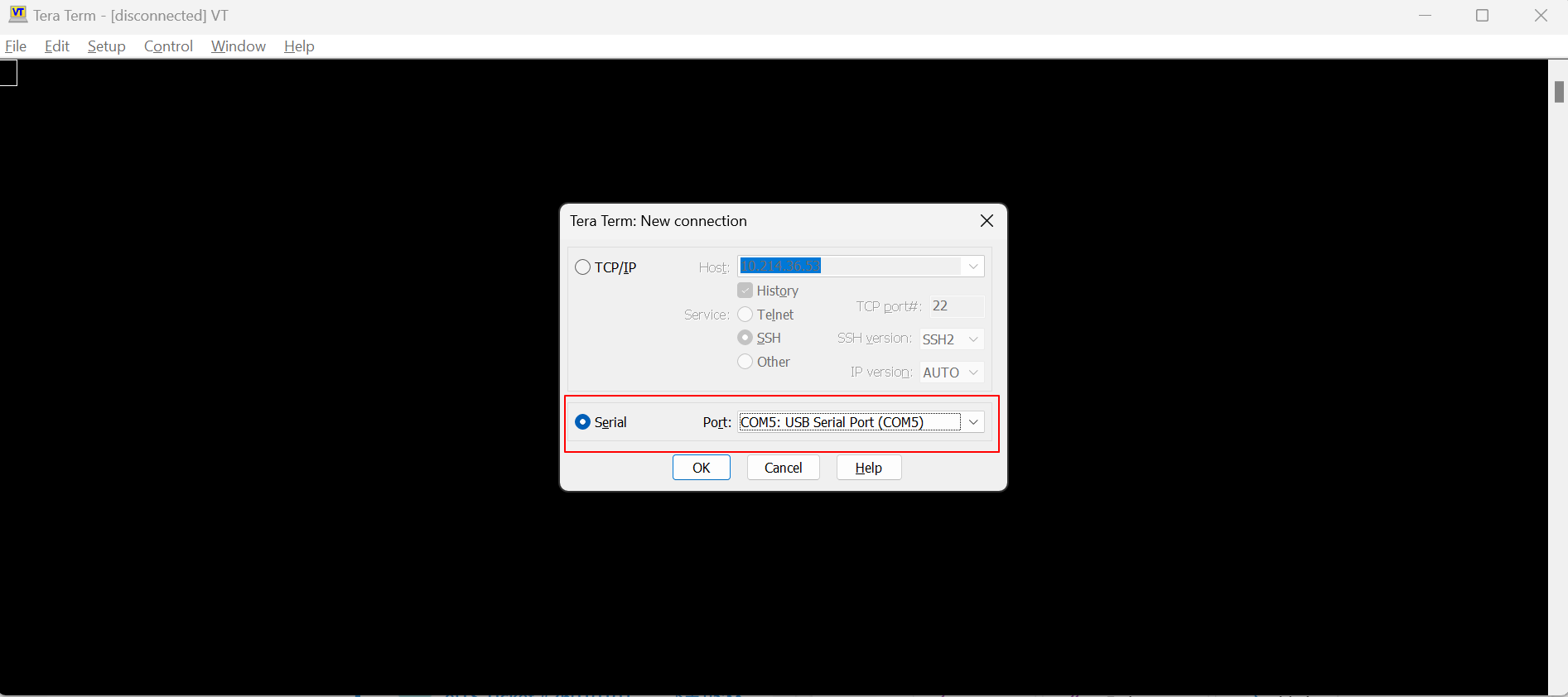
To access the device via console, you will need to use the terminal software, like Tera Term, to access.
Connect with serial port USB Serial port.
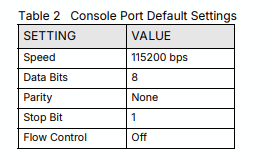
The console port setting should be:
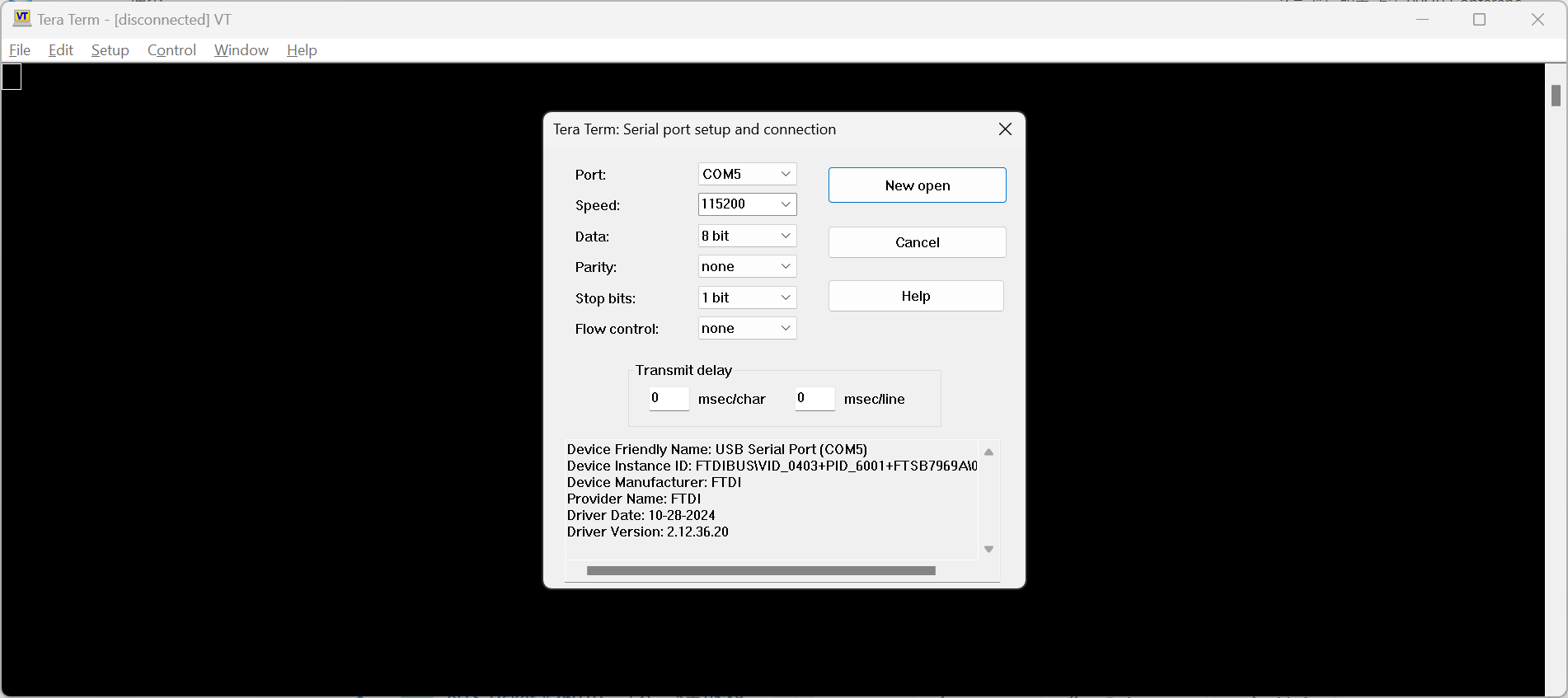
To change the console port setting for Tera Term, the path is Setup > Serial port.
The login account and password are the same as you login to device via web GUI.
In addition, web console can't replace physical console in this case since you will disconnect the IP layer connection, but the physical layer connection will be kept.
Zyxel Melen0 -
Hi @Zyxel_Melen,
I don't have any RS-232/DB9 connector on the computer, I cannot use the console port in this way.
It's a problem?
0 -
Hi @Zyxel_Melen ,
It's so strange… yesterday and today the firewall seems that have rebooted at the same time: more or less 3:40PM and 11:33PM CET.
It's possible that you've introduced some procedure for reboot at this time? It's seems as planned reboot (every 8hours… 7:30AM is switched on, 3:40PM reboot, 11:33PM reboot, more or less every 8 hours)
Thank you
0 -
Hi @Maverick87
Thanks for the information and your diagnostic file. We are investigating on your issue, and I will keep you posted once I get further information.
Zyxel Melen0

 Zyxel Community Virtual Assistant





Categories
- All Categories
- 442 Beta Program
- 2.9K Nebula
- 220 Nebula Ideas
- 128 Nebula Status and Incidents
- 6.5K Security
- 606 USG FLEX H Series
- 344 Security Ideas
- 1.7K Switch
- 84 Switch Ideas
- 1.4K Wireless
- 52 Wireless Ideas
- 7K Consumer Product
- 298 Service & License
- 482 News and Release
- 92 Security Advisories
- 31 Education Center
- 10 [Campaign] Zyxel Network Detective
- 4.8K FAQ
- 34 Documents
- 87 About Community
- 105 Security Highlight


