Error update uOS V1.37(ABZI.0)

 Freshman Member


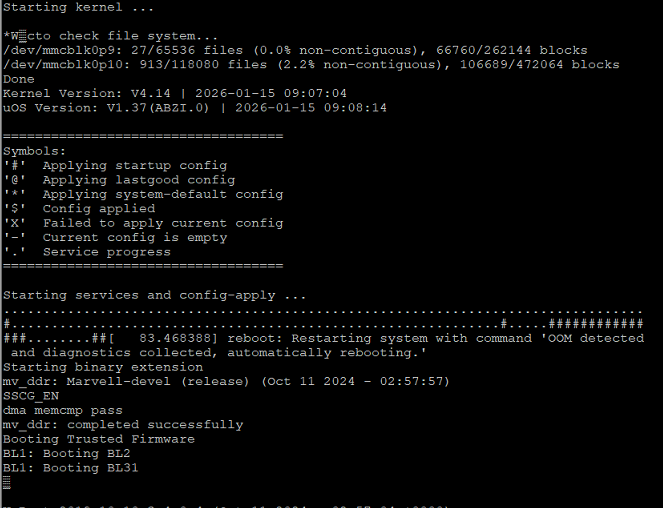
Good day, I'd like to report a problem I'm having trying to update my 700h. When I update the firmware, the entire update process goes through correctly, but the 700h doesn't start. When I plug in the console, the following error appears (shown in the image), and it restarts and gets stuck in an infinite loop. I should mention that I'm updating from version V1.35 (ABZI.2) because V1.36 had VPN problems, so I didn't update it, and I wanted to try this new version, which I ultimately couldn't update. It forced me to revert to the previous version. I hope you can help me. Thank you.
All Replies
-
Hi @YanShadowGT,
I understand you're encountering an infinite reboot loop on your USG FLEX 700H after attempting to update the firmware to uOS V1.37 (ABZI.0) from V1.35 (ABZI.2). The console output indicates an "OOM detected" error and "Failed to apply current config."
This issue often occurs when the device fails to apply the new configuration after a firmware update, leading to a rollback or an unstable state. Firmware upgrades for the USG FLEX H series can be particular about the upgrade path and available memory.
Here's a step-by-step approach to resolve this:
Recover using Debug Mode and Rollback: Your device, being a USG FLEX H series, supports a recovery mechanism. You can enter debug mode and instruct the device to boot from a specific partition, effectively rolling back to your previous working firmware.
- Connect a console cable to your USG FLEX 700H.
- Restart the device.
- When you see "Press any key to enter debug mode within 3 seconds," press a key to enter debug mode.
- Use the command
atcd 1(oratcd 2depending on which partition holds your V1.35 firmware) to set the command line to use partition 1. - Then, execute
atgoto restart the device. - Once the device boots up, access the GUI via
https://192.168.168.1(default IP) and verify that it has reverted to V1.35.
Ensure Sufficient Memory Before Re-attempting Update: Insufficient memory can cause firmware upgrade failures.
- Reboot the device before attempting the firmware upgrade to release memory.
- Manual firmware upgrades require 700 MB of free memory. The web GUI should prompt you to reboot if memory is insufficient.
Follow the Recommended Upgrade Path: Direct upgrades to the latest version might fail if a specific intermediate version is required. For initial installations, it's advised to upgrade to uOS 1.08 Patch 1 first, then to uOS 1.10. While you are on V1.35, there might be specific intermediate steps or patches needed before jumping to V1.37.
Download Firmware from Official Sources: Always obtain firmware from Zyxel's official support channels. Note that some firmware versions might not be directly available on myZyxel.com if a specific upgrade path is mandatory.
To further assist you, please provide the following information:
- A screenshot of the "System Status" or "Dashboard" page once you have successfully reverted to firmware V1.35.
- Confirm the exact version of the V1.35 firmware you reverted to (e.g., V1.35(ABZI.2)).
- The specific firmware file name you attempted to use for the V1.37 update.
This AI response aims to provide initial troubleshooting steps and identify information needed for further diagnosis. Feel free to share additional details based on the suggestions above — this will help community members offer more targeted assistance.
If you have feedback or idea about this AI assistant, share them in Community Feedback.0 -
Hello,
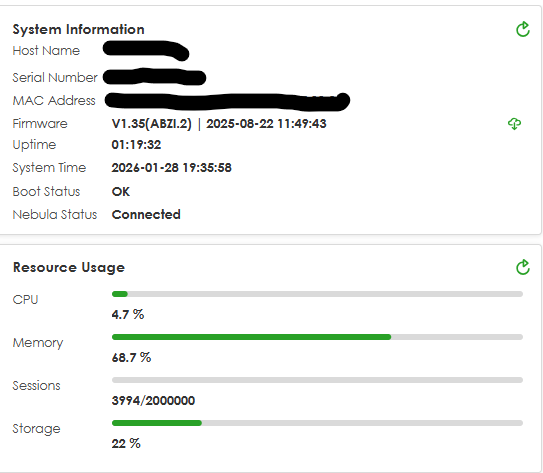
I understand everything the AI is telling me. I'm already on the previous version, which has no problems. The issue is that I can't update to the new version. I don't have any memory problems or anything like what the AI is indicating, and I've included screenshots to show this. I hope you can help me.
 0
0 -
Download update V1.36 first
0 -
Hi @YanShadowGT
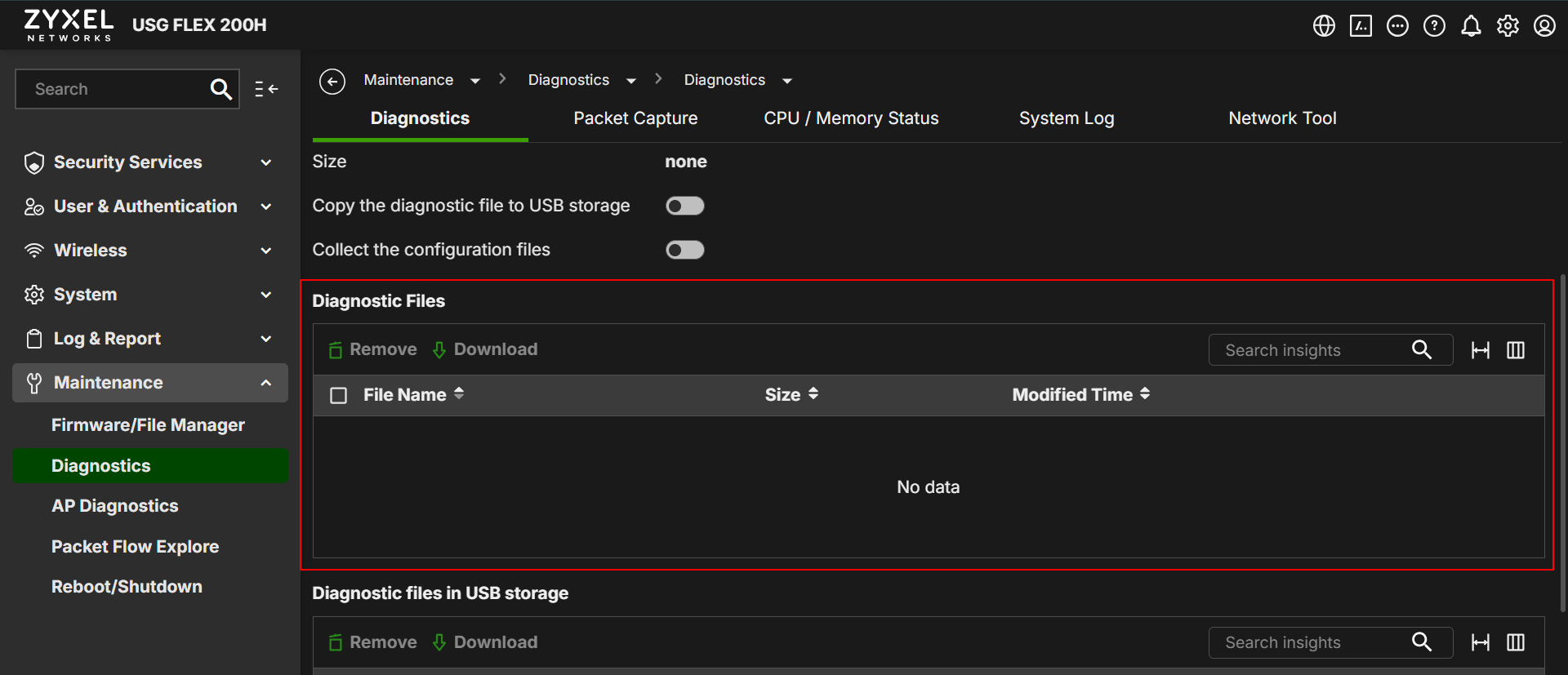
Could you help to check if Menu > Maintenance > diagnostics > Diagnostics tab > Diagnostic files has any file? If so, please help to collect and share with me.
 Zyxel Melen0
 -
Hi,
Thanks @PeterUK for your input, but it didn't work for me. I updated to version 1.36, and everything seems fine; it runs, but the VPN isn't working due to routing policy issues that I haven't wanted to change. However, when I try to update from 1.36 to 1.37, I get the same error. I don't understand why the update isn't working.
Regarding @Zyxel_Melen question, it doesn't generate any diagnostic file; it's empty. I don't know if I can send you the configuration file so you can help me figure out what's wrong, because only version 1.37 is giving me problems. The previous versions work perfectly, or at least they don't give any errors when I apply the configuration.
Thanks for your support and response, @Zyxel_Melen .
0 -
When on V1.36 download your config then upload it under a backup name check box that file and click test to see if it passes.
What you might have to do is when on V1.37 reset to defaults then upload a backup config from V1.36 and apply for V1.37.
0 -
-
Hi @YanShadowGT
Since V1.37 patch 1 is released, may I know if you encounter the same issue when upgrading?
USG FLEX H Series - V1.37 Patch 1 Firmware Release — Zyxel Community
Zyxel Melen0

 Zyxel Community Virtual Assistant

 Guru Member






Categories
- All Categories
- 442 Beta Program
- 3.1K Nebula
- 234 Nebula Ideas
- 6.7K Security
- 706 USG FLEX H Series
- 369 Security Ideas
- 1.8K Switch
- 87 Switch Ideas
- 1.4K Wireless
- 56 Wireless Ideas
- 7.1K Consumer Product
- 313 Service & License
- 512 News and Release
- 99 Security Advisories
- 31 Education Center
- 10 [Campaign] Zyxel Network Detective
- 5.2K FAQ
- 34 Documents
- 89 About Community
- 116 Security Highlight


