How do I change the WAN trunk algorithm settings on the USG Flex H model using the CLI?

 Zyxel Employee



Question :
How do I change the WAN trunk algorithm settings on the USG Flex H model using the CLI?
Answer :
For example, the user would like to change the WAN trunk algorithm from Spillover to Weighted Round Robin in the WAN1-Active profile on the USG Flex 200HP. Please refer to the below CLI :
usgflex200hp> show config vrf main interface-group WAN1-Active
interface-group WAN1-Active
algorithm spill-over
loadbalancing-index total
interface ge1
passive false
limit 2097152
..
interface wan3
passive true
limit 2097152
..
interface ge2
passive false
limit 2097152
..
..
usgflex200hp> edit running
usgflex200hp running config# vrf main interface-group WAN1-Active algorithm wrr
usgflex200hp running config# commit
usgflex200hp running config# copy running startup
Overwrite startup configuration? [y/N] y
usgflex200hp running config# exit
usgflex200hp> show config vrf main interface-group WAN1-Active
interface-group WAN1-Active
algorithm wrr
interface ge1
passive false
weight 1
..
interface wan3
passive true
weight 1
..
interface ge2
passive false
weight 1
..
..
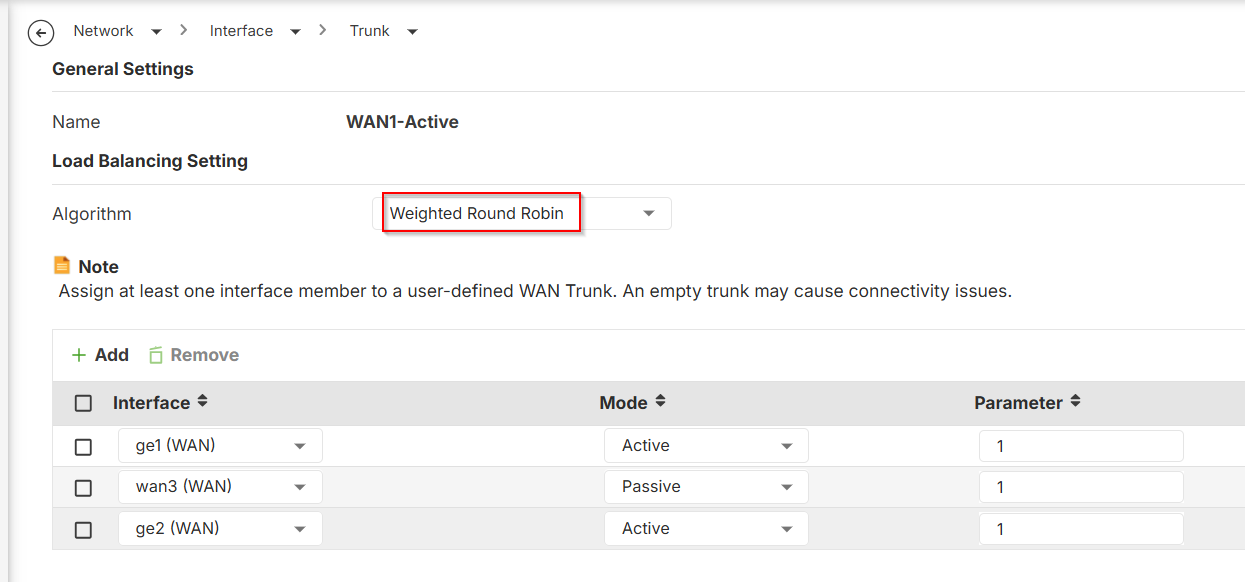
The modified trunk settings in the Web GUI are shown below.
Categories
- All Categories
- 442 Beta Program
- 3.1K Nebula
- 234 Nebula Ideas
- 6.7K Security
- 706 USG FLEX H Series
- 369 Security Ideas
- 1.8K Switch
- 87 Switch Ideas
- 1.4K Wireless
- 56 Wireless Ideas
- 7.1K Consumer Product
- 313 Service & License
- 512 News and Release
- 99 Security Advisories
- 31 Education Center
- 10 [Campaign] Zyxel Network Detective
- 5.2K FAQ
- 34 Documents
- 89 About Community
- 116 Security Highlight