IPSec VPN stuck on DPD

 Freshman Member


Hi,
I'm having trouble making an IPSec VPN tunnel to be established between a USG FLEX 500H v1.37 ABZH.1 located in a branch office and another firewall (not Zyxel) located at Head Quarter. Our firewall is behind the ISP's router, set in DMZ.
It seems the tunnel is correctly established as the monitor page says it's connected, but no one can ping/reach any device from either side. What I can see from log is that after these two steps:
generating IKE_AUTH response 1 [ IDr AUTH SA TSi TSr ] |
|---|
CHILD_SA sec_policy1_NAMEOFVPN {354} established with SPIs cd2f192b_i cb8d1f2a_o and TS locallan/24 === remotelan/23 |
only these messages appear and the VPN is not functioning:
Message | Src. IP | Src. Port |
|---|---|---|
parsed INFORMATIONAL response 1 [ ] | HQ WAN IP | 4500 |
generating INFORMATIONAL request 1 [ ] | 192.168.0.253 | 4500 |
VIVATIS_DE sending DPD request | 192.168.0.253 | 4500 |
What does it mean? What settings I have to check or there's something that they have to check remotely?
Thank you
All Replies
-
Hi @kaika313
If the VPN connection is established, and you can see in the VPN status page(local GUI path is Menu > VPN Status > Site-to-site VPN, Nebula path is Menu > Monitor > Firewall > VPN connections), please help to check:
- Is your VPN local and remote subnet set specific IP(like 192.168.1.1(/32))? If so, please change to a correct IP subnet range.
- If the configuration is correct, please try to use a PC under USG FLEX H to continues ping the HQ firewall. In the same time, capture packet on USG FLEX H and your HQ firewall.
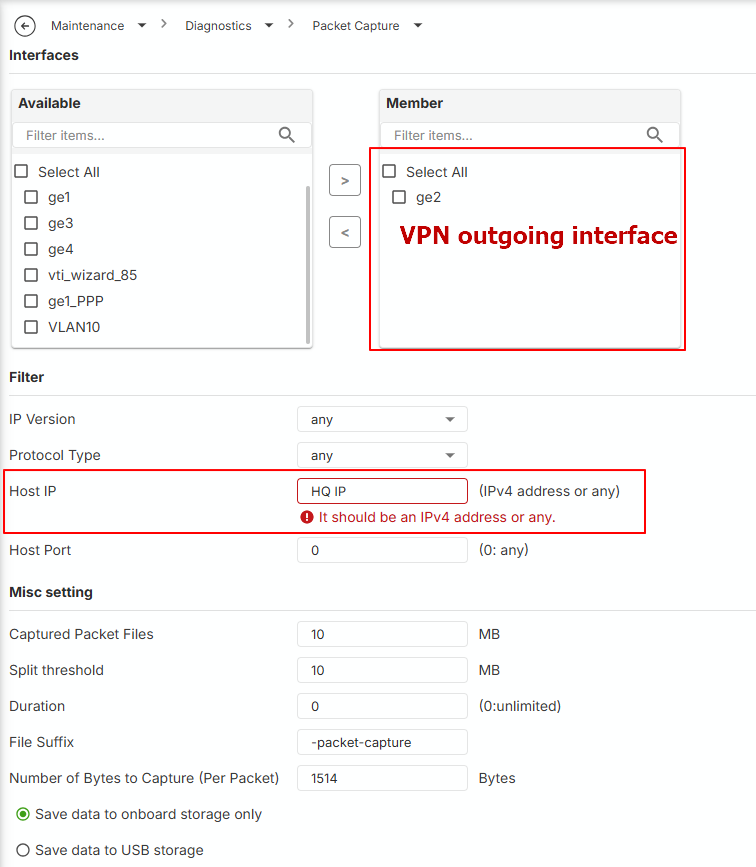
USG FLEX H support to capture packet on the device's local GUI. Path: Menu > Maintenance > Diagnostic > Packet Capture. Please select the capture item and click the edit button to set up capture interface and the host IP(HQ firewall's WAN IP). After apply it, click the start button in capture column (>) to start capture.
Zyxel Melen0 -
Hello @Zyxel_Melen,
I'm sorry I don't fully get the first suggestion. Do you refer to Phase 2 Policy setting? HQ Subnet is 10.0.0.0/23 and Branch subnet is 10.0.90.0/24, is this wrong?
This is what the captured traffic looks when ping is performed from the local branch LAN:
No.,"Time","Source","Destination","Protocol","Length","Info"
1,"10:53:51.755271","192.168.0.253","HQ WAN IP","UDPENCAP","43","NAT-keepalive"
2,"10:54:01.877139","HQ WAN IP","192.168.0.253","ISAKMP","126","INFORMATIONAL MID=04 Initiator Request"
3,"10:54:01.877689","192.168.0.253","HQ WAN IP","ISAKMP","126","INFORMATIONAL MID=04 Responder Response"
4,"10:54:09.995864","192.168.0.253","HQ WAN IP","ESP","146","ESP (SPI=0xccb051c3)"
5,"10:54:10.016101","HQ WAN IP","192.168.0.253","ESP","146","ESP (SPI=0xc20b3fac)"
6,"10:54:11.001596","192.168.0.253","HQ WAN IP","ESP","146","ESP (SPI=0xccb051c3)"
7,"10:54:11.021161","HQ WAN IP","192.168.0.253","ESP","146","ESP (SPI=0xc20b3fac)"
8,"10:54:12.010669","192.168.0.253","HQ WAN IP","ESP","146","ESP (SPI=0xccb051c3)"
9,"10:54:12.030111","HQ WAN IP","192.168.0.253","ESP","146","ESP (SPI=0xc20b3fac)"
10,"10:54:13.019564","192.168.0.253","HQ WAN IP","ESP","146","ESP (SPI=0xccb051c3)"
11,"10:54:13.039437","HQ WAN IP","192.168.0.253","ESP","146","ESP (SPI=0xc20b3fac)"
12,"10:54:14.024684","192.168.0.253","HQ WAN IP","ESP","146","ESP (SPI=0xccb051c3)"
Thank you
0 -
Hi @kaika313
I'm sorry I don't fully get the first suggestion. Do you refer to Phase 2 Policy setting? HQ Subnet is 10.0.0.0/23 and Branch subnet is 10.0.90.0/24, is this wrong?
Your configurations are correct. My reply was just because we have experience that the user set it wrongly.
From the packets, it seems like the tunnel is forwarding traffic correctly. Please help to check:
- The PC's firewall setting. Some PCs might block the icmp/ping by default firewall rule.
- Install Wireshark on the PC (H side and HQ side) and check the icmp packet. Assume the ping is from H side to HQ side:
- If the HQ side PC doesn't receive icmp request, check the HQ firewall's firewall rule/security policy.
- If the HQ side PC receives icmp request, but no icmp response. Check the PC's routing table if 0.0.0.0 is to the default gateway and correct interface. (firewall rule should be checked since item 1)
- If the H side PC doesn't receive icmp response, check the H's security policy.
Zyxel Melen0 -
Hi @Zyxel_Melen ,
thank you. We found out that all HQ devices are pingable and, if available, their web pages are reachable.
We cannot make RDP connection but this is probably a wrong Windows configuration. Anyway, there are 2 strange things left. First one is that if we do a tracert to any "pingable" device this happens:
1 <1 ms <1 ms <1 ms IP H firewall
2 * * * Timeout.
3 20 ms 20 ms 20 ms IP HQ remote deviceSecond:
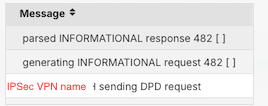
Should I be worried of these messages?
Thank you
0 -
Hi @kaika313
You don't need to worry about these. The first one is because one of hop doesn't response to the ping. The second one is VPN connection check(as known as Dead Peer Detection (DPD)). See the request and response means the VPN connection is still linking.
Zyxel Melen0 -
Hi @Zyxel_Melen,
thank you, it seems that it's working now. But another issue came out: before setting up the IP Sec VPN, users were able to connect to branch network using SSL VPN connection. But when IP Sec VPN is on, they can connect and they receive an IP address within SSL VPN range but they cannot reach any of branch device/share folder/server nor they can browse Internet. Everything's fine as soon as we shut down the tunnel. Any suggestions about this behavior?
0 -
It seems like your security policy only allows SSL VPN to other interfaces, please check your security policy if there has IPSec VPN zone allow to any.
And the IPSec VPN client get SSL VPN IP pool could be because a misconfiguration on IPSec VPN client IP pool range. If you want they have different IP range, you should change it.
Zyxel Melen0 -
Hi @Zyxel_Melen,
this is our current security policy. It seems that it's already allowing any traffic between SSL and everything else, isn't it?

I have mistakenly let you understood that IP SEC client gets the same pool as SSL but it's not. It has a totally different subnet (192.168.198.0/24). So I cannot understand what could be the problem here.
0
 Zyxel Employee



Categories
- All Categories
- 442 Beta Program
- 3.1K Nebula
- 237 Nebula Ideas
- 6.8K Security
- 746 USG FLEX H Series
- 377 Security Ideas
- 1.8K Switch
- 87 Switch Ideas
- 1.5K Wireless
- 58 Wireless Ideas
- 7.2K Consumer Product
- 319 Service & License
- 512 News and Release
- 99 Security Advisories
- 31 Education Center
- 10 [Campaign] Zyxel Network Detective
- 5.3K FAQ
- 34 Documents
- 90 About Community
- 119 Security Highlight


