XS 1930-12HP link speed settings in aggregation mode missing (Nebula Cloud Interface)


 Freshman Member
I want to create an aggregated link between my GS1900-24 and the XS1930-12HP with 2 DAC cables on the SFP ports.
If I configure the individual SFP+ ports and set the link speed on the XS1930 to 1G (because GS1900 only supports SFP = 1 G) then the links work fine. When I then aggregate the two ports the link setting is overridden and returns to AUTO on the XS1930 and the connection cannot be established.
In Nebula Cloud I am not able to change the link speed setting of the aggregated ports. And, contrary to the note that appears in the aggregation dialog, the settings of the lower port number are not taken over by the other port(s).
Please advice how to solve this? Is it possible to change the link speed in the local management console?
Thanks!
Accepted Solution
-
Got it working. I had to set the ports to Auto/1G before making the trunk.
If a fixed link speed of 1G was set it reverts to Auto during aggregation.
But if it is set to Auto/1G it stays on Auto/1G.
Would however be better to allow modification of the link speed also in aggregation.0
All Replies
-
I think the 1G is not the point because both switches have auto negotiation on switch ports.
You should configure port media type to 'DAC 10G' instead of SFP+ on the two ports of XS1930 before aggregated them.0 -
Thanks, but I have already set it to DAC10G and still the same.
I think the auto negotiation doesnt work properly, because in auto mode I do not get an active link even without aggregation.0 -
Got it working. I had to set the ports to Auto/1G before making the trunk.
If a fixed link speed of 1G was set it reverts to Auto during aggregation.
But if it is set to Auto/1G it stays on Auto/1G.
Would however be better to allow modification of the link speed also in aggregation.0 -
As of today this is broken, Auto/1G does not persist anymore when creating LACPs on Firmware V4.80(ABQE.5) | 05/22/2026.
@Kilby which firmware are you using?0 -
Hi @Propstat
Could you share more details? Which management mode are you using? Nebula mode or standalone mode?
Zyxel Melen0 -
Hey Melen,
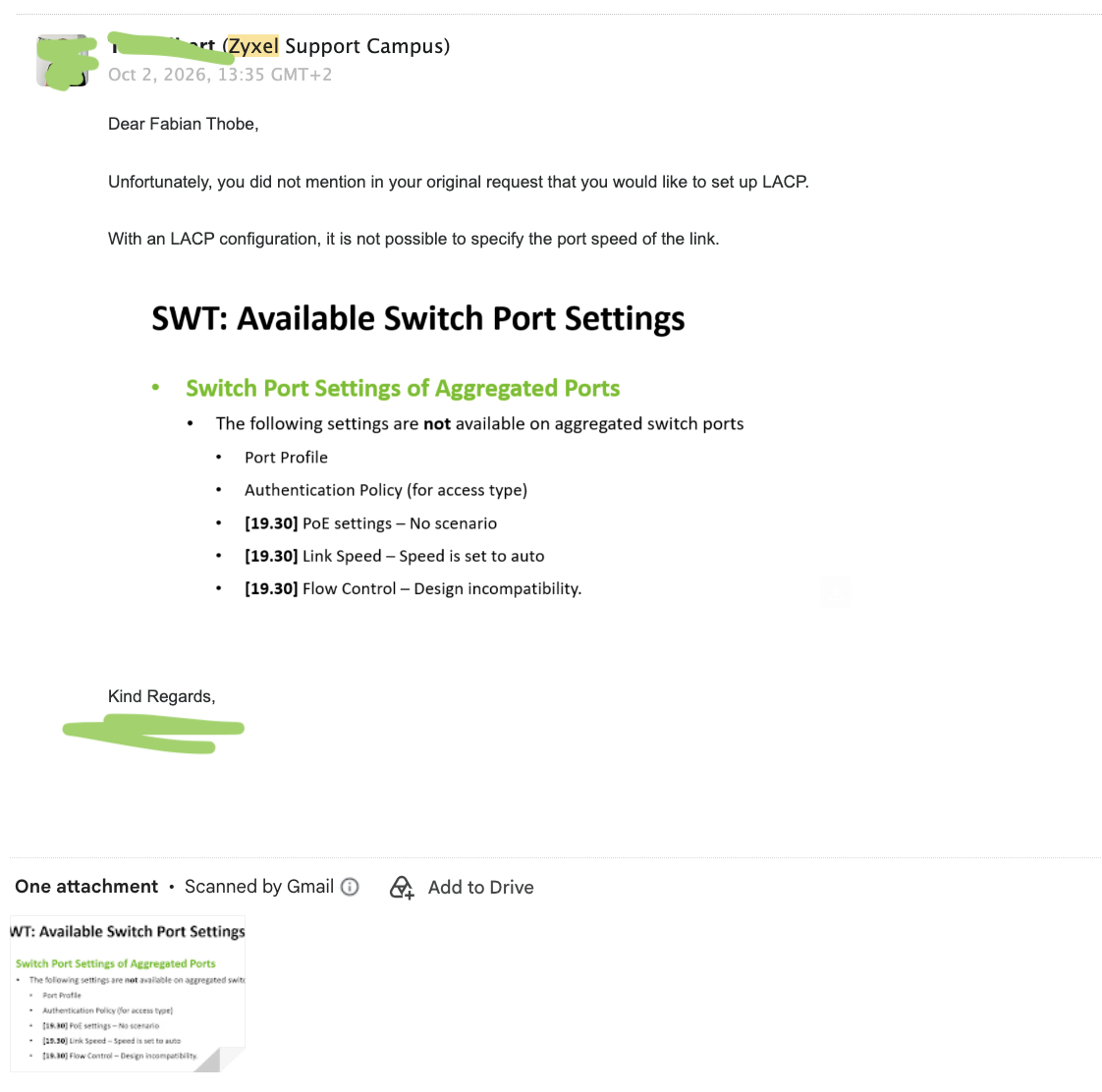
the issue was illustrated at large in #596358
The documentation provided did not match up with the current documentation:
Basically LACPs on Nebula overwrite what ever link speed setting has been configured prior and discards the configuration overwriting Auto/1G with Auto placing an LACP Group between SFP+ and SFP ports in disfunctional state. The configuration can only be achieved by removing the devices from Nebula.
0 -
I want to underline that the support received was highly efficient and that my issue is of purely technical nature.
 0
0 -
Hi @Propstat
Thanks for the information. Our product team is evaluating on this matter.
Zyxel Melen0









 Zyxel Employee
Categories
- All Categories
- 442 Beta Program
- 3.1K Nebula
- 243 Nebula Ideas
- 6.8K Security
- 783 USG FLEX H Series
- 389 Security Ideas
- 1.8K Switch
- 87 Switch Ideas
- 1.5K Wireless
- 58 Wireless Ideas
- 7.2K Consumer Product
- 325 Service & License
- 527 News and Release
- 101 Security Advisories
- 31 Education Center
- 10 [Campaign] Zyxel Network Detective
- 5.3K FAQ
- 34 Documents
- 91 About Community
- 122 Security Highlight


