Multiple Source IPs in NAT rules





 Freshman Member
Hi,
I currently have a Web API that requires HTTPS traffic forwarding to our internal Web server through the USG Flex H series.
We've got a group of IPs that all require this same NAT rule applying to them, but I couldn't figure out a way to do this and as a result I have had to configure 6 individual NAT rules that virtually do the same thing, just with a different source IP.
Is there not a way to reference an IP Address Group object as a Source for a NAT rule?
Any help appreciated.
Lucas
All Replies
-
Its a good idea but at this time you can not which seems odd why they didn’t at the time.
Its also my hope they add FDQN (non-wild card) support for Source IP NAT.
0 -
On the USG FLEX H series (running uOS), the NAT (Virtual Server) configuration currently requires a single IP address or "Any" for the Source IP field. It does not natively support selecting an Address Group object directly within the NAT rule settings at this time.
To achieve your goal without maintaining six separate NAT rules, you can use the following approach:
- Simplify the NAT Rule: Set the Source IP in your NAT (Virtual Server) rule to `Any`. This allows the NAT translation to trigger for any incoming traffic on the specified port.
- Restrict Access via Security Policy: Since NAT only handles the translation, the actual access control is managed by the Firewall/Security Policy.
- Go to Object > Address > Address Group and ensure your 6 IPs are grouped there.
- Navigate to Security Policy > Policy Control. Create (or edit) the rule that allows traffic to your internal Web server (usually from **WAN** to LAN/DMZ).
- In the Source field of this security policy, select your Address Group object.
- Set the Destination to your internal server's IP and the Service to HTTPS.
- By setting the NAT rule source to `Any` and restricting the Security Policy to your specific Address Group, the firewall will drop any traffic from IPs not included in your group before it reaches the server, effectively achieving the same result with only one NAT rule and one Security Policy rule.
I hope this helps! Please let us know if you have any further questions.
Zyxel Melen0 -
Hi @Zyxel_Melen,
Thanks for your response.
Unfortunately, this approach isn’t particularly helpful for our use case.
With your suggestion, the issue we would encounter is that when staff connect via the full-tunnel client-to-site VPN, all of their HTTPS (port 443) web browsing would be redirected to the internal web server.
I hope this feature can be added in a future firmware update, it exists on many other SMB firewall brands.
0 -
Why you think you will encounter this issue? Could you share more details with us? Like your topology and use cases.
Normally, you shouldn't encounter that problem since the remote access VPN clients are under the firewall and the HTTPS traffic should be from the firewall internal to external. This will not match the NAT rule which source interface is WAN.
Zyxel Melen0 -
Hi @Zyxel_Melen,
You are correct that outgoing traffic is not affected by this NAT rule, and that it only applies from WAN to LAN. The issue, however, is that incoming SSL certificates are being intercepted by this WAN-to-LAN NAT rule. As a result, the certificates never reach the VPN client and are instead redirected to the web server via NAT.
As a result, the below SSL error is encountered by a VPN client when attempting to browse the internet:
“This site can’t be reachedThe web page might be temporarily down or may have moved permanently to a new web address.ERR_SSL_KEY_USAGE_INCOMPATIBLE”This issue is not limited to any specific URL. It occurs across all URLs, as SSL certificates are consistently being intercepted.
The only workaround is to configure the VPN as a split tunnel. However, this is not ideal, as there is a requirement for VPN clients to appear with the customer’s public IP address, since certain applications are restricted to that specific IP.
0 -
I'm a bit confused when you said about remote access VPN in the mix
can you show us your working NAT rule
you can draw your topology here
Network Testing Tools | Port Scanner, VPN Tests & DNS Lookup
0 -
Hi @PeterUK,
Apologies, I'm aware this is getting confusing… Here is the problematic NAT rule, setup how was described by @Zyxel_Melen, with 'Any' as our Source IP.
10.137.42.5 is our Web server.
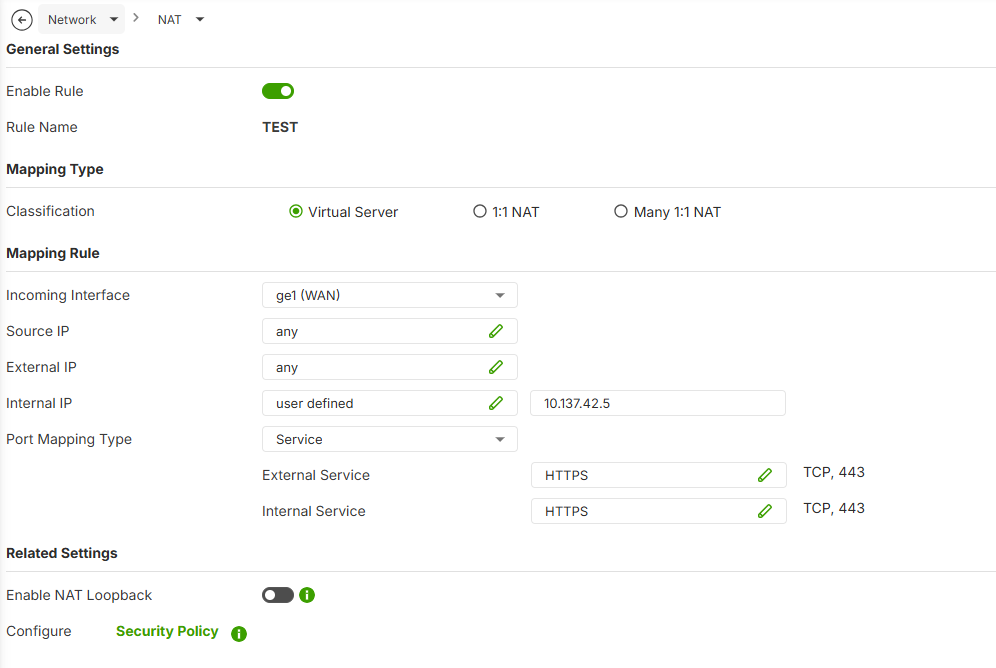
Setting up this NAT rule, and controlling access via Security Policy as described, breaks web browsing for full-tunnel VPN clients. It gives the below error.
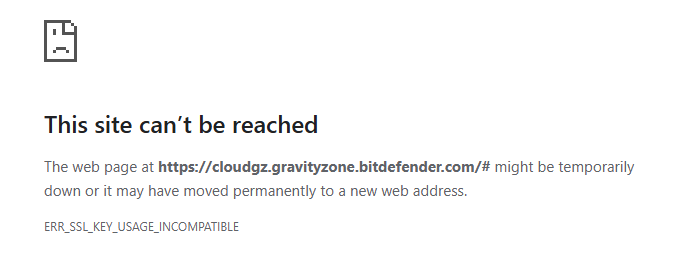
I can only assume that this is because the NAT rule is intefering with incoming SSL certificates when VPN clients are attempting to access websites protected by SSL… I dont know why this is the case since local network users seem to be able to access websites just fine when this rule is enabled. It only seems to affect full-tunnel vpn users. I guess maybe because LAN and WAN physically seperate interfaces, but the IPSec VPN uses the WAN port for it's connection.
We get the same result on a USG Flex 500H, and a USG Flex 200H firewall. I double checked to make sure I wasn't going mental! 😊
0 -
Not sure if this will solve it but you should really not have that external IP set to any it is best to make a address object with interface to your WAN port so its mapped to that IP.
0 -
Hi @PeterUK,
The customer’s firewall isn’t accessible via any other IP address, so this makes no difference in this case.
0 -
So….there is no need for this NAT rule? your not expecting anyone WAN side to get to
10.137.42.5Web server? but more when users connect by VPN to get to this server.In which case do you have routing rules? as you need to do this
0



 Guru Member




 Zyxel Employee
Categories
- All Categories
- 442 Beta Program
- 3.1K Nebula
- 242 Nebula Ideas
- 6.8K Security
- 777 USG FLEX H Series
- 387 Security Ideas
- 1.8K Switch
- 87 Switch Ideas
- 1.5K Wireless
- 58 Wireless Ideas
- 7.2K Consumer Product
- 324 Service & License
- 526 News and Release
- 101 Security Advisories
- 31 Education Center
- 10 [Campaign] Zyxel Network Detective
- 5.3K FAQ
- 34 Documents
- 91 About Community
- 121 Security Highlight


