[Circle] How to Terminate Pay As You Go?
Options

Zyxel_Judy
 Zyxel Employee




Zyxel Employee
To terminate PAYG, go to My Devices > On-cloud > Pay As You Go > General Settings. In the below screen, click the Pay As You Go switch to the left.
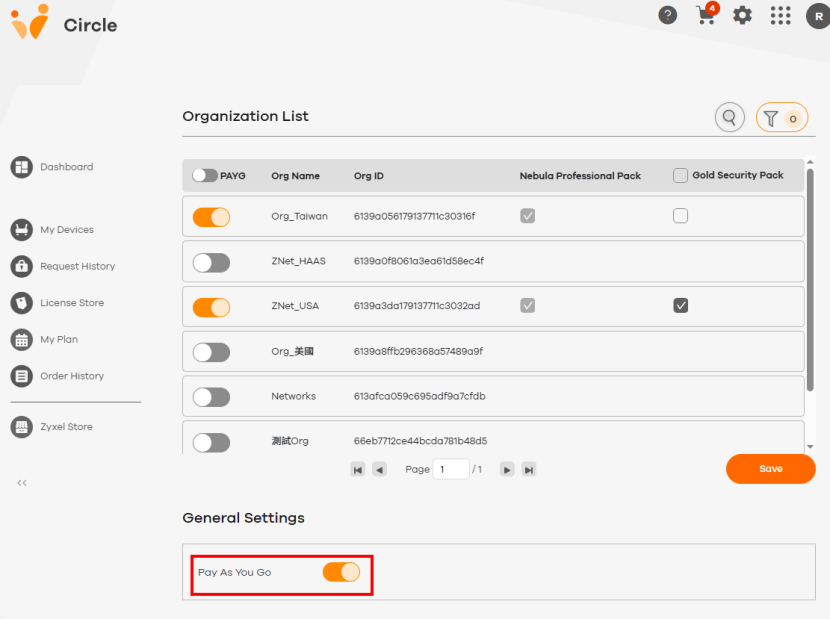
A confirmation prompt appears. Note that once you terminate the PAYG contract, Circle will charge you for any unpaid usage. Read the message carefully and click Confirm.
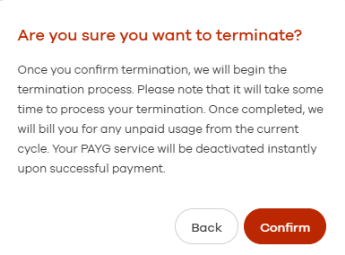
Note: If you terminate PAYG, Circle will request full payment immediately. In this case, you have 24 hours to complete the payment.
Zyxel_Judy
0
Categories
- All Categories
- 442 Beta Program
- 3.1K Nebula
- 237 Nebula Ideas
- 6.8K Security
- 740 USG FLEX H Series
- 376 Security Ideas
- 1.8K Switch
- 87 Switch Ideas
- 1.5K Wireless
- 58 Wireless Ideas
- 7.2K Consumer Product
- 319 Service & License
- 512 News and Release
- 99 Security Advisories
- 31 Education Center
- 10 [Campaign] Zyxel Network Detective
- 5.3K FAQ
- 34 Documents
- 91 About Community
- 119 Security Highlight