Cannot access NWA50AX Dashboard

 Freshman Member
I have installed a NWA50AX AP wired to my router. If I try to open the admin dashboard I get the message "The setup wizard can only be run on the system with default settings". If I reset the AP and run setup again I get a similar message at the end.
The AP appears to be working correctly with a solid green light and connection to WiFi.
Accepted Solution
-
Hi @ChrisBeck57 ,
To access the NWA50AX web GUI, please enter the NWA50AX's LAN IP address in your browser. You can find this IP address in one of the following ways:
- Check the DHCP client table on your router (uplink device)
- Check the NWA50AX's configured static IP address
- If there is no uplink device connected, try the default address: 192.168.1.2
Additionally, please clear your browser cache or open an Incognito/Private browsing window before accessing the IP address. This ensures the browser is not loading an old session of the setup wizard.
If the issue persists, please send us a screenshot showing the NWA50AX's IP address and the error message.
Zyxel_Judy
0





 Zyxel Employee
All Replies
-
Hi @ChrisBeck57 ,
To access the NWA50AX web GUI, please enter the NWA50AX's LAN IP address in your browser. You can find this IP address in one of the following ways:
- Check the DHCP client table on your router (uplink device)
- Check the NWA50AX's configured static IP address
- If there is no uplink device connected, try the default address: 192.168.1.2
Additionally, please clear your browser cache or open an Incognito/Private browsing window before accessing the IP address. This ensures the browser is not loading an old session of the setup wizard.
If the issue persists, please send us a screenshot showing the NWA50AX's IP address and the error message.
Zyxel_Judy
0 -
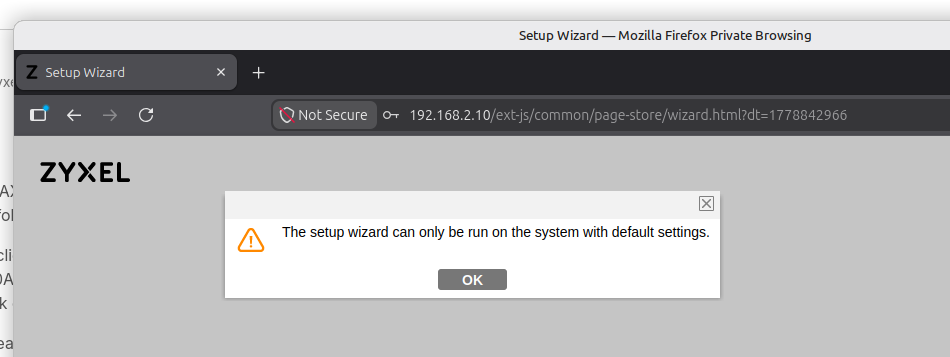
After using the IP address in my browser in a private browsing session, and after entering the credentials to log in to the web interface, I see the following. Unfortunately I'm unable to reconfigure it since this page doesn't allow me to access the device settings page. It's a NWA55AXE access point.
 0
0 -
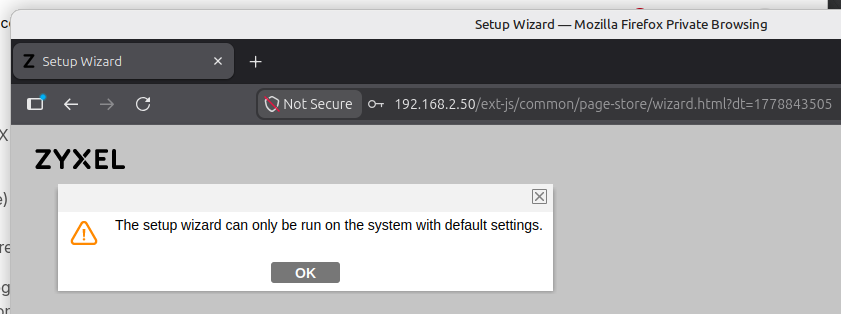
I changed the IP address, changed the default password, and rebooted the AP. I can access the device using the new IP address in a private browsing session, but after logging in, it tells me I'm not allowed to configure it. See screenshot.
 0
0 -
Hi @kaheli ,
It seems you are trying to use the Setup Wizard to configure the NWA55AXE, but the device already has an existing configuration. As indicated by the message, the wizard can only be used with default settings — either on first-time setup or after a factory reset.
You have two options to proceed:
- Click OK to dismiss the message and use the Configuration tab to adjust the settings manually.
- Factory reset the NWA55AXE and then use the Setup Wizard to configure it from scratch.
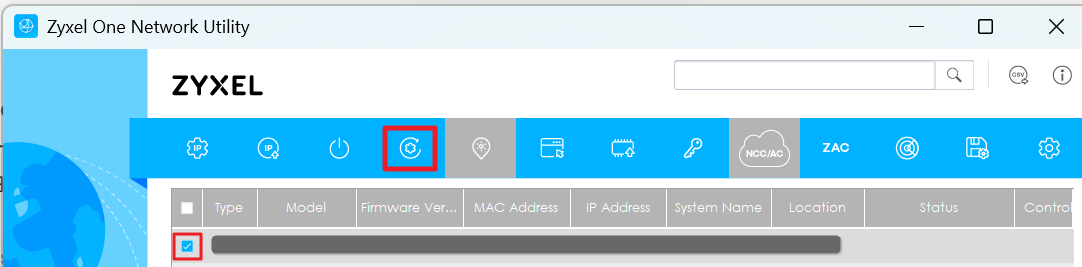
You can use ZON to reset the NWA55AXE
Zyxel_Judy
0


Categories
- All Categories
- 442 Beta Program
- 3.1K Nebula
- 243 Nebula Ideas
- 6.8K Security
- 783 USG FLEX H Series
- 389 Security Ideas
- 1.8K Switch
- 87 Switch Ideas
- 1.5K Wireless
- 58 Wireless Ideas
- 7.2K Consumer Product
- 325 Service & License
- 527 News and Release
- 101 Security Advisories
- 31 Education Center
- 10 [Campaign] Zyxel Network Detective
- 5.3K FAQ
- 34 Documents
- 91 About Community
- 122 Security Highlight


