OIDC Setup on FLEX H




 Ally Member
I'm trying to configure OIDC on FLEX H with MS Entra. Tried to follow this guide:
SSLVPN authentication with Microsoft Entra ID — Zyxel Community
But when I press the test button I get this error:
Invalid OIDC authorization_endpoint.
Error Code: (10016)cmd aaa validate-oidc-profile MS365
Normally my Issuer URL, Client ID and secret are identically, but I wonder if it has something to do with the certificate? The guide only mentions potential problems when trying to connect the client..? I have a wildcard certificate (.pfx) on my domain name, but can't import it on the FLEX because it's not compatible…
ANyhow what also is different then in the guide, I'm not using for example zyxeltest.com but firewall.zyxeltest.com because I'm still in testfase and using an onmicrosoft domain name. Bit stuck here with the not saying that much errormessage…
Edit: looking a bit further, I also don't see any sign in tries on my Entra portal
Ok so now it seems like my Issuer URL had a "/" too much. Moving on now I get
OIDC Authentication TestAn error occurred during OIDC processing:
Claim 'email' not found in ID Token claims
But I have allowed this all:
| Delegated | View users' email address | No | ||
|---|---|---|---|---|---|
offline_access | Delegated | Maintain access to data you have given it access to | No | ||
openid | Delegated | Sign users in | No | ||
profile | Delegated | View users' basic profile | No | ||
User.Read | Delegated | Sign in and read user profile | No |
Also added:

All Replies
-
Hi @nielsscheldeman,
Regarding the error "Claim 'email' not found in ID Token claims", this typically means the email attribute is not populated for that user in Entra ID.
We would suggest first verifying the email property of the user account in Entra ID and make sure it is properly filled in.
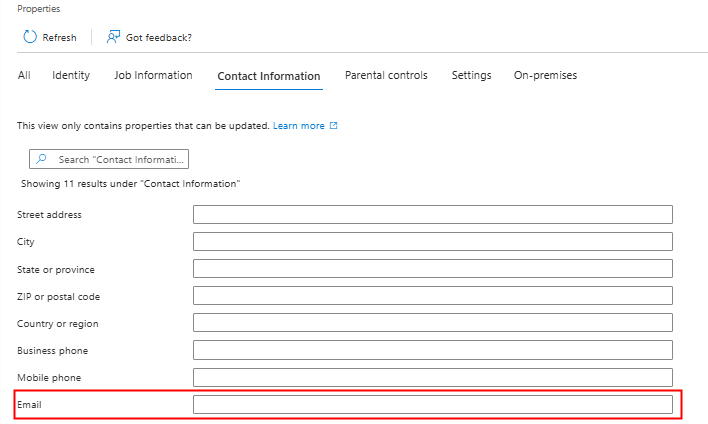
Additionally, if you prefer, you can also configure the OIDC profile on the FLEX H to use "preferred_username" as the username claim instead, which is already included in the default "profile" scope and requires no extra setup on the Entra ID side.

Zyxel Tina
0 -
Ok, now OIDC Authentication Test is working fine, I added an ext-group-user with Group Identifier from security group I want to use and selected this user in Allowed Users in SSL VPN and primary server OIDC/Entra. However as soon as I log in to the SSL VPN, I get Access Denied, error ID: …. Please contact your administrator. My user is in the right security group, so I'm a bit stuck now.
The guide from ZyXEL doesn't mention anything else after the OIDC Authentication Test is successful. It assumes that everything works then.
0 -
Hi @nielsscheldeman,
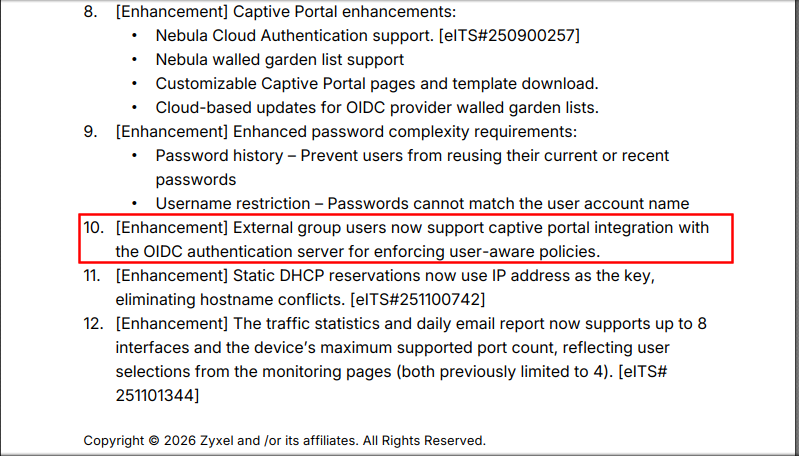
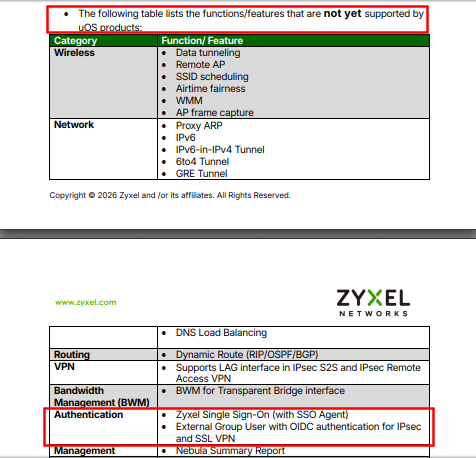
Regarding the issue you have encountered, this behavior is expected. According to the v1.38 release notes, OIDC external group users are currently supported only for captive portal authentication and are not yet supported for SSL VPN authentication; this feature will be enhanced in the future firmware, v1.39.
Specifically:
- External group users can be used with OIDC for captive portal integration to enforce user-aware policies.
- External group user with OIDC authentication is not yet supported for IPsec and SSL VPN on uOS.
Thank you for your understanding and patience!
Zyxel Tina
0 -
Ok, so now I'm confused. It means that this guide:
SSLVPN authentication with Microsoft Entra ID — Zyxel Community
is not ok then? I don't understand the meaning of that guide then because that is for SSL VPN
0 -
Any update please?
Ok, so now I'm confused. It means that this guide:
SSLVPN authentication with Microsoft Entra ID — Zyxel Community
is not ok then? I don't understand the meaning of that guide then because that is for SSL VPN
0 -
Hi @nielsscheldeman,
Sorry for the late reply.
We would like to clarify that the article you mentioned covers the setup for basic OIDC authentication with Microsoft Entra ID for SSL VPN, where the Allowed User is set to the built-in oidc-users. However, in your scenario, you are trying to achieve SSL VPN access for a specific Entra ID security group using an ext-group-user, which is a more advanced use case.
As mentioned earlier, OIDC with external group user authentication is not yet supported for SSL VPN and IPsec VPN in the current firmware (uOS v1.38). This feature is planned for the upcoming v1.39 release.
We hope this helps clarify your concern.
Zyxel Tina
0





 Zyxel Employee
Categories
- All Categories
- 442 Beta Program
- 3.1K Nebula
- 242 Nebula Ideas
- 6.8K Security
- 779 USG FLEX H Series
- 387 Security Ideas
- 1.8K Switch
- 87 Switch Ideas
- 1.5K Wireless
- 58 Wireless Ideas
- 7.2K Consumer Product
- 324 Service & License
- 527 News and Release
- 101 Security Advisories
- 31 Education Center
- 10 [Campaign] Zyxel Network Detective
- 5.3K FAQ
- 34 Documents
- 91 About Community
- 121 Security Highlight


