Switch Port Template Status Enhancement
Options

Zyxel_Lynn
Posts: 212




 Zyxel Employee
Zyxel Employee
Troubleshooting Switch Ports with Template Status Visibility
Managing large-scale switch deployments using site templates is a key feature of Nebula, but identifying local configuration overrides has historically been difficult. The 20.00 update introduces a dedicated Template Status column to address this challenge.
Visualizing Configuration Sources
When a switch is bound to a template site, it inherits global settings, though specific ports can be "overridden" with local customizations. The new Template Status column (located in the Switch Port list) identifies the configuration source for each port:
- Sync: The port is actively synchronized with and following the template site settings.
- Overridden: The port is using locally customized settings that differ from the template.
- Dash (-): The port is not bound to any template site.
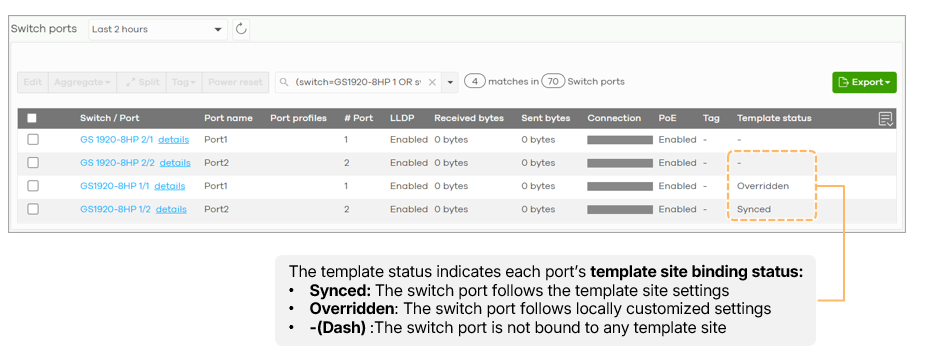
This clarity allows administrators to perform more efficient configuration reviews and significantly speeds up the troubleshooting process when port behavior deviates from the expected template standards.
0
Categories
- All Categories
- 442 Beta Program
- 3.1K Nebula
- 243 Nebula Ideas
- 6.8K Security
- 783 USG FLEX H Series
- 389 Security Ideas
- 1.8K Switch
- 87 Switch Ideas
- 1.5K Wireless
- 58 Wireless Ideas
- 7.2K Consumer Product
- 325 Service & License
- 527 News and Release
- 101 Security Advisories
- 31 Education Center
- 10 [Campaign] Zyxel Network Detective
- 5.3K FAQ
- 34 Documents
- 91 About Community
- 122 Security Highlight