PAYG UIX Enhancement
Options

Zyxel_Lynn
Posts: 212




 Zyxel Employee
Zyxel Employee
Enhanced Transparency for Pay-As-You-Go (PAYG) Users
The Nebula 20.00 update introduces UI enhancements for the Pay-As-You-Go (PAYG) licensing model to provide users with a clearer understanding of their service status and billing.
Real-Time Service Identification
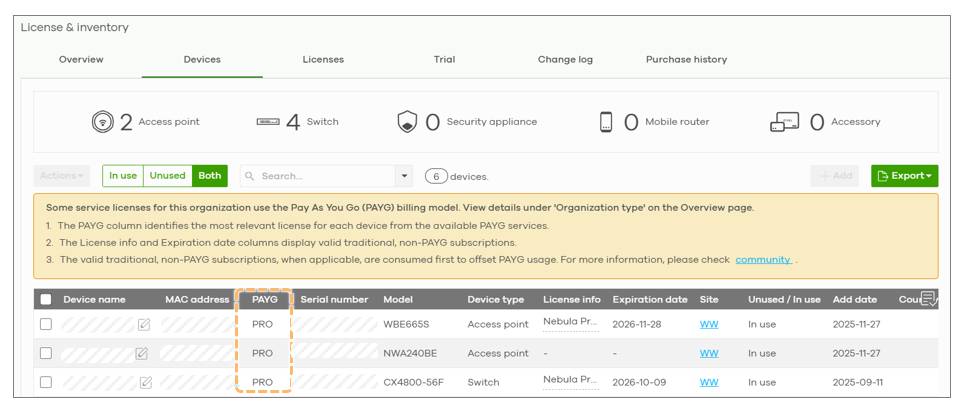
To eliminate confusion regarding which devices are active, a new PAYG column has been added to the device tab. It displays the specific service being consumed:
- Pro: The device is using Nebula Pro Pack features via PAYG.
- GSP: The device is using Gold Security Pack features via PAYG.
- Dash (-): The device is not currently utilizing PAYG services.
Billing Clarity and Notifications
A yellow notification area has been added to the device tab to explain the interaction between traditional licenses and PAYG services. Key points include:
- Prioritization: Valid traditional non-PAYG subscriptions are always consumed first to offset usage.
- Billing Commencement: PAYG billing only begins after any existing active licenses have reached their expiration date.
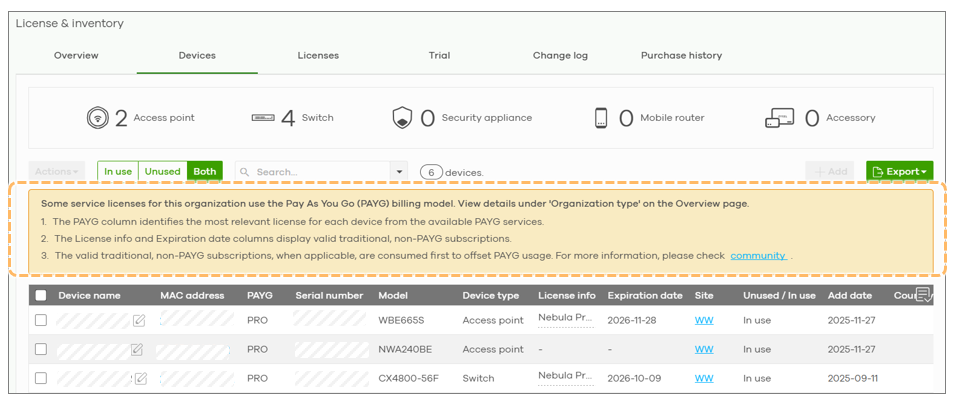
This prioritized consumption ensures that users are never double-billed for services and can easily monitor their transition from traditional licenses to the PAYG model.
0
Categories
- All Categories
- 442 Beta Program
- 3.1K Nebula
- 243 Nebula Ideas
- 6.8K Security
- 783 USG FLEX H Series
- 389 Security Ideas
- 1.8K Switch
- 87 Switch Ideas
- 1.5K Wireless
- 58 Wireless Ideas
- 7.2K Consumer Product
- 325 Service & License
- 527 News and Release
- 101 Security Advisories
- 31 Education Center
- 10 [Campaign] Zyxel Network Detective
- 5.3K FAQ
- 34 Documents
- 91 About Community
- 122 Security Highlight