USG FLEX H - LAG Interface edit Transmit Hash Policy issue



 Freshman Member
Hi, editing "Transmit Hash Policy", changing from src-dst-ip-mac to src-dst-mac and viceversa, made the firewall unresponsive.
I had another interface for configuring USG FLEX 200 H via Ethernet, so it wasn't the same LAG interface I was editing.
HTTP access works, but I cannot use any command since it logs me out everytime. Via SSH it was the same, I didn't get the prompt, just some timeout messages.
The only one way to restore it, was unplug e plug again the power cable. After reboot it was working correctly with the setting I've made before it hanged.
Could you check please if there is some issue related to this setting?
Firmware 1.38.
Thank you.
Federico
All Replies
-
Hi @fedebros,
To better understand the issue, could you please help confirm the following:
As you mentioned changing from "src-dst-ip-mac" to "src-dst-mac" and vice versa,
- Which interface was your PC connected to?
- Which firewall interface IP were you using for management access?
We would like to learn whether the management traffic was passing through the affected LAG interface or through a separate interface.
Zyxel Tina
0 -
Hi Tina, it was a separate interface: I was in the following situation (just covered name ad IP address of my customer):
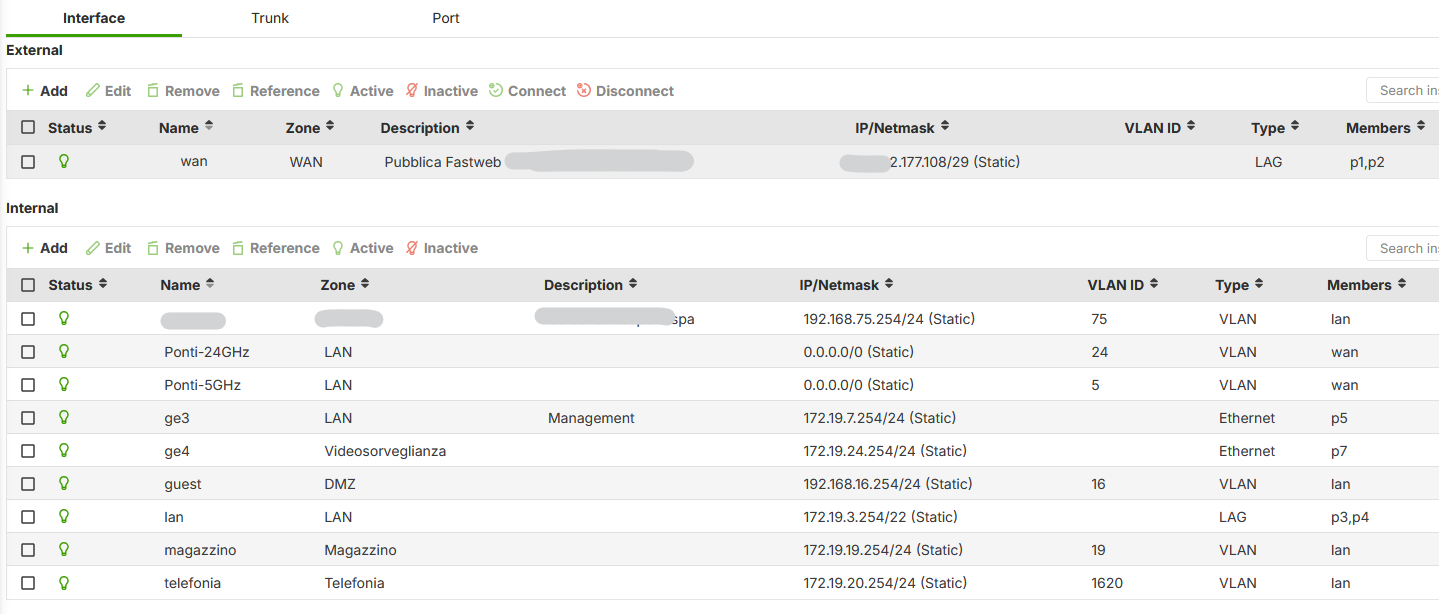
My PC was attached to ge3 interface, and I was editing "lan" interface, but the same happened this morining editing "wan" interface..
At the first time this moring after some minute the firewall come back responsive, i was editing "wan" interface from remote site. The second time I was locally connected, editing "wan" interface, and I needed to unplug the power connector.
The firewall continue to answer to ping requests and the passive Device HA remain passive since the active device is still responding.
I don't know if it's related to this question
but I don't think that it's specifically related since via ssh I was still connected via ge3 interface, but the firewall gone in timeout executiing commands like get-configuration (sorry I didn't take a note about the command)…
Thank you
Kind regards
0 -
Hi @fedebros,
Thank you for the additional information.
To ensure we correctly understand the sequence of events, could you please confirm the following:
- First case
- Your PC was locally connected to ge3.
- You edited the "lan" LAG interface Transmit Hash Policy.
- After applying the change, the firewall became unresponsive and only recovered after a power cycle.
- Second case
- You were remotely connected (via remote configurator) while editing the "wan" LAG interface.
- After applying the change, the firewall became temporarily unresponsive, but recovered automatically after a few minutes.
- Third case
- You were locally connected again while editing the "wan" LAG interface.
- After applying the change, the firewall remained unresponsive until the power cable was unplugged.
Additionally, please help clarify at which stage the firewall was still replying to ping requests and the passive HA device remained passive. Was this observed during all three cases above, or only during one specific occurrence?
We have also performed a quick test on another USG FLEX 200H with firmware 1.38. During our test, changing the Transmit Hash Policy temporarily interrupted connectivity for a few seconds before recovering automatically. For example:
- WAN LAG test: around 5 ping packets lost
- LAN LAG test: around 3 ping packets lost
After that, the device became responsive again normally.
Zyxel Tina
0 - First case
-
Hi Tina, correct.
On Second case I was connected through IPSec VPN not via remote configurator.
About passive HA device, in all cases passive device remain passive.
I will try to reproduce the issue with the next FLEX H I will configure.
Thank you for your support.
Federico
0 -
Hi @fedebros,
Sorry for the late reply!
As you mentioned "About passive HA device, in all cases passive device remain passive.", this would be expected if the primary device was still responsive. Since the active device continued replying to ping requests and remained in active state, the secondary HA device would not consider the primary as failed and therefore would not take over.
Zyxel Tina
1





 Zyxel Employee
Categories
- All Categories
- 442 Beta Program
- 3.1K Nebula
- 243 Nebula Ideas
- 6.8K Security
- 783 USG FLEX H Series
- 389 Security Ideas
- 1.8K Switch
- 87 Switch Ideas
- 1.5K Wireless
- 58 Wireless Ideas
- 7.2K Consumer Product
- 325 Service & License
- 527 News and Release
- 101 Security Advisories
- 31 Education Center
- 10 [Campaign] Zyxel Network Detective
- 5.3K FAQ
- 34 Documents
- 91 About Community
- 122 Security Highlight


