USG FLEX 200H: LAG LACP Interface Issue



 Freshman Member
Hi, in my scenario I have a stack of two XGS3700-48HP, firmware V4.30(AAGF.3),and a LAG of two ports on which I've connected public network. I had ATP500 Firewall connected on that LAG with the external interface and it worked fine for years since I've changed with USG FLEX 200 H, firmware V1.38(ABWV.0).
Both LAGs where LACP, hash policy src-dst-mac. After two days of fine working, USG FLEX started to lose packets on the WAN interface. I tried some changes in the xmit-hash-policy, or in LACP Timeout on XGS3700, I rebooted both the systems too, but nothing worked.
I changed from
/ vrf "main" interface lag "wan" "mode" "lacp"
/ vrf "main" interface lag "wan" "xmit-hash-policy" "src-dst-mac"
/ vrf "main" interface lag "wan" "lacp-rate" "slow"
/ vrf "main" interface lag "wan" "mii-link-monitoring" "100"
to
/ vrf "main" interface lag "wan" "mode" "static"
/ vrf "main" interface lag "wan" "xmit-hash-policy" "src-dst-mac"
/ vrf "main" interface lag "wan" "mii-link-monitoring" "100"
and disabled LACP and changed to static on the XGS3700, and it started to work again.
The iessue I noticed was that some Access Point (and PC, or printers too) connected to XGS3700 responded via IPSec VPN to the ping for about 10 seconds, then for about 1 minute or more I had Request timeout.
The strange thing is that via IPSec VPN I was able to ping correctly XGS3700, for example, both XGS1930 connected via fiber, and just one Access Point conneted to the XGS3700. The VPN was made through the same LAG interface that had issues.
All of the other devices lose connectivity, and go back up again for 10 seconds sometimes.
From the LAN side (that was another LAG interface with LACP), conencted via Wi-Fi or ethernet, I was able to ping all the internal devices, but I was losing connectivity to internet and the other side of the IPSec VPNs.
Actually is working with "wan" LAG static, and "lan" LAG lacp.
What could be happened? Can you figure out?
Thank you
Federico
All Replies
-
Hi @fedebros,
May I ask whether you collected the diagnostic information file when the issue occurred?
If so, we would appreciate it if you could share it with us for further analysis.Zyxel Tina
0 -
Hi Tina, sorry, I didn't create the diagnostics file.
If this happens again with other firewalls with the same configuration, I'll do it.0 -
Hi @fedebros ,
Sorry for the late reply!To further investigate this issue, could you please help clarify a few details regarding your setup?
- Could you please verify if your network topology matches the diagram provided below?
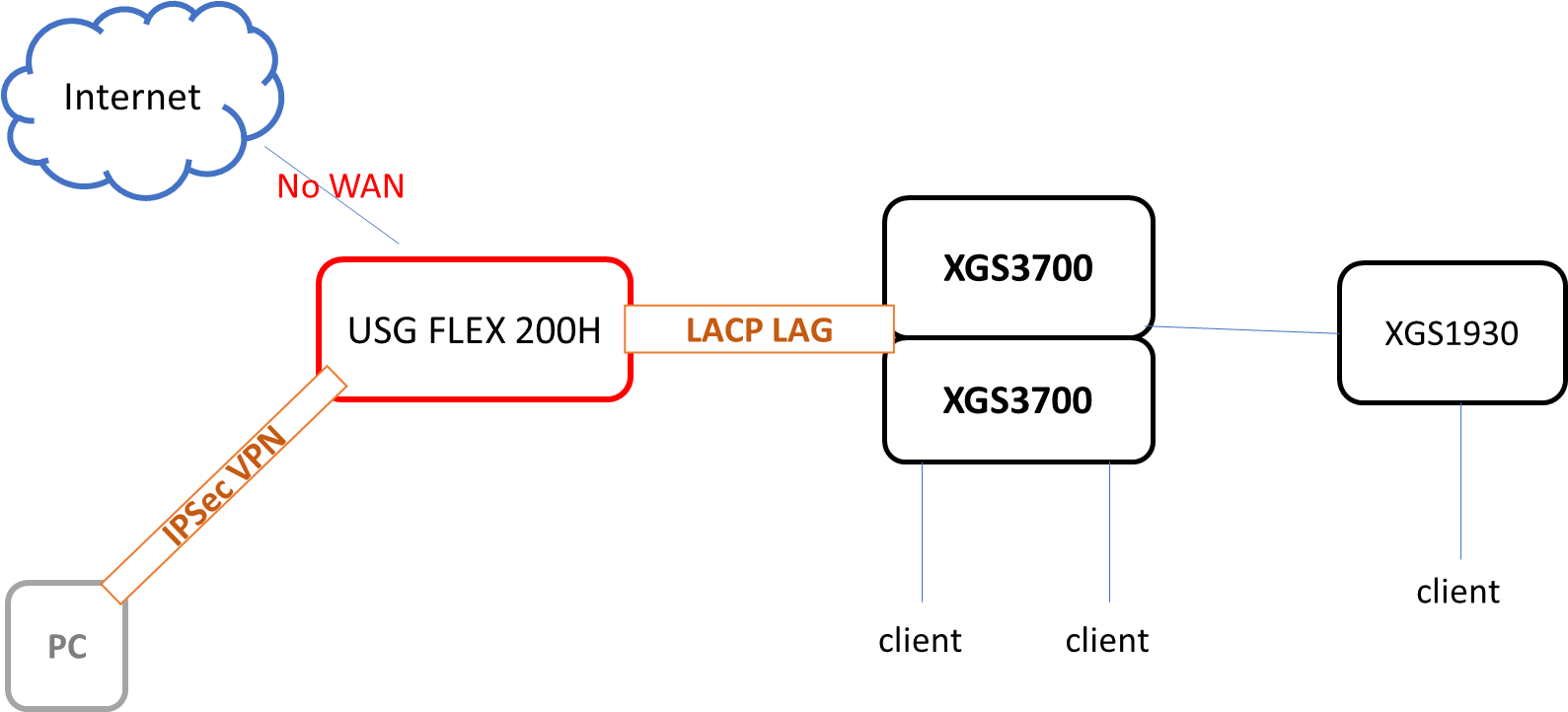
- If our understanding of the topology is correct, we would like to confirm the timing of the symptoms. Were the issues you described—such as the loss of WAN/Internet connectivity and intermittent IPsec VPN access—only experienced while the WAN LAG was configured as LACP (prior to the change)?
- Additionally, please help us confirm that since you switched the WAN LAG configuration to Static on both the USG FLEX 200H and the XGS3700 stack, the packet loss and disconnection issues have stopped and have not reoccurred?
Zyxel Tina
0 - Could you please verify if your network topology matches the diagram provided below?
-
Hi @Zyxel_Tina your topology is correct and I confirm both of your sentences.
0 -
Hi @fedebros,
Thank you for your confirmation.
We suspect the issue may be related to the LACP rate setting. If the LACP rate is not consistent on both devices, the negotiation may fail, preventing the LACP LAG from being established correctly.
If possible, please check and verify this setting on both sides when the issue occurs.
Additionally, if the configuration is confirmed to be consistent but the issue persists, we would appreciate it if you could provide the configuration files of the USG FLEX 200H and the XGS3700 stack. This will help us reproduce the issue and investigate it further.
Zyxel Tina
0





 Zyxel Employee
Categories
- All Categories
- 442 Beta Program
- 3.1K Nebula
- 243 Nebula Ideas
- 6.8K Security
- 783 USG FLEX H Series
- 389 Security Ideas
- 1.8K Switch
- 87 Switch Ideas
- 1.5K Wireless
- 58 Wireless Ideas
- 7.2K Consumer Product
- 325 Service & License
- 527 News and Release
- 101 Security Advisories
- 31 Education Center
- 10 [Campaign] Zyxel Network Detective
- 5.3K FAQ
- 34 Documents
- 91 About Community
- 122 Security Highlight


