Advanced Troubleshooting for WISP Links





 Zyxel Employee
When deploying long-range WISP wireless links, several factors can affect connection stability and performance. If a Leaf AP cannot connect to the Root AP, first verify that there is a clear line of sight between both devices.
The Leaf AP should also not be positioned at an angle greater than 90 degrees relative to the Root AP. In addition, confirm that both devices belong to the same Nebula site and that Smart Mesh is enabled.
If the 5GHz connection works but the 6GHz link cannot be established, administrators should check the AFC status in Nebula live tools. A “Success” status is required for 6GHz operation. If the AFC status shows “Fail,” verify that the GPS function is working correctly and confirm the device location information is accurate.
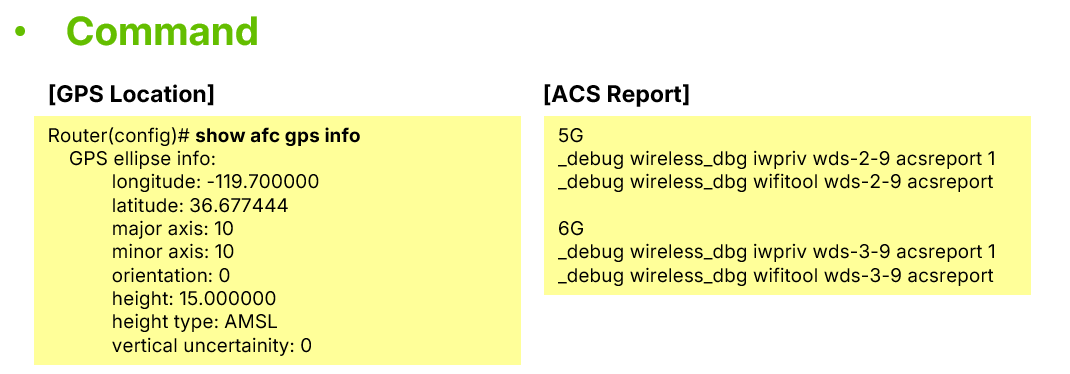
Technicians can also use CLI commands such as : show afc gps info to check AFC frequency settings and GPS sensor status. If the wireless connection remains unstable, the ACS (Automatic Channel Selection) Report can be used to identify channels with the lowest interference and help optimize wireless performance.


Categories
- All Categories
- 442 Beta Program
- 3.1K Nebula
- 243 Nebula Ideas
- 6.8K Security
- 783 USG FLEX H Series
- 389 Security Ideas
- 1.8K Switch
- 87 Switch Ideas
- 1.5K Wireless
- 58 Wireless Ideas
- 7.2K Consumer Product
- 325 Service & License
- 527 News and Release
- 101 Security Advisories
- 31 Education Center
- 10 [Campaign] Zyxel Network Detective
- 5.3K FAQ
- 34 Documents
- 91 About Community
- 122 Security Highlight