How to Disable AP LEDs on Nebula?
Options

Zyxel_Jami
Posts: 246




 Zyxel Employee
Zyxel Employee
in Other Topics
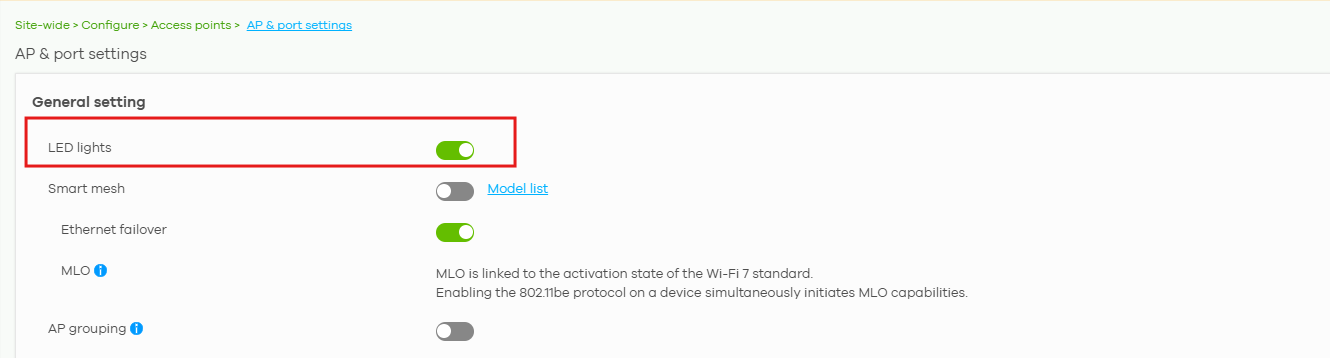
If the LED lights on your access points are distracting or not suitable for the installation environment, you can disable the AP LED function from Nebula Control Center.
To disable the AP LEDs, go to:
Configure > Access Points > AP & Port Settings > General Settings > AP LED Lights
In this section, disable the AP LED Lights option.
After the setting is applied, the LED indicators on the APs will be turned off according to the configured Nebula settings.
0
Categories
- All Categories
- 442 Beta Program
- 3.1K Nebula
- 243 Nebula Ideas
- 6.8K Security
- 781 USG FLEX H Series
- 387 Security Ideas
- 1.8K Switch
- 87 Switch Ideas
- 1.5K Wireless
- 58 Wireless Ideas
- 7.2K Consumer Product
- 324 Service & License
- 527 News and Release
- 101 Security Advisories
- 31 Education Center
- 10 [Campaign] Zyxel Network Detective
- 5.3K FAQ
- 34 Documents
- 91 About Community
- 121 Security Highlight