How can I find out which channel is least used near my access point?
Options

Zyxel_JoyLee
Posts: 218


 Zyxel Employee
Zyxel Employee
in Other Topics
You could use the function "Neighbor scan" of Nebula Live tools that scans the surrounding Wi-Fi environment.
Site-wide > Devices > Access points > Live tools > Neighbor scan
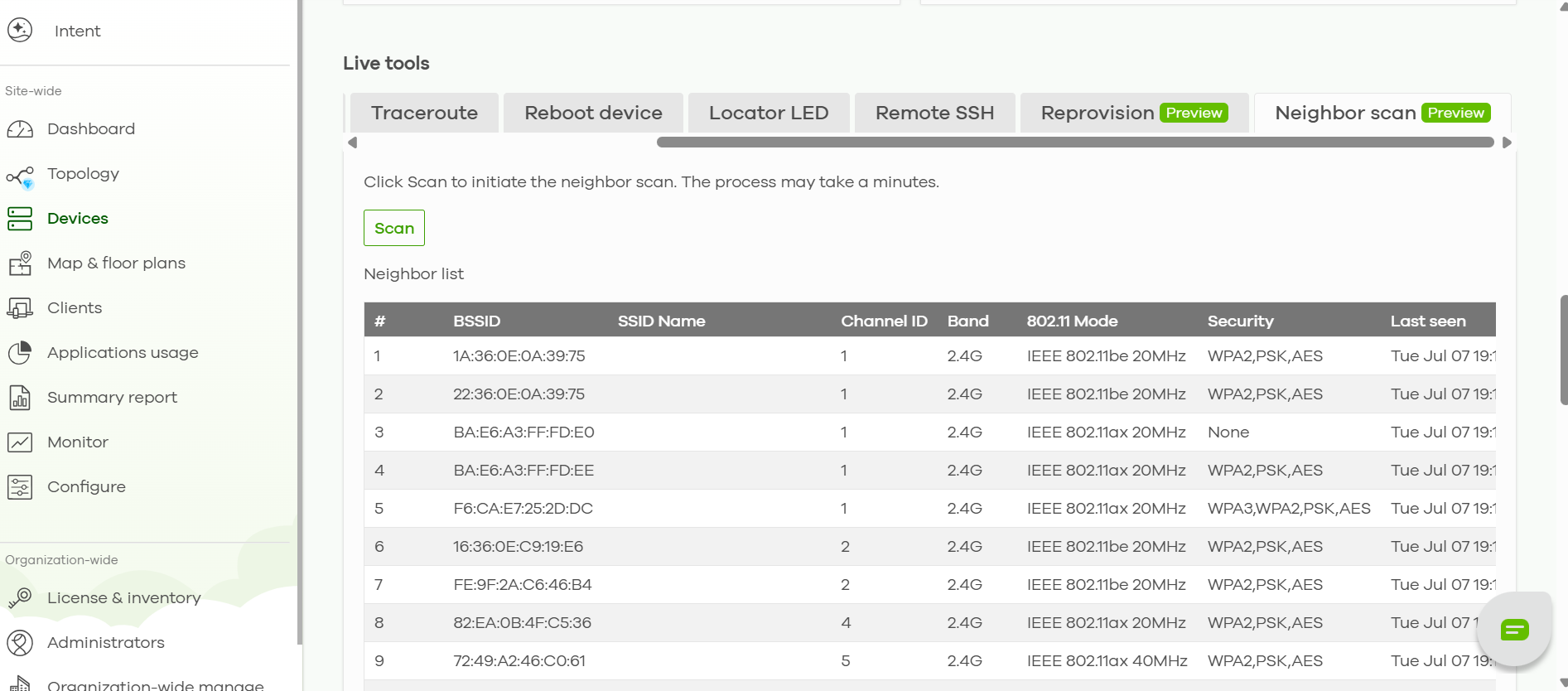
Neighbor Scan allows the access point to scan nearby wireless networks and show which channels are being used in the surrounding environment. You can use this information to identify a less-used channel and set it as the preferred channel for the access point.
0
Categories
- All Categories
- 442 Beta Program
- 3.1K Nebula
- 243 Nebula Ideas
- 6.8K Security
- 783 USG FLEX H Series
- 389 Security Ideas
- 1.8K Switch
- 87 Switch Ideas
- 1.5K Wireless
- 58 Wireless Ideas
- 7.2K Consumer Product
- 325 Service & License
- 527 News and Release
- 101 Security Advisories
- 31 Education Center
- 10 [Campaign] Zyxel Network Detective
- 5.3K FAQ
- 34 Documents
- 91 About Community
- 122 Security Highlight